

Laughing Hyena
  • Home
  • Hyena Games
  • Esports
  • NFT Gaming
  • Crypto Trends
  • Game Reviews
  • Game Updates
  • GameFi Guides
  • Shop
Tag:

Touchscreen

An elderly sad woman in a wheelchair looks at a tablet and talks to her family via video call - stock photo
Gaming Gear

Steam’s new store look is out and is earning a mixed response: ‘Thanks Valve I am a grandma using Steam on a giant old touchscreen Samsung tablet’

by admin September 24, 2025


I’m beginning to think I have far-too-strong feelings about changes to Steam minutiae. Why? Because when I heard that Valve had finally unleashed its updated storefront from beta, I fired up the site so quickly you’d have thought it was giving out candy. No one should care this much about website UI updates. I do. This is my cross to bear.

Anyway, Steam’s storefront update is out of beta and the frontpage is a whole lot slicker now. Also, wider. Valve has merged the two constituent parts of its old UI—that big list of categories down the left-hand side and the blue bar up top—into a single easy-to-navigate bar.

As part of that merge, the Categories section now displays, well, actual categories. Before, when it was consigned to the sidebar, the Steam categories you could select consisted of things like “Top sellers,” and “New releases.”


Related articles

Now, hovering over the new Categories display section shows much more useful game genres, letting you easily browse by things like racing, stealth, and what-have-you. Also, the categories that appear are personalised for you, which is either very convenient or yet another intrusion by the dead hand of surveillance capitalism. Whichever you prefer.

I like the look of it, though I suspect the most stalwart PC gamers among you might recoil a little at how clearly mobile-friendly the new layout is. Indeed, some of the community response on Reddit has been a little mixed. “Thanks Valve I am a grandma using Steam on a giant old touchscreen Samsung tablet,” writes dogdillon, who may in fact be a grandma on a giant tablet but is more likely a sarky Steam user. “Yet another site update that gets worse on pc in favor of mobile. Bigger icons, less information, more clicks to navigate menus…” concurs hooliganmike.

It’s a brave new world. (Image credit: Valve)

Still, at least some people do like it. “Good lord, it’s actually so, so much better,” writes Xedronic, “and the categories tab is ACTUALLY COMPREHENSIBLE to look at!”

Me? I like it. Or at least, I disliked how it looked before enough that this feels like an improvement. Hey, take the wins where you can: at least Valve hasn’t installed a helpful AI chatbot prompt up there.
Keep up to date with the most important stories and the best deals, as picked by the PC Gamer team.


Source link

September 24, 2025 0 comments
0 FacebookTwitterPinterestEmail
I’ve been using macOS Tahoe 26 since June and here are the eight best things about it
Gaming Gear

The touchscreen MacBook rumors are never ending

by admin September 22, 2025


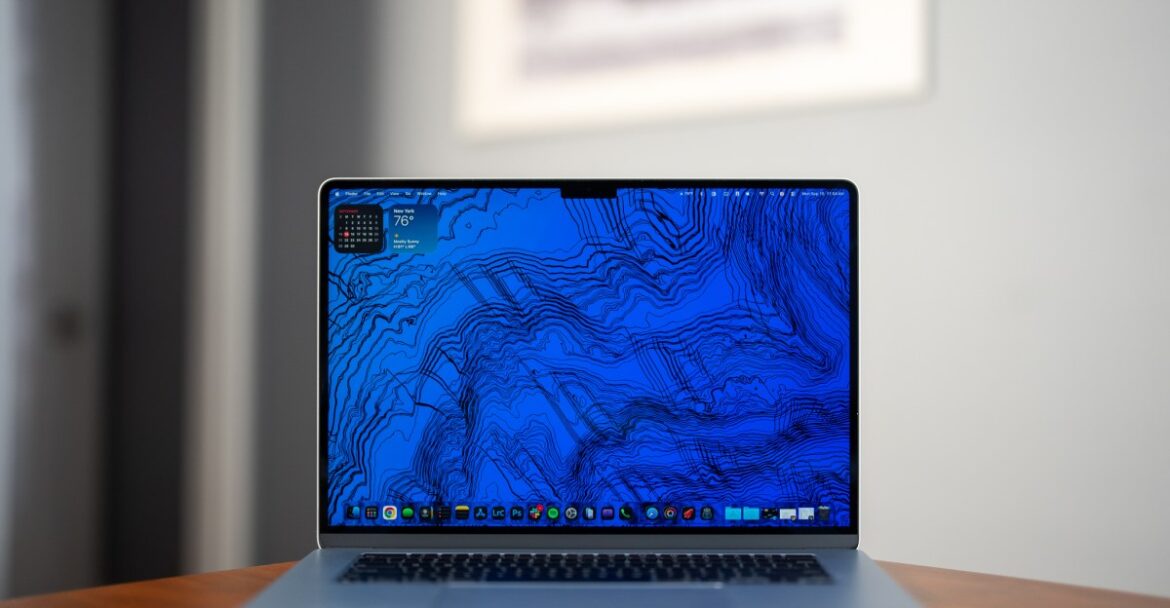
Analyst Ming-Chi Kuo took to X on Wednesday to claim that a MacBook Pro with an OLED touchscreen was expected to enter mass production by late 2026. Today Bloomberg’s Mark Gurman is following up to remind us that he was reporting on a touchscreen MacBook Pro way back in 2023. He confirmed Kuo’s timeline was correct. Since Gurman’s original story, the launch date has been pushed back from late 2025, to late 2026 or early 2027.

Apple has traditionally been resistant to the idea of merging the iPad and MacBook lines, and still likely won’t do it completely. But according to Gurman iPad sales have begun to taper off, and customers increasingly expect touch-based interfaces, even on their laptops. This is in part because many Windows laptops now include touchscreens by default. So Apple is feeling the pressure to bring the two product lines more in sync with each other.


Source link

September 22, 2025 0 comments
0 FacebookTwitterPinterestEmail
KeyGo keyboard
Gaming Gear

KeyGo’s hybrid keyboard brings Apple Touch Bar dreams to life with a 12.8-inch touchscreen, making every workspace instantly more versatile

by admin August 18, 2025


  • KeyGo 12.8-inch screen offers sharp visuals despite a compressed 1440p layout for multitasking
  • Scissor-switch keys provide a tactile typing experience suitable for serious work or long sessions
  • RGB lighting enhances visibility in low-light conditions while allowing personal customization

Small external screens have steadily become essential for those seeking flexible workflows and improved multitasking capabilities.

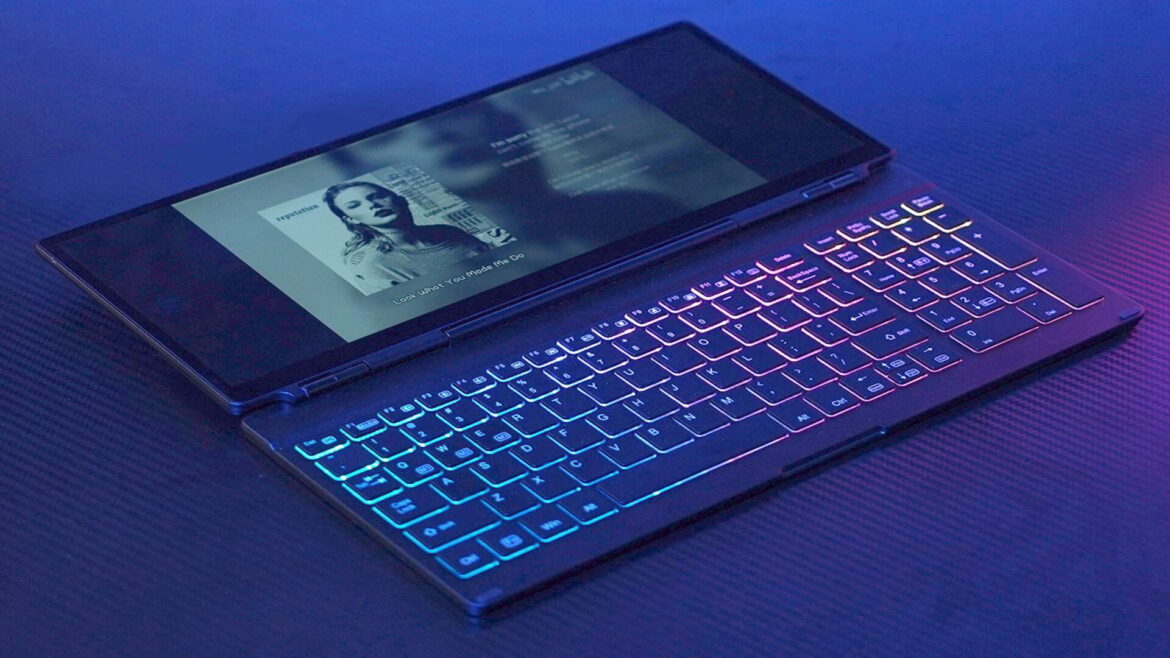
Yanko Design’s new KeyGo keyboard merges a 12.8-inch touchscreen monitor with a full-size keyboard.

It aims to create a hybrid device that extends the traditional workspace without requiring a full desktop setup.


You may like

A screen built for precision

This concept is ambitious, but its practicality is limited by the absence of a built-in battery, meaning users must remain connected to a power source for extended use.

The integrated display delivers a resolution of 1920×720 at 60Hz, which might initially raise eyebrows among those accustomed to conventional 1080p monitors.

However, the design essentially compresses a 1440p screen across a wider layout, producing a pixel density that keeps text sharp and visuals reasonably crisp.

For professionals who rely on portable monitors or a monitor for video editing, this width-oriented resolution provides a usable secondary screen for reference materials, timelines, or notifications, even if it cannot fully replace a main 4K display.

Sign up to the TechRadar Pro newsletter to get all the top news, opinion, features and guidance your business needs to succeed!

The keyboard uses scissor-switch keys, which offer a responsive typing experience comparable to high-end laptops.

This design minimizes the often-criticized “mushy” feel of cheaper units, enabling fast and accurate typing.

RGB lighting is integrated with three modes, supporting work in dimly lit environments and allowing a degree of personalization.

While the visual flair may appeal to gamers, business users may appreciate the practicality of illuminated keys during extended work sessions.

Connectivity is handled through USB-C, simplifying connections to laptops, tablets, or smartphones across Windows and macOS platforms.

The single-cable solution handles both power and data, which reduces clutter and streamlines setup for mobile professionals.

Despite its thin CNC-machined aluminum build, which gives it a premium feel, the device remains somewhat limited by its dependence on external power.

It also comes with a 180-degree hinge, allowing users to orient the touchscreen above the keys or stand it fully upright as a second monitor.

While the KeyGo revisits ideas reminiscent of Apple’s Touch Bar, it expands the concept into a standalone, multi-touch interface.

Pricing begins at $538, although early backers can purchase the KeyGo for $249, representing a 54% discount.

The product also includes global shipping and a one-year warranty, and the company claims only 23 of 200 units remain.

You might also like


Source link

August 18, 2025 0 comments
0 FacebookTwitterPinterestEmail

Categories

  • Crypto Trends (1,098)
  • Esports (800)
  • Game Reviews (772)
  • Game Updates (906)
  • GameFi Guides (1,058)
  • Gaming Gear (960)
  • NFT Gaming (1,079)
  • Product Reviews (960)

Recent Posts

  • This 5-Star Dell Laptop Bundle (64GB RAM, 2TB SSD) Sees 72% Cut, From Above MacBook Pricing to Practically a Steal
  • Blue Protocol: Star Resonance is finally out in the west and off to a strong start on Steam, but was the MMORPG worth the wait?
  • How to Unblock OpenAI’s Sora 2 If You’re Outside the US and Canada
  • Final Fantasy 7 Remake and Rebirth finally available as physical double pack on PS5
  • The 10 Most Valuable Cards

Recent Posts

  • This 5-Star Dell Laptop Bundle (64GB RAM, 2TB SSD) Sees 72% Cut, From Above MacBook Pricing to Practically a Steal

    October 10, 2025
  • Blue Protocol: Star Resonance is finally out in the west and off to a strong start on Steam, but was the MMORPG worth the wait?

    October 10, 2025
  • How to Unblock OpenAI’s Sora 2 If You’re Outside the US and Canada

    October 10, 2025
  • Final Fantasy 7 Remake and Rebirth finally available as physical double pack on PS5

    October 10, 2025
  • The 10 Most Valuable Cards

    October 10, 2025

Newsletter

About me

Welcome to Laughinghyena.io, your ultimate destination for the latest in blockchain gaming and gaming products. We’re passionate about the future of gaming, where decentralized technology empowers players to own, trade, and thrive in virtual worlds.

Recent Posts

  • This 5-Star Dell Laptop Bundle (64GB RAM, 2TB SSD) Sees 72% Cut, From Above MacBook Pricing to Practically a Steal

    October 10, 2025
  • Blue Protocol: Star Resonance is finally out in the west and off to a strong start on Steam, but was the MMORPG worth the wait?

    October 10, 2025

Newsletter

@2025 laughinghyena- All Right Reserved. Designed and Developed by Pro


Back To Top
Laughing Hyena
  • Home
  • Hyena Games
  • Esports
  • NFT Gaming
  • Crypto Trends
  • Game Reviews
  • Game Updates
  • GameFi Guides
  • Shop

Shopping Cart

Close

No products in the cart.

Close