Laughing Hyena
  • Home
  • Hyena Games
  • Esports
  • NFT Gaming
  • Crypto Trends
  • Game Reviews
  • Game Updates
  • GameFi Guides
  • Shop
Tag:

review

8BitDo 64 Bluetooth Controller Review: For Human Hands
Gaming Gear

8BitDo 64 Bluetooth Controller Review: For Human Hands

by admin August 25, 2025


The Nintendo 64 was a fantastic console, home to generation-defining games such as Super Mario 64 and GoldenEye 007. With its four built-in controller ports, it revolutionized multiplayer gaming in front of the TV, and it was the first mainstream console to introduce an analog stick, essential for navigating the burgeoning 3D worlds the medium was starting to deliver.

Unfortunately, the controller it did all that with was an abomination, an unholy three-pronged monstrosity that earned my lifelong disdain. Fast-forward roughly three decades, though, and third-party peripheral maker 8BitDo has improved on the original N64 pad in almost every way with its new 64 Bluetooth Controller.

Nostalgia Upgraded

Photograph: Matt Kamen

8BitDo’s pad is chiefly designed for the Analogue3D, an upcoming field programmable gate array (FPGA) console set to play original N64 cartridges, but it can be paired to practically any Bluetooth-enabled device, from PCs to smartphones to Nintendo Switch and Switch 2 consoles, where it can be used to play the digital N64 game library included for Nintendo Switch Online + Expansion Pack subscribers.

Aesthetically, traditionalists may lament the lack of the original N64 pad’s pops of color, but they have a sleek elegance to them. Intended to mirror the similarly monochrome Analogue3D, 8BitDo’s efforts match perfectly, while also looking like a fitting companion to Nintendo’s official Switch 2 Pro Controller. Functionally, this takes everything that made Nintendo’s original controller so groundbreaking and repackages it into a modern unit that, crucially, fits into the average human’s two hands. Every input is present and accounted for, accurate down to icons and fonts.

The 64 Bluetooth Controller massively improves the orientation, though. The original Z-Trigger, once on the underside of the official controller’s middle prong, is now two shoulder buttons, sitting where the L2/R2 triggers do on a PlayStation grip, while the analog stick is shunted to the left, comparable to an Xbox controller’s left stick. The result is that every input is within easy reach, eliminating the need to juggle your grip. It also introduces some welcome 21st-century upgrades, like making the thumbstick drift-proof thanks to Hall effect tech, and baking in haptic feedback, eliminating the need for a separate Rumble Pak.

Stick ’Em Up

Photograph: Matt Kamen

The thumbstick is the star, feeling incredibly precise thanks to both Hall effect sensors and retaining the eight-way “gate” at its base, the octagonal notches allowing it to snap satisfyingly into place. Expect effortless combos in 1080° Snowboarding, precise shots in Perfect Dark, and smooth flying in Starfox. The staff of the stick is also wider, shorter, and made of metal, making it feel far sturdier than that of the original pad. While the top of the stick reproduces the trio of raised concentric rings and subtle concave dip for your thumb to rest on, it’s rubberized now, rather than slippery plastic, making for a surer grip.
Source link

August 25, 2025 0 comments
0 FacebookTwitterPinterestEmail
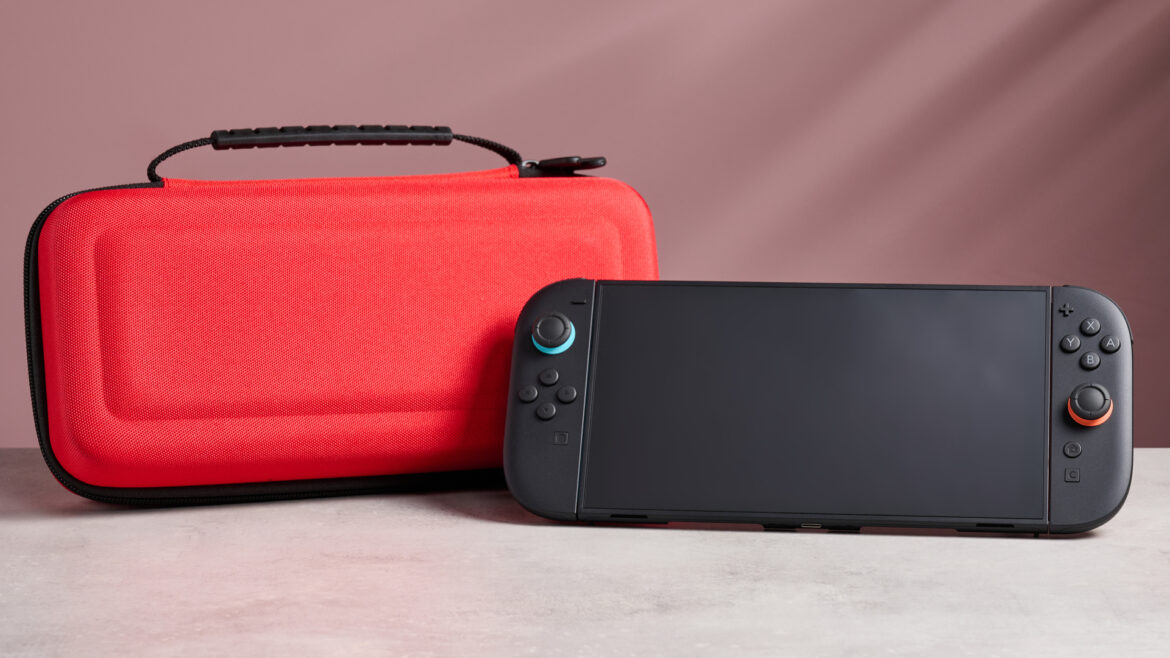
The Nintendo Switch 2 in front of the Nacon Hard Carrying Case for Nintendo Switch 2, with a pink background behind it.
Product Reviews

Nacon Hard Carrying Case for Nintendo Switch 2 review: a robust case that doesn’t cost loads of cash

by admin August 24, 2025


Why you can trust TechRadar


We spend hours testing every product or service we review, so you can be sure you’re buying the best. Find out more about how we test.

Nacon Hard Carrying Case for Nintendo Switch 2: review

The Nacon Hard Carrying Case for Nintendo Switch 2 is a reasonably priced case for the handheld console. It offers storage not only for the console itself but also most of its accessories, as well as a handful of Switch games cartridges. So how does it feel in use?

Generally, I’ve found it holds up well. The bright Mario red feels suitably attention-grabbing without being gaudy – I wouldn’t be embarrassed pulling it out on my commute, and it doesn’t remotely feel at odds with the premium console inside. I’ve seen similar materials getting scuffed or dirty after months of being thrust into a backpack, but in all the time I’ve spent carting it round so far it’s maintained that vibrant hue without picking up any marks.

Given the name of the product, I’d kind of assumed it had been designed with the Nintendo Switch 2 in mind. But if you actually try to place the console in the molded inner tray Nacon has supplied, you quickly realize that it’s far too small, because it’s shaped to fit the original Switch. You can remove this and the Switch 2 will sit snugly in the base of the case, but it’s not quite as well fitted around the console’s Joy-Con 2, which is something I would expect from one of the best Nintendo Switch 2 accessories.

Despite this, the Nacon Hard Carrying Case seems sturdy and well constructed. Even squeezed in a bag with my work laptop and climbing gear, it seems to be able to protect the Switch 2 well and keep its shape, even while it’s under pressure. I never really felt I had to worry about the safety of my Switch 2 when it was in the Nacon and that’s the kind of peace of mind you’re looking for when picking up a case.

When it comes to additional storage, the Hard Carrying Case has a decent amount of space. The main compartment is capacious enough that I was able to squeeze in the Joy-Con 2 Grip, the Switch 2’s charger and an HDMI cable. Pretty much the only thing I was unable to fit was the console’s dock but if you’re desperate to take this on the go with you, something like the Nacon XL Carrying Case for Nintendo Switch 2 should offer sufficient space for this.

(Image credit: Future)

I did occasionally find myself wishing that some of this storage could be better laid out however. I was never that clear what the central pocket was intended for, given it was too small for most accessories but felt an odd fit for loose cabling. Equally, the Nacon’s storage for Switch 2 cartridges is pretty limited – you can fit a maximum of four cards in its little bandolier, which feels like it will fill up fast.

All told though, the Nacon Hard Carrying Case for Nintendo Switch 2 feels like a reliable way to keep your Switch 2 safe and offers a pretty attractive package while it does so. Particularly when you consider its price: at $14.90 / £12.90 (around AU$25), this case very much sits at the more affordable end of the market. So if you’re looking for a cheap way to keep your Switch 2 safe and you’re not too fussy about odd details, this is a decent choice.

Sign up for breaking news, reviews, opinion, top tech deals, and more.

(Image credit: Future)

Nacon Hard Carrying Case for Nintendo Switch 2 review: specs

Swipe to scroll horizontally

Price

$14.90 / £12.90

Dimensions

12 x 5.9 x 1.9 inches (305 x 150 x 50mm)

Weight

14.5oz (412g)

Number of game card slots

4

Compartments

2

Handle

Yes

Color

Red, black or blue

(Image credit: Future)

Should I buy the Nacon Hard Carrying Case for Nintendo Switch 2?

Swipe to scroll horizontally

Design

Decent understated looks, hardy construction; while it comfortably fits the Switch 2, the removable molded tray is only compatible with the original Switch.

4 / 5

Storage

Very few game cartridge slots, no space for Switch 2 Dock, not clear what every pocket is for.

3.5 / 5

Value

Only a few cases come cheaper than this and given what you’re paying for it, it does pretty much everything you could ask of it.

5 / 5

Buy it if…

Don’t buy it if…

(Image credit: Future)

Nacon Hard Carrying Case for Nintendo Switch 2: Price Comparison


Source link

August 24, 2025 0 comments
0 FacebookTwitterPinterestEmail
Solana Seeker Review: A More Measured Crypto Phone
NFT Gaming

Solana Seeker Review: A More Measured Crypto Phone

by admin August 24, 2025


Solana’s first smartphone, 2023’s Saga, was a big swing for Solana Labs—and initially a miss with consumers, at least until a massive price cut and crypto airdrop incentives drove sudden, sellout demand months after release.

Now, the 2.0 model has arrived. The new Seeker serves as an attempt by Solana to deliver a more palatable crypto phone. It costs half the price of the Saga at launch, currently selling for $500, with early pre-orders getting it $50 cheaper. By some measures, it’s expectedly less robust and ultra-premium than the pricey Saga.

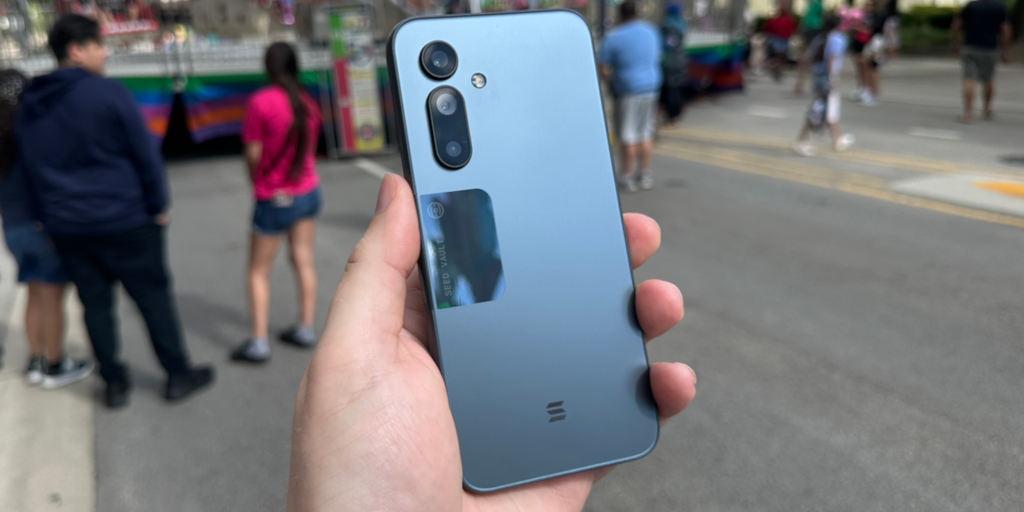
Solana Seeker. Photo: Decrypt

But the Seeker hits a much better sweet spot at this price, with mostly good-to-great hardware plus the added crypto features that help set it apart from your average Android phone. It’s still decidedly niche in appeal, and the state of the Solana dapp store doesn’t feel that different from back in 2023, with little to keep my attention beyond trading apps.

But Solana users don’t have to take as much of a gamble buying the Seeker, and if the mobile dapp ecosystem improves and/or there are serious airdrops ahead, maybe it’ll prove to be just as worthwhile as the Saga was to early adopters. But that’s still a maybe, for now.

A solid Android

The moment it hit your hand, it was clear that the Solana Saga was a beast—heavy and expensive-feeling, thanks to the ceramic backing, with distinctive visual elements.

At half the price, the Seeker has taken a different route. A plastic frame and glass backing make it more mid-range in feel than flagship, though it’s hardly anonymous among Androids thanks to the reflective “Seed Vault” cutout on the back and along the side (which houses the fingerprint sensor), plus a pair of Solana logos.

Solana Seeker and Saga. Photo: Decrypt

The 6.36-inch screen—while smaller than the 6.67-inch display of the Saga—is actually both brighter and noticeably crisper than its predecessor, with the same kind of dynamic refresh rate (up to 120Hz) that makes for smooth scrolling. That’s a big win.

The Mediatek Dimensity 7300 chip here is a step down in terms of raw horsepower, though, with Geekbench benchmark testing showing a 33% dip in multi-core and 44% drop in single-core performance compared to the Saga’s more powerful Qualcomm Snapdragon 8+ Gen1 chip.

What does that mean in practice? Not much, really: In everyday use, the Seeker feels snappy and responsive when navigating around Android, browsing the web, and using social media and video apps. It’s not built to handle the glossiest games at top settings, but in terms of day-to-day needs, the Seeker didn’t disappoint. And the beefy 4,500mAh battery should get you to bedtime without a top-up, with wireless charging here as a welcome convenience.


Camera quality was the one notably underwhelming element of the Seeker during my testing, which is typical at this price point. During my week of carrying the Seeker around, the three rear cameras—a 108-megapixel main sensor plus 50MP telephoto (zoom) and 13MP ultra-wide—gave me broadly similar outcomes: pretty good shots when there was a lot of natural light, and routinely rough and blurry snaps in low light.

The Solana Saga was largely conceived during a bull run and ultimately launched after SOL cratered in value. Meanwhile, the Seeker was created following that collapse, though ultimately launched after the Solana ecosystem’s monumental comeback.

It makes sense that the Seeker is a more measured device at a much more reasonable starting price—and camera qualms aside, it did everything I needed it to as a smartphone.

Room to grow

Like the Saga, the Solana Seeker is designed from the ground up to be a secure crypto wallet thanks to the Seed Vault, which stores your private keys and guards transactions behind your fingerprint approval.

Solana Seeker. Photo: Decrypt

The native, Solflare-powered Seed Vault Wallet is easy to use, with a double-tap of the side button and fingerprint scan used to authorize moves. Phantom and other wallets can also be added via the Solana Dapp Store. And the Seeker ID, which gives you a plain-English .skr wallet name (or “digital passport”) for sending and receiving crypto, is a nice user-friendly touch that could become more useful in time.

The Seeker is primed to power a potential world of decentralized, on-chain apps… and yet, the Dapp Store selection gives me a similar feeling that it did with the Saga back in 2023. Beyond trading apps like Jupiter, Drift, Vector, and Marinade.finance, there were few Solana-powered apps or games that really grabbed my attention.

Solana Seeker. Photo: Decrypt

If you’re actively trading in the Solana trenches, then the Seeker can keep you in the game wherever you are. But if you’re betting on Solana Mobile’s vision of disrupting the Google/Apple duopoly and upending centralized apps and services with comparable crypto-powered alternatives, then that potential future still feels far off right now. Most of the apps I needed to communicate and stay connected and entertained still came from Google’s Android Play Store.

But there’s promise, and the Saga showed us that being an early adopter to the Solana Mobile ecosystem could pay off big time in terms of exclusive token airdrops and access.

Whether the Seeker can recreate that magic—or crucially, expand upon it—remains to be seen.

Just 20,000 Saga phones were ultimately made, while 150,000 Seekers have already shipped. A larger group of users means better adoption for developers, but it also means dilution and less exclusivity for airdrops and rewards. And we’ve yet to see how the upcoming SKR token, which will be distributed to both users and developers, will help boost growth.

Buying a Seeker is a bet that the Solana Mobile ecosystem will keep growing in the coming years, and that the access and incentives for owners will justify the buy-in price. That’s a gamble for now, but it’s a much more affordable one than the Saga. And if you’re already actively in the Solana world, then picking up a Seeker feels like a no-brainer.

Daily Debrief Newsletter

Start every day with the top news stories right now, plus original features, a podcast, videos and more.


Source link

August 24, 2025 0 comments
0 FacebookTwitterPinterestEmail
VTOMAN
Product Reviews

Vtoman FlashSpeed Pro 3600 portable power station review

by admin August 24, 2025


Why you can trust TechRadar


We spend hours testing every product or service we review, so you can be sure you’re buying the best. Find out more about how we test.

The Vtoman FlashSpeed Pro 3600 is hefty. There is no way around that. This is not a power station that you’ll want to be toting around, though it is technically still portable.

See, unlike many of the best portable power station units I’ve reviewed, the Pro 3600 is more designed for long-term backup or for use with enormous power demands, not just to charge your smartphone (though it could).

So, for that reason, this unit is hefty in both size and specs, yet it is still something that can be used in real-world applications with ease.

(Image credit: Collin Probst // Future)

VTOMAN FlashSpeed Pro 3600: Pricing & Availability

The Vtoman FlashSpeed Pro 3600 starts around $1499 right now, on sale from $2,299. They do offer bundles at the point of purchase that include solar panels that can stretch up to $2,700, too, all with a two-year warranty.

Also worth mentioning is that the unreleased battery expansion is expected sometime in 2025. Outside of that, the other pieces are available.

(Image credit: Collin Probst // Future)

VTOMAN FlashSpeed Pro 3600: Unboxing & first impressions

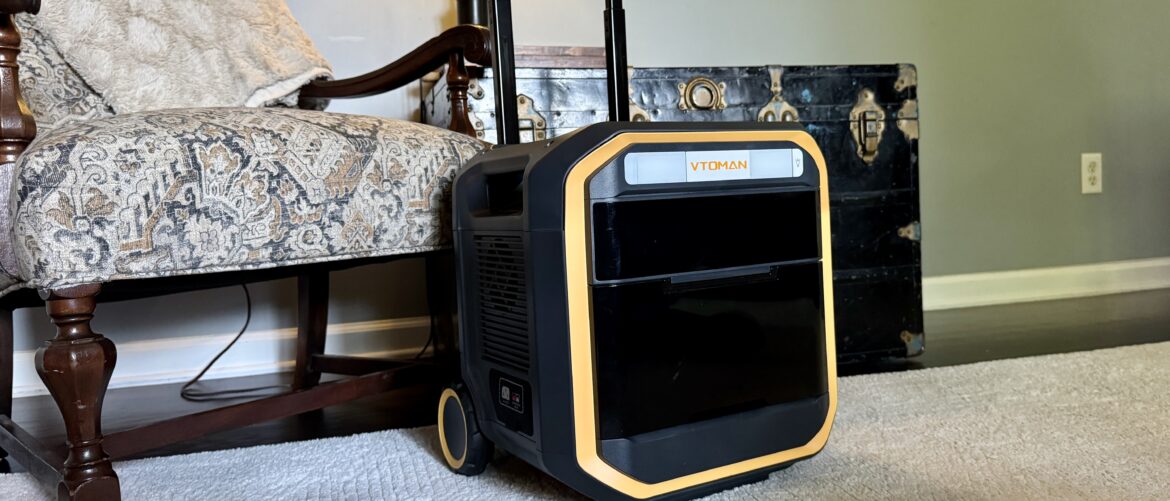
The FlashSpeed Pro 3600 Portable Power Station is a fluorescent yellow and black power station that made me sigh when I picked it up; it was so heavy. Keep in mind, I pick up and move power stations, chairs, desks, and more. This one shocked me.

Thankfully, this unit has wheels and a handle with two height settings to accommodate those with varying heights and those who can’t quite reach the same physical height.

Sign up to the TechRadar Pro newsletter to get all the top news, opinion, features and guidance your business needs to succeed!

From the first moment I turned this unit on, I loved the screen. The readout is excellent; it’s easy to understand, shows all the information I want, and feels premium in quality.

Taking another pass, I noticed the lightbar that can shine white or even red light. I saw a small storage bay in the back of the unit, perhaps for the charging cable, and I noticed that the port layout is super helpful.

(Image credit: Collin Probst // Future)

VTOMAN FlashSpeed Pro 3600: Design & build quality

Specs

Battery Capacity: 3,096 Wh
Continuous Output: 3,600 W AC (6,000 W surge)
Outputs: 4× AC, 2× 100 W USB‑C, 2× DC, 4× USB‑A, 2× Cigarette port
Features: UPS (switch‑over <20 ms), LCD screen, wheels, IP65-rated shell
Dimensions / Weight: 378×418×581 mm / 38 kg
Warranty: 2-year global

The whole unit feels like a hefty suitcase. I wish that suitcases or luggage in general rolled as easily as this machine does. I’d even be happy if shopping carts rolled as smoothly as this setup does. Moving on, the ports are covered with a flap, enhancing their water resistance. And the entire case around the power station feels rugged and ready to take anywhere. The wheels I mentioned briefly above are not easily damaged. They are large with a decent grip, and super easy to maneuver the power station with.

The ports are organized and easily accessible, and clearly labeled. All things that make using a power station super helpful. If you are in an emergency and need power quickly, the last thing you want to have to do is slow down to try to figure out where ports are, which are which, and how to turn your power supply on. It’s easy to know what is what, and with the integrated light bar, you can light up your scenario to make getting things plugged in and backed up even easier.

(Image credit: Collin Probst // Future)

VTOMAN FlashSpeed Pro 3600: In use

I’ve used a lot of power stations, and while I don’t usually note or have the recharge time stand out to me, in the VTOMAN FlashSpeed Pro 3600’s case, it stands out as one of the most significant benefits to this unit. Now, rather than feeling like you need to have this always charged, if you know a storm is coming, you have time to recharge it quickly, whether from zero to full or from partial charge to full charge.

Additionally, you are more likely to use this power station for portable power where there isn’t shore power or a grid power system. In that case, you can plan to go, quickly plug this in, get everything else ready and squared away, and only two hours later (zero to full), you can have a fully charged power station prepared to tackle your construction project, off-grid camping, or whatever else you may be powering.

I don’t currently have this power station plugged into my house, but I have had it power my garage while working on projects, running saws, air compressors, shop vacs, and battery chargers. I’ve also had this recharge my EGO Electric mower, my Eufy E18 Robot Mower, my Lectric XPedition2 E-Bike, and more, to see if it can – and it did without any issue.

(Image credit: Collin Probst // Future)

If you live on some land and are looking for more ways to recharge, rather than using the grid, you could also add a solar panel to recharge using the sun, which also recharges incredibly fast.

The unit also boasts Uninterrupted Power Supply (UPS), and for good reason. If you have networking gear, computers, or other devices, you don’t want to have any downtime in a power outage, the UPS will flip over before your devices even realize that the grid lost power.

Overall, this is a great power station. It is pretty heavy, so the wheels are essential for moving it around. However, I suggest only relocating it when necessary. It’s best to place it in a location where you’ll use it frequently and leave it there for a while.

VTOMAN FlashSpeed Pro 3600: Final verdict

The FlashSpeed Pro 3600 is a power station for the (semi) portable pros. This is a great hub to place and use as an added power source wherever you may need it, whether that is a job site, an off-grid setup, or a backup unit. It’s got incredible speeds, high capacity, a fantastic port layout, a built-in light bar, and wheels to help move it around.

If you’re in the market for a power station, especially one with a fast recharge and multiple ports, this power station is a great one to consider. IF you’re wanting something ultra portable, or if you don’t need 3000Wh capacity, though, this may be too much of a unit for your use case.

Swipe to scroll horizontally

Attributes

Notes

Rating

Design

Rugged, hefty design

⭐⭐⭐⭐

Ease of use

Easy to use

⭐⭐⭐⭐⭐

Practicality

For those who need massive power

⭐⭐⭐⭐

Price

Decent price for what it is

⭐⭐⭐⭐⭐

Vtoman FlashSpeed Pro 3600: Price Comparison


Source link

August 24, 2025 0 comments
0 FacebookTwitterPinterestEmail
Synology
Product Reviews

Synology BeeStation Plus NAS review

by admin August 24, 2025


Why you can trust TechRadar


We spend hours testing every product or service we review, so you can be sure you’re buying the best. Find out more about how we test.

I’ve used Synology for a while now, both personally and professionally. I’ve worked with DiskStations, the original BeeStation, and many other NAS devices, too. As someone who juggles many businesses, clients, and a ton of storage at any given time, even with great internal storage on my primary laptop, access to more on others that I am testing, and external drives all around me, there is something simple and so helpful about cloud storage.

But, as many of you have also noticed, subscriptions are getting ridiculous these days. Everything has moved to subscriptions, and with that, when you want to expand further, the cost continues to skyrocket. That’s why I started paying attention to Synology a few years back, recognizing that while some things I can keep on SSDs, having everything accessible no matter what company I am with, if I am home or away, or no matter what device, was something that I still desired in my daily workflow.

The ease and ability to pull up any number of documents, photos, videos, diagrams, and so on for any of my clients at any time, all without cluttering my internal storage or having to rummage through several external hard drives, is hard to pass up.

The frictionless action of searching in Finder (on my Mac) to grab the file I want and have it ready on my machine without having to store it there is always spectacular. And, with how fast I move these days, that is the kind of flexibility I need. That’s where the BeeStation Plus comes in. It’s got a few key upgrades from the original BeeStation, the first and foremost being that it doubled in storage from 4TB to 8TB.

(Image credit: Collin Probst // Future)

  • Synology BeeStation Plus (16GB 16GB RAM) at Amazon for $409.99

Synology BeeStation Plus: Pricing & Availability

The Synology BeeStation Plus is available the official website by clicking here. Right now, it’s being sold for around $400 for the 8TB of NAS.Right now, it’s being sold for around $400 for the 8TB of NAS.

It’s also available from other online retailers including B&H Photo, Amazon.com, and Amazon.co.uk.

Synology BeeStation Plus: Unboxing & first impressions

Unboxing and setting up the BeeStation Plus could not have been easier. I opened up the box, chose a spot in my home office where I wanted it to live, and plugged it into my monster of a desk setup with battery backup from my Anker Power Station with UPS. Lastly, to ensure I had the best download and upload speeds possible, I plugged the included Ethernet cable in from the Synology BeeStation Plus to my network switch, which then routes up to my TP-Link Deco XE75 Pro system. One power cable, one Ethernet cable, that’s all.

Sign up to the TechRadar Pro newsletter to get all the top news, opinion, features and guidance your business needs to succeed!

After that, I jumped in and set up the BeeStation Plus via the IP address and web interface and began setting up sync folders, shared folders, a Plex Server, backups to my DiskStation (review coming soon), and more. I also added one right-angle USB-C adapter, but more on that later. All around, this setup took a matter of minutes, and probably took longer for me to cable manage one more thing into my monster of a desk setup than it did actually to set up the BeeStation Plus itself.

(Image credit: Collin Probst // Future)

Synology BeeStation Plus: Design & build quality

Specs

Storage: 8TB SSD
Connectivity: Gigabit Ethernet, USB for external drives
Software: Synology BeeStation OS
Apps: Mobile apps (iOS/Android), Mac Finder integration, web portal access
Cloud: Google Drive, Dropbox, OneDrive
Streaming: Plex media server compatible
Backup: Can back up to Synology DiskStation NAS
Remote Access: Synology QuickConnect, direct VPN connection

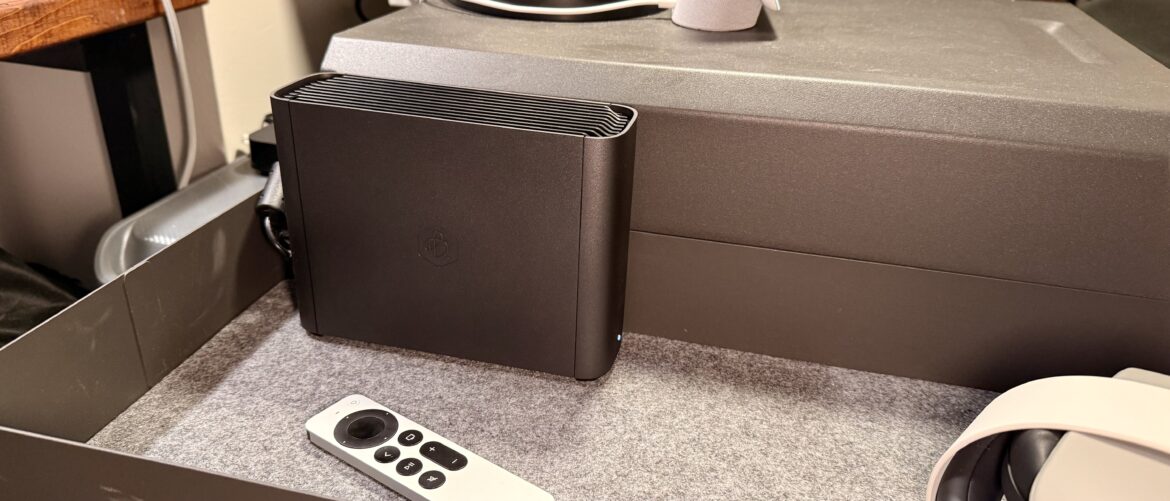
The BeeStation Plus has a sleek matte plastic shell with its modern and clean design. It blends in, and it fits in with my office setup. I don’t feel like I need to hide it, so I didn’t. It’s got a visible spot in my setup, but I barely notice it, which is excellent.

Even when this NAS is up and running, I can’t hear it at all. The only reason that I know it is on, other than being able to access my files, is because of the status lights.

The only ports on here are the Ethernet port, a USB-C port, and the power port. The BeeStation Plus keeps it simple while packing a lot of power in a simple package.

(Image credit: Collin Probst // Future)

Synology BeeStation Plus: In use

I’ve had the BeeStation Plus set up in my home office for 75 days at the time of writing this review. In that time, the BeeStation Plus has been my primary storage solution for the many clients that I work with, for all of the files, content, and assets that I have created for each client, as well as working files I have received from clients. All of them are stored on the BeeStation Plus and accessed from my many devices via the files/finder integrations or from the web or mobile apps.

Thanks to the Ethernet port, I have not noticed any downtime or issues with network speeds, and because my entire workspace is backed up with a power station from Anker, I don’t worry about losing any data either. Even in a power outage, I could access my files locally from my computer over local Wi-Fi or Ethernet. Alternatively, if my internet line is still active but power is out, my whole home battery backup system will kick in, and I can access files from anywhere.

If you don’t have a battery backup, though, that is not the end of the world; you will want to have a plan in place in case of a power outage if you have critical client files stored on the BeeStation Plus.

(Image credit: Collin Probst // Future)

Another critical way that I utilize the BeeStation Plus is to offload files from any drives I am working with. Occasionally, I have a role where I need to transfer data from external drives or SD Cards. With the BeeStation Plus’ USB-C port, I can plug in an SSD directly to that port, or I can use an SD Card reader with a USB-C port and plug that in to access an SD Card directly through my BeeStation Plus.

The benefit to this, of course, is that I never have to take up internal storage, nor do I have to ingest files, to upload them to a cloud service, to then share. Instead, I can plug in, choose where to move the files to, such as a previously shared client folder, and then I am good to go. I can walk away, work on something else, and so on.

Another thing that makes the BeeStation Plus super helpful, mainly when used as a business storage tool, is the ability to sync in multiple different ways, with multiple different servers. I work across Google Drive, Dropbox, and others daily.

For those folders that I want to make sure I don’t lose anything, or that I have what I need, without having to jump in and out of folders every day, logging in and out of accounts and trying to remember where I have each file. Instead, I set up cloud sync preferences so that my folder structure on my BeeStation Plus will automatically stay in sync with some folders, one way download other folders, and auto upload to others—making my file management a breeze. Setting something like this up right from the start makes it feel like I have an admin helping me manage my file management, without the need for an admin or a monthly subscription cost.

Synology BeeStation Plus: Final verdict

All in all, the Synology BeeStation Plus is a welcome upgrade from the previous model. I haven’t even gone into depth on the Plex integrations and other TLC updates that Synology has made. This is the perfect storage solution if you need terabytes of secure storage and don’t want to pay an absurd monthly charge to access your files on another big-name cloud storage service. Power users may still need something more robust like the DiskStation, but for small businesses, freelancers, contract workers, and fractional guys like me, this is a spectacular option.

Swipe to scroll horizontally

Attributes

Notes

Rating

Design

Simplistic, Minimal, Professional

⭐⭐⭐⭐⭐

Ease of use

Easy to use

⭐⭐⭐⭐⭐

Practicality

Practical for anyone with digital storage

⭐⭐⭐⭐⭐

Price

Decent price for what it is

⭐⭐⭐⭐⭐

For more storage solutions, we’ve reviewed the best NAS hard drives you can get right now.

Synology BeeStation Plus: Price Comparison


Source link

August 24, 2025 0 comments
0 FacebookTwitterPinterestEmail
Casabrews 5418 Pro coffee maker on kitchen counter with coffee cups, milk pitcher, and plant
Product Reviews

Casabrews 5418 Pro review: a budget-friendly espresso machine, but one that cuts a few too many corners

by admin August 24, 2025


Why you can trust TechRadar


We spend hours testing every product or service we review, so you can be sure you’re buying the best. Find out more about how we test.

Casabrews 5418 Pro: one-minute review

The Casabrews 5418 Pro espresso machine is compact, lightweight, and easy to operate via physical buttons and a simple lever to control all its functions. A pressure meter on the machine’s face helps guide extraction; but the pressure can be inconsistent, leading to under-extracted espresso.

This inconsistency may well be down to the boiler, but it’s further hindered by the lightweight plastic tamper, which makes it difficult to exert much pressure on the coffee puck. The portafilter also feels rather flimsy, and with no clip to keep it in place, the filter basket had a tendency to fall out when I was knocking out used grounds.

The Casabrews 5418 Pro can work well, but it sometimes struggles to achieve the necessary pressure for well-extracted espresso (Image credit: Future)

On the positive side, the 5418 Pro heats up quickly, and the shot volume can be manually configured to compensate for any drips once the pump has finished. The steam wand is also a highlight, with a good range of movement and a cool-touch silicone handle. The machine can also dispense hot water for tea, which is handy.

  • Casabrews 5418 Pro at Amazon for $159.99

My first impressions were overwhelmingly positive, but the more I used this machine, the more it became apparent where corners had been cut to keep the price so low.

Casabrews 5418 Pro: price and availability

  • Launching late August 2025
  • List price $299.99 (about £220 / AU$460)
  • About the same price as Breville/Sage Bambino

At the time of writing, the Casabrews 5418 Pro has yet to be officially launched. It will go on sale on August 26, 2025, with a list price of $299.99 (about £220 / AU$460). However, there will be a $120 launch coupon, bringing that price down to just $179.99 (about £130 / AU$280) – and, ahead of its launch date, Casabrews is offering pre-orders for an early bird price of $159.99 (about £120 / AU$250) at Amazon.

The Breville Bambino (known as the Sage Bambino in the UK) is a compact espresso machine sporting roughly the same specifications, and has a similar list price at $299.95 / £329.95 / AU$449.95. The Bambino has been around for several years, and can usually be found steeply discounted on Black Friday and Amazon Prime Day. Check out our full Sage Bambino review for more details.

Today’s best Casabrews 5418 Pro deals

Casabrews 5418 Pro: specifications

Swipe to scroll horizontally

Name

Casabrews 5418 Pro

Type

Semi-automatic espresso machine

Dimensions

12 x 5 x 11 inches / 30.5 x 13.5 x 28cm

Weight

7.2lbs / 3.27kg

Water reservoir capacity

34oz / 1 liter

Steam wand

Manual

Max pressure

20 bars

User profiles

N/A

Casabrews 5418 Pro: design

  • Very compact and lightweight
  • Physical buttons rather than touchscreen
  • Accessories feel somewhat flimsy

The Casabrews 5418 Pro is extremely compact, and very light, making it ideal for small kitchens; you can easily tuck it in a corner and move it around, if necessary. It measures just 12 inches / 30.5cm tall, 5 inches / 13.5cm wide, and 11 inches / 28cm deep. That’s tiny enough to fit on my kitchen scale, which confirmed that it weighs around 7.2lbs / 3.27kg including its power cable and plug.

Sign up for breaking news, reviews, opinion, top tech deals, and more.

I was testing the North American version. The UK model, when it launches, will be slightly heavier as a result of the bigger fused plug.

Image 1 of 2

The tank is easy to lift off the back of the machine(Image credit: Future)The water tank has a robust handle (Image credit: Future)

The water tank lifts easily out of the back of the machine, and has a robust handle that makes it easy to carry to and from the sink. There’s no water filter provided, but I wouldn’t expect that for such an affordable espresso machine. Casabrews doesn’t currently appear to sell filters for this machine, but you could fill it with filtered water, if you like. Just don’t use distilled water; it’s not good for any coffee machine, and can cause problems with the water-level sensors.

There’s no touchscreen here; instead, all the controls are in the form of physical buttons arranged along the front of the 5418 Pro: power, single shot, double shot, and steam. The steam wand is operated using a lever on the right-hand side of the machine, which feels a little lightweight in the hand, but works perfectly well. The wand itself has a good range of motion, and a heat-resistant silicone grip, so you can adjust it safely without burning yourself.

The steam wand is a breeze to use, although the machine doesn’t come with a milk pitcher (Image credit: Future)

On the front of the machine you’ll see a pressure meter, which is a helpful guide to help you see whether your espresso shot is likely to be extracted correctly. The pressure goes up to 20 bars, but you’re aiming to be around nine when pulling a shot. It’s worth noting that this is the pressure at the boiler, and will likely be higher than the pressure at the group (where the hot water is forced through your coffee grounds).

The Casabrews 5418 Pro comes with just a handful of accessories: the portafilter handle, a pressurized double-shot filter basket, and a plastic scoop with a tamper on the end. According to the instruction manual there should also be a single-shot pressurized filter basket, but this wasn’t present with my review sample.

The machine comes with pressurized filter baskets, but no single-walled units (Image credit: Future)

The portafilter is different to any I’ve used before, because it doesn’t have a spring clip to hold the basket in place. Instead, you place the basket in the handle and rotate it to fasten it in place. This was presumably a design decision made to keep costs down.

The tamper is super light, and you may find it tricky to tamp your coffee grounds hard enough – although it helps that the portafilter handle has silicone ridges on the base that help stabilize it on your countertop. I have my own wood and metal tamper, which I would have tried for comparison, but it’s too large for the 51mm basket.

The portafilter handle has no clip, so the basket has a tendency to fall out when you’re knocking out used grounds (Image credit: Future)

There’s no milk pitcher provided with the machine, so you’ll need to buy one separately. Look for one with a fine spout if you want to try your hand at latte art.

According to its Amazon listing, the 5418 Pro will be available in two colorways (Silver and Metallic Gray); but at the time of writing, only the latter is available to pre-order.

Casabrews 5418 Pro: performance

  • Heats up very quickly
  • Initial results were promising
  • Inconsistent extraction (sometimes under-extracted)
  • Lots of dripping after pouring a shot

I wanted to love the Casabrews 5418 Pro, and my initial impressions were very positive. My first attempt at brewing a shot with the 5418 Pro turned out well, and I was pleasantly surprised at how well the espresso was extracted. Foaming milk was a piece of cake, and within a couple of minutes I was enjoying a very pleasant latte.

Unfortunately, this wasn’t always the case, and the 5418 Pro sometimes struggled to reach the optimal nine bars of pressure, leaving me with under-extracted espresso, even when I set my Sage Dose Control Pro grinder to its finest setting. I’m quite sure from experience that my grinder wasn’t the limiting factor, so it may have been the pump, or it may have been due to me struggling to apply sufficient pressure consistently using the plastic tamper. If you choose to pick up this machine, I’d recommend investing in something sturdier.

The machine sometimes managed to reach the correct pressure for extracting espresso, but it wasn’t consistent, even after dialling in the grinder (Image credit: Future)

I also didn’t love the clipless portafilter, since the basket tended to fall out when I was trying to knock out the used puck. Fishing a hot filter basket out of a food waste bin is nobody’s idea of a good time.

On the plus side, Casabrews’ claims that the machine can reach temperature in just a few seconds proved accurate. The 5418 Pro comes with a sticker warning you to pre-heat the groupset by running hot water through it without the portafilter attached, and another note to the same effect in the instruction manual – but this is good practice with any espresso machine. I certainly didn’t experience any problems with cold espresso during my testing.

The pressurized basket means there’s no shortage of crema (Image credit: Future)

The double-shot pressurized basket certainly creates lots (and I mean lots) of crema, but I’d be curious to use the single-shot basket as well.

Like the Breville/Sage Bambino, the 5418 Pro tends to dribble coffee after the pump has stopped, presumably for the same reason – the lack of a three-way solenoid valve. If you own the Bambino, you can get around this problem by using the manual shot button. This lets you choose how long the pump runs, and you can stop it early so you don’t end up with too much espresso.

There’s no such button on the Casabrews machine, but if you’re finding yourself with too much espresso, you can configure the shot volume manually. To do this, press and hold either the single or double espresso shot button for three seconds (depending on which one you want to customize), then press it once to start the pump. Once you’ve reached the desired amount of espresso, press the button again to stop the flow. The machine will then remember this setting and re-use it next time.

You can also use the Casabrews 5418 Pro to dispense hot water for tea, which is a nice feature that you won’t find on all espresso machines.

My only other criticism is that the 5418 Pro’s beeps sound somewhat tinny, which is perhaps a strange thing to complain about, but it does add to the overall impression that this is an espresso machine made to a strict budget.

Should you buy the Casabrews 5418 Pro

Swipe to scroll horizontallyCasabrews 5418 Pro score card

Attribute

Notes

Score

Value

One of the most affordable home espresso machines I’ve tested, with early bird discounts available too.

5/5

Design

Compact and light, but some unsatisfying design decisions have been made to keep the cost down.

3.5/5

Performance

Initially performed well, but proved inconsistent with continued use.

3/5

Buy it if

Don’t buy it if

Casabrews 5418 Pro: also consider

If you’re not sure whether the Casabrews 5418 Pro is the right espresso machine for you, here are two alternatives to consider.

How I tested the Casabrews 5418 Pro

I used the Casabrews 5418 Pro for two weeks in place of my usual coffee machine, and brewed coffee using a blend of freshly roasted Brazilian and Colombian arabica beans. When my shot wasn’t properly extracted, I adjusted the grind size of my Sage Dose Control Pro grinder to compensate. I used the tamper provided with the machine to tamp the coffee. I tested the steam wand with fresh, full-fat dairy milk and oat milk.

I flushed the machine with hot water before and after brewing (to preheat and cool it respectively). I purged the steam wand and wiped it with a damp cloth after making each drink.

For more information, see how we test, rate, and review products at TechRadar.

First tested August 2025

Casabrews 5418 Pro: Price Comparison


Source link

August 24, 2025 0 comments
0 FacebookTwitterPinterestEmail
BLUETTI
Product Reviews

Bluetti AC180T portable power station review

by admin August 23, 2025


Why you can trust TechRadar


We spend hours testing every product or service we review, so you can be sure you’re buying the best. Find out more about how we test.

Specs

Battery: 2× 716 Wh LFP (total 1,433 Wh), ≥3,500 cycles
Output: 1,800 W continuous; 2,700 W surge; four AC outlets + USB-A/C + car port
Inputs: 1,440 W AC, ~500 W solar; UPS switching <20 ms; app + LCD control
Weight/Size: 26.5 kg, 390×280×395 mm

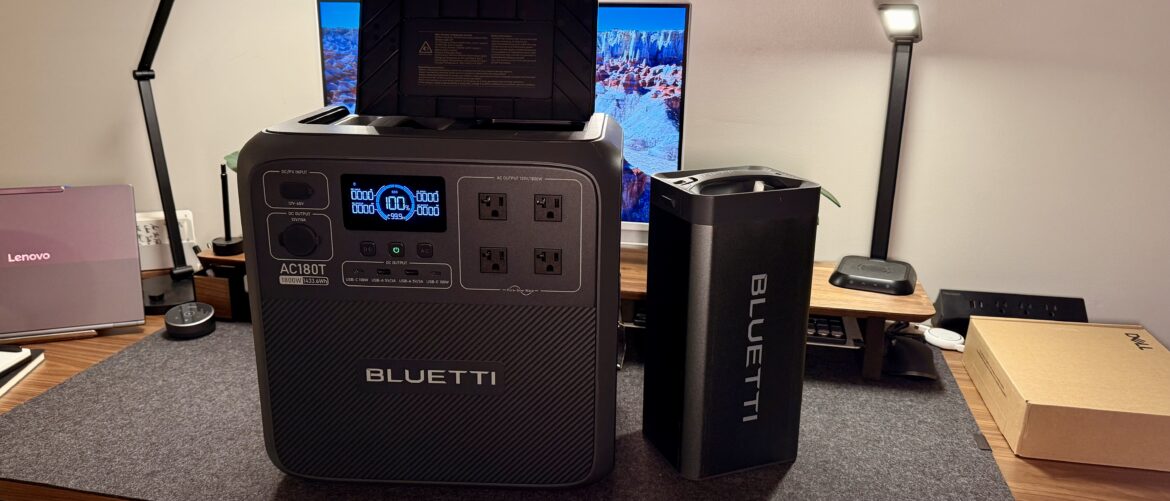
When I have the chance to go on any adventure, I will occasionally take portable power with me. Having something like the swap power system, where I can move around my charged power banks to whatever inverter I want, is handy, especially when you pair that with the SwapSolar Multi-Cooler.

This system allows me to have my Multi-Cooler anywhere in the world that I want, running on batteries, and when one gets low, I can pop it out, hot swap it with another battery that is charging in my AC180T, for example, and keep the cool times cooling. Plus, on the days or trips that I don’t need to bring an entire Cooler with me, I can use just the AC180T on its own, just as I would any standard portable power station.

Bluetti’s AC180T is one of many devices in the SwapSolar ecosystem, and I hope Bluetti continues expanding the devices in that family, too. I didn’t realize how helpful this was until I visited my family cabin. I am in the process of installing the Bluetti AC500 system as a whole cabin backup, but until then, having portable solutions like the SwapSolar Multi-Cooler is vital.

The Cabin is on an old lakefront grid, so during storms, the power goes out regularly. Knowing I can put my meats, dairy, and some beverages I want to keep cold in the SwapSolar Multi-Cooler, and keep that inside, in a tent, in the truck, or wherever I want while at the same time being able to put the AC180T wherever needed to best pull some solar power makes for such an easy experience. Mainly because I don’t even have to move the full AC180T when the batteries are charged, I have to pull out one of the hot-swappable batteries.

(Image credit: Collin Probst // TechRadar Pro)

  • Bluetti AC180T at Walmart for $499

Bluetti AC180T: In use

I’ve gotten to the point where power stations are all the same to me. Yes, there are, of course, specifics that make each unique, but each portable power station is the same idea. It’s heavy enough that you don’t want to move it, but not heavy enough that you can’t.

This makes it portable, and it has a range of port options and capacities. That’s the portable power station market. Now, however, there is a new possibility that has joined the scene. The hot-swappable batteries make for an entirely new possibility when it comes to mentioning specs, features, and even use cases.

(Image credit: Collin Probst // TechRadar Pro)

I use the AC180T entirely differently than I use any of the best portable power stations I’ve tested. Most power stations I can plug in and charge, then bring to where I need it, plug things in there, and go from there.

Sign up to the TechRadar Pro newsletter to get all the top news, opinion, features and guidance your business needs to succeed!

With AC180T, I can set up a charging station. This allows me to efficiently run my cooler or any other Bluetti products within the SwapSolar ecosystem. I can take out a fully charged battery from my AC180T and place it into a different inverter (like my cooler) when I need it. Or, I can use my AC180T as a UPS, a power strip, a battery backup, or anything else.

Speaking of the cooler, it has plenty of space, which is excellent. In addition, if you add some filtered water, you can make ice on the go. So with this setup, you’ll not only have portable power, but you can also keep your food cold and enjoy ice-cold drinks—literally!

The AC180T stands out on its own. It can recharge in about an hour and has enough output to power even larger devices. The accompanying app provides all the relevant stats and information.

On the front of the AC180T, you’ll find four AC ports, two USB-A ports, two USB-C ports, and a 120W car port. There’s also a port for the Explore Charger 1, which allows for faster car charging, as well as options for a standard car charger, solar panels, or lead-acid battery charging. The right side features a standard AC port for more traditional recharging of the unit.

Overall, this power station has been fantastic. It’s impressive on its own, but when paired with the cooler, it unlocks amazing capabilities.

If you’re a nomadic traveler, a camper, or just someone looking to ensure you have a backup to keep food and drinks cool, this power station is an excellent choice.

Bluetti AC180T: Final verdict

The Bluetti AC180T is one of the most unique power stations I have tried. It can hot swap batteries with a portable fridge with a working ice maker, it has great ports, fast recharging, and it will hopefully work with other devices in the future as well.

For RV caravaners, van campers, off-grid users, and anything in between, this is a serious power station to consider. It’s a sweet spot. It’s not the largest, but it’s got enough power to give a good amount of power to those who need it, plus it has the added benefit of being able to hot swap with the portable fridge.

Swipe to scroll horizontally

Attributes

Notes

Rating

Design

Easy to use, great layout

⭐⭐⭐⭐⭐

Ease of use

Easy to use

⭐⭐⭐⭐⭐

Practicality

Practical for most who want portable power

⭐⭐⭐⭐

Price

Decent price for what it is

⭐⭐⭐⭐⭐

Bluetti AC180T: Price Comparison


Source link

August 23, 2025 0 comments
0 FacebookTwitterPinterestEmail
GoalZero
Product Reviews

Goal Zero Yeti Pro 4000 portable power station review

by admin August 23, 2025


Why you can trust TechRadar


We spend hours testing every product or service we review, so you can be sure you’re buying the best. Find out more about how we test.

The Goal Zero powerstation lineup is impressive, especially since their merger with BioLite. According to Goal Zero, the Yeti Pro 4000 is their most remarkable power station yet. It boasts a high output, high capacity, high weight, and a high price to match.

There are several different setups that this power station can support. First, there are Haven Setups that provide additional capacity and a home connection point, allowing a home to function as a battery backup. Second, there is an option to integrate solar power, enabling recharging from the sun. Lastly, there is an escape system that can either convert a towable RV into a system powered by the Goal Zero Yeti Pro 4000 or a drivable kit that transforms an adventure vehicle into a system backed by the Yeti Pro 4000.

No matter what the use case is, if you need a large amount of reliable power, high output, and you’re willing to pay for quality gear, this system could be the right fit for you. Goal Zero’s goal with the Yeti Pro 4000 was to replace noisy and messy traditional gas generators – and they’ve done it.

I will note here that I have seen some notes about reliability issues that some have had with this unit, though I have not experienced that myself. So far, I haven’t had any problems.

(Image credit: Collin Probst // TechRadar Pro)

  • Goal Zero Yeti Pro 4000 at Amazon for $2,379.89

Goal Zero Yeti Pro 4000: Pricing & Availability

The Goal Zero Yeti Pro 4000 is available on Goal Zero’s website for just under $4000. There are other retailers selling, including Amazon.com.

You can pick up an expansion battery to extend the capacity for another $2000, and there are other accessories to outfit this even further.

Worth noting that I’m seeing limited availability outside the US right now.

(Image credit: Collin Probst // TechRadar Pro)

Goal Zero Yeti Pro 4000: Design & build quality

Specs

Battery: ~3,994 Wh (LiFePO₄), 4,000+ cycles
Power: 3,600 W continuous; 7,200 W surge
Recharge: 1,800 W AC inlet; up to 3,000 W solar

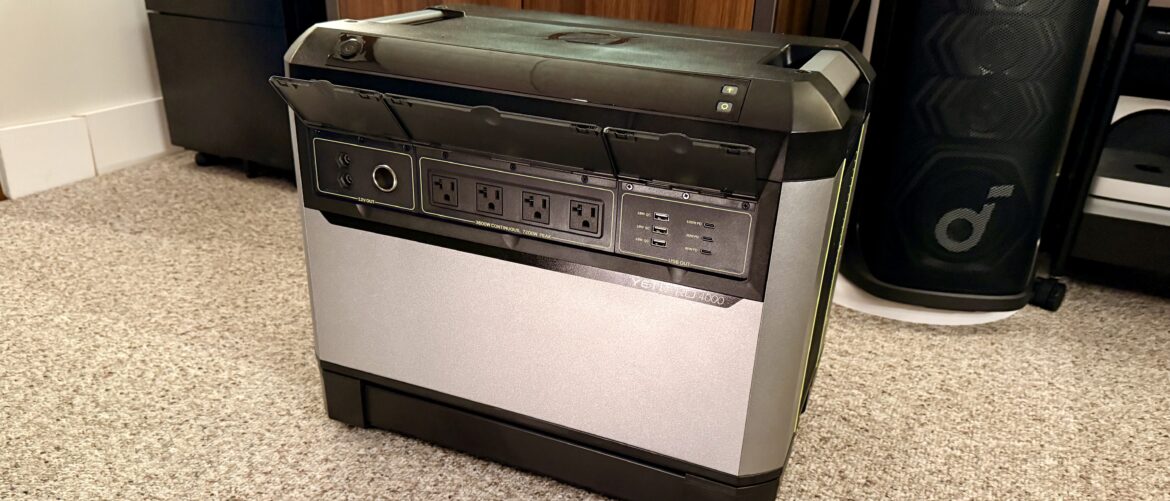
The Goal Zero Yeti Pro 4000 is not a compact device. It’s pretty cumbersome, so it has a wheeled base that comes with the standard purchase to facilitate more effortless movement.

Sign up to the TechRadar Pro newsletter to get all the top news, opinion, features and guidance your business needs to succeed!

However, what it misses in ease of mobility, it makes up for in pure power. The output is phenomenal for this size, and the choice in port layout makes sense. All of the inputs are on the back of the unit, plus the inverter you would use if you are plugging into the Haven system, for example.

All of the output ports are on the front, making it super simple if you want to set this unit up and leave it somewhere for an extended period. You can set it and forget it, and still you’re able to plug in everything you may need to without moving the unit around, unless you are changing primary inputs, which is less familiar to change around than outputs.

(Image credit: Collin Probst // TechRadar Pro)

Goal Zero Yeti Pro 4000: In use

The Yeti Pro 4000 by Goal Zero is designed to carry a heavy load, all without any issue. It’s intended to be a home backup, a primary power system on the road, or even a primary system for an off-grid building.

It’s rated to run a residential fridge for 1-2 days, while also running a Wi-Fi Setup, basic lighting, and other essentials. If you connect to solar, depending on the sun, you can keep things running for longer. You recharge with the sun and then run off the battery when the sun is not out, and recharge via the solar panels.

For home use, this is an easy option. Set it, forget it, keep it tucked away, hooked up to your house with a Haven backup system. If your home requires more power, you can add more tanks, which adds capacity to run off-grid for longer.

For those who are looking for an RV/Van Life/Off-Grid Camper solution, you can have this unit in the corner of your setup, or tucked away and have it plugged in with the Escape system to have an integrated screen and complete system, meaning you’ll never even have to touch this unit, or if you don’t want to do that, you can plug anything and everything you need into the front of this unit, have any solar input plugged into the back, and then you can run things that way.

If you do choose to add the Escape System, you can then add an integrated screen wherever you want in the vehicle or trailer to control all aspects of the Yeti Pro 4000 while the unit itself is tucked away. Add this to a system where you have outlets placed where you want them throughout your off-grid home on wheels, and it will feel like you’re in a standard home when it comes to power convenience.

Some people don’t need a semi-permanent setup, and they want something that can be brought out for job sites, one-off jobs, or similar projects. The Yeti Pro 4000 can be great for this, too, as long as you have a good way to transport it there. But, if you work at a job site and you want to be able to swap out the traditional generator for a portable power station to recharge tools, run a table saw, or similar tasks, this is a great solution.

Goal Zero Yeti Pro 4000: Final verdict

No matter your potential solution, this power station is a serious one worth considering. It could power you for days on the road if used reasonably, and it could back up essentials in your home in the case of a power outage. The Yeti Pro 4000 has a great set of offerings for expansion, and it is built to last. If you’re looking for a high-powered, high-capacity, and highly reliable power station, the Yeti Pro 4000 is one worth considering – keep in mind that it’s not easy to move.

Swipe to scroll horizontally

Attributes

Notes

Rating

Design

Hefty, robust.

⭐⭐⭐⭐⭐

Ease of use

Easy to use

⭐⭐⭐⭐

Practicality

Practical for heavy users

⭐⭐⭐⭐

Price

Expensive

⭐⭐⭐⭐⭐

For more power solutions, we’ve tested and reviewed the best portable power stations.

Goal Zero Yeti Pro 4000: Price Comparison


Source link

August 23, 2025 0 comments
0 FacebookTwitterPinterestEmail
Plugable
Product Reviews

Plugable Thunderbolt 5 docking station review

by admin August 23, 2025


Why you can trust TechRadar


We spend hours testing every product or service we review, so you can be sure you’re buying the best. Find out more about how we test.

Plugable has been in the computer accessory game for quite some time. I used to think of them as another option, then as a great option, and now, with their Thunderbolt 5 offerings, they might become one of the better options.

This unit boasts quite a few features I have yet to see as neatly packaged with even some of the best docking stations. Thunderbolt 5 support offers up faster file transfers than TB3 and TB4, and means there’s also up to dual 8K outputs, depending on your laptop’s capabilities. And it even allows 140W charging to your host laptop, and then direct more power output to accessories.

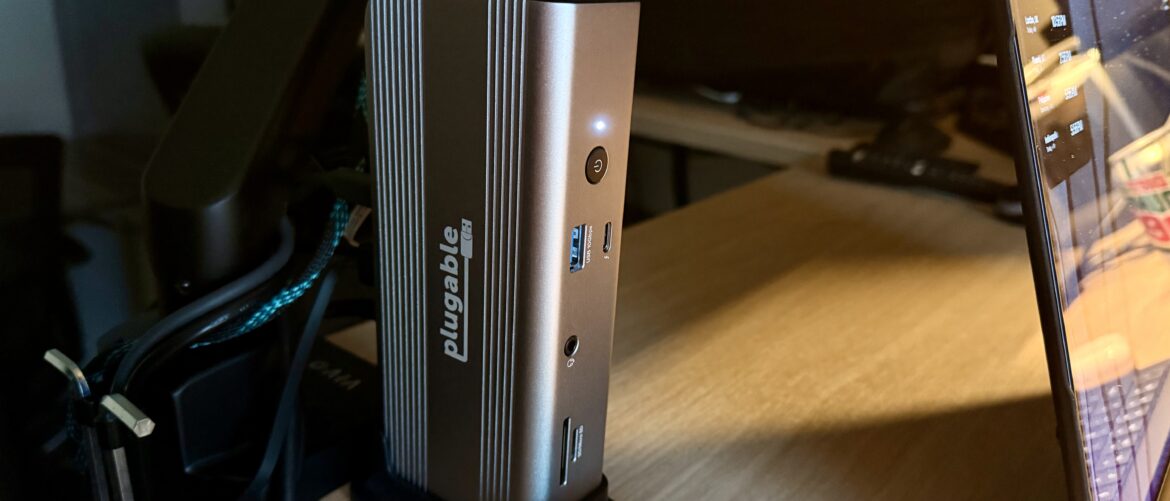
The dock itself feels sturdy and rugged, reminding me of the ever-popular CalDigit docks. Further, the port offering is fantastic, granting users 11 ports that they can utilize from their machine, including Thunderbolt Share integrated into the dock, which is something I have not seen as a mainstream offering yet.

(Image credit: Collin Probst // Future)

Plugable’s Thunderbolt 5 Dock: Pricing & Availability

  • Plugable Thunderbolt 5 Dock at Amazon for $299.95

The Plugable’s Thunderbolt 5 Dock is currently on sale for $300.

It’s available from the official website by clicking here and you can grab it from other online retailers like Amazon.com.

However, I am seeing less availability outside the US.

Plugable’s Thunderbolt 5 Dock: Unboxing & first impressions

The Plugable 11-in-1 Thunderbolt 5 Docking Station arrived in a very clean and simple box, just as I would expect from Plugable. Nothing fancy, just basic packaging. Within the box are the dock itself, a Thunderbolt 5 cable, the power brick, a stand, and some basic documentation.

Sign up to the TechRadar Pro newsletter to get all the top news, opinion, features and guidance your business needs to succeed!

The dock feels very good in the hand, and the aluminum chassis feels durable and rugged, while at the same time, the added touches like the rubber feet show that Plugable is thinking ahead and doesn’t want their dock to scuff up your desk or workspace. Depending on your setup, this dock may fit under a desk shelf, or you could mount it with adhesive, a 3D printed mount, or another mounting method to the underside of your desk.

Alternatively, you can use the base that the dock comes with to stand the dock up vertically if you so choose. At my setup for testing, I decided to slide it under my desk shelf as it fits perfectly.

Once I got the power supply plugged in, I connected my monitor, an ethernet line, and the Thunderbolt 5 cable to my laptop, and then I got to work.

(Image credit: Collin Probst // Future)

Plugable’s Thunderbolt 5 Dock: Design & build quality

Specs

Ports: 2× TB5/USB4, 2× HDMI 2.1, 1× DP 2.1, 3× USB-A (10Gbps), 1× USB-C (10Gbps), 1× 2.5GbE, 1× UHS-II SD, 1× 3.5mm audio
Power: 240W total (140W host, 100W peripherals)
Display: Dual 8K60 or triple 4K144 (Mac limited to dual 6K)
Bandwidth: 120Gbps TB5 (split lanes for display + data)
Compatibility: Windows, macOS, Linux (TB5 or TB4 laptops)

As I mentioned, the aluminum is a nice touch. It makes this dock feel premium without adding a ton of unnecessary weight or flair. The aluminum also helps with heat, as this dock can get warm when pumping out up to 240W of power. One of the things I always pay attention to with laptop docks is the port layout and how easy it is to use it in a day-to-day scenario.

From what I can tell, even after just setting this up, the dock has a great port layout. I don’t feel like, after setup, I’ll need to go digging behind the dock to plug things in repeatedly, and if I do, it will be understandable. Plugable has put the more permanent, or set-it-and-forget-it ports on the back, so if you tuck this under a desk shelf, or if you mount this under your desk, you won’t feel like you are constantly having to reach around or re-adjust.

Another thing I noticed off the bat was the size of the power brick. Granted, I see a lot of Thunderbolt 4 bricks, but this one still surprised me. It’s got to be larger due to the demand for this power output and the draw of Thunderbolt 5, but still, it’s pretty extensive.

(Image credit: Collin Probst // Future)

Plugable’s Thunderbolt 5 Dock: In use

This dock has been fantastic. I’ve been able to try it out with both macOS and Windows OS, I even tried it with a Chromebook that I have too. All around, it works great. The charging is fast, the monitors were stable, and didn’t feel like they had any issues.

Plugable has made it so that both macOS and Windows can push to the computer’s maximum video output, capping Mac-based systems on the chip’s abilities, and the same with Windows.

The power delivery was impressive, too. My primary machine is a 14-inch M4 Pro MacBook Pro that draws a good amount of power, but my secondary machine, the Dell Precision 5690, draws even more power.

So far, the Plugable Thunderbolt 5 dock has handled both without a problem. I can even charge at full speed while running multiple displays, powering an SSD, and transferring terabytes of information over a network link to my Synology DiskStation. That’s impressive.

(Image credit: Collin Probst // Future)

The ports are plentiful, but the best port is the second Thunderbolt 5 port. On a Thunderbolt 5 dock, with a Thunderbolt 5 laptop, I would want to be able to also connect to other devices at Thunderbolt 5 speeds. Part of the reason this port is so incredible is not just the TB5 specs, but the fact that this is how Plugable allows Thunderbolt Sharing through this dock.

Now, I can connect two Windows Laptops and take advantage of Thunderbolt Sharing, transferring files at lightning TB5 speeds, controlling one laptop with the other, and so on.

All around, this dock is incredibly powerful, and I have found the only fundamental limitations to be computer-based, and not docking station-based, which says a lot about the quality and abilities of this docking station.

Plugable’s Thunderbolt 5 Dock: Final verdict

The Plugable Thunderbolt 5, 11-in-1 dock is not only a powerful docking station, but it brings the power of Thunderbolt 5 to your laptop, providing high-quality display, fantastic power delivery, and a plethora of perfectly placed ports.

Thanks to the design of both the dock and the power brick, it’s not the most portable device. Couple that with its thoughtful port placement (where lesser users ports are tucked around the rear), it’s probably best left in a single-space set-up.

If you are looking for a docking station for your Thunderbolt 5 machine, this one is worth considering. But if you are looking for a dock that will work great for your Thunderbolt 4 or earlier machine, you’ll get more bang for your buck with other docks.

Swipe to scroll horizontally

Attributes

Notes

Rating

Design

Simple, Powerful, Durable

⭐⭐⭐⭐⭐

Ease of use

Easy to use

⭐⭐⭐⭐⭐

Practicality

Practical for anyone with Thunderbolt 5

⭐⭐⭐⭐

Price

Understandable Price

⭐⭐⭐⭐⭐

Plugable Thunderbolt 5 Dock: Price Comparison


Source link

August 23, 2025 0 comments
0 FacebookTwitterPinterestEmail
The Insta360 GO Ultra camera held by a female photographer against a green wooded backdrop
Product Reviews

Insta360 GO Ultra review: the ultimate tiny hands-free 4K action cam?

by admin August 23, 2025


Why you can trust TechRadar


We spend hours testing every product or service we review, so you can be sure you’re buying the best. Find out more about how we test.

Insta360 Go Ultra: two-minute review

Get drawn in by the fun magnetic system and tiny size, and be genuinely impressed by the quality of the 4K footage. That’s what happened when I tested the Insta360 Go Ultra, a product that takes the advancements made with Insta360’s Ace Pro 2 and GO 3S and turns them into another (really) compact, pocket-sized camera system for adventurous creators.

I’ve been into action cameras since the first GoPros came out (terrifyingly, almost 20 years ago). But until recently, I’ve always found their bulky housings less than ideal in adventure-type scenarios (running up a mountain peak, or learning to surf, for example). The whole point of the Go Ultra is to unlock more creative opportunities without sacrificing portability.

Insta360 might be best known for its innovative 360-degree cameras, but it’s a brand that’s becoming synonymous with challenging the norms of action cams, too. The Go Ultra is a frankly tiny, pocketable camera (at 1.9 oz / 53g), about the same size as an Apple Watch. It’s a natural successor to the Go 3S (released in 2024), but not a replacement. At the time of writing, Insta360 told me that both cameras will remain on sale.

(Image credit: Lauren Scott)

Like its predecessor, the magic of the Go Ultra is its modular design that combines a standalone camera and an Action Pod, giving you unique ways to shoot, charge and play. On the surface, the camera simply looks like a square version of the Go Ultra 3S, and powerful magnets on its base mount to the Action Pod (where the screen and buttons are) or numerous accessories and attachments. I even mounted the camera to our car, but that’s a story for another day.

  • Insta360 Go Ultra at BHPhoto for $449.99

However, inside its dark gray exterior are some notable improvements. The sensor is 221% bigger for better low-light capture, and a new 5nm AI chip delivers benefits to video quality using algorithms. The Go Ultra can shoot 4K60fps video, where the Go 3S was limited to 4K 30fps. And I found the PureVideo mode – that uses said AI algorithms to cut down on noise in low light – delivered good results at sundown, where my previous action cams struggled. The maximum wide 156-degree POV is great for group shots and selfies, vlogs and immersive action alike, and the view can be tailored to avoid a warped perspective.

This is a content companion for people with an active lifestyle rather than professional athletes. I found myself shooting more with the camera overall, simply because in one snap, I could have hands-free recording.

Like the Go 3S, the standalone camera is more rugged than the Action Pod. You can use it in freezing conditions and depths of 33 feet (10 meters) underwater, while the pod is only splashproof, which is a shame. Other rugged points for the camera include a replacement lens cap (helpful if you scratch it during activities) and a push-up cover to keep the memory card slot inside dry.

Sign up for breaking news, reviews, opinion, top tech deals, and more.

I love the simplicity of the Go Ultra’s design. Like the Insta360 Ace Pro 2, the flip-up touchscreen on the action pod is an alternative to the front-and-back solution on GoPro, and I found it more intuitive for vlogging. Handling is a three-button operation, with intuitive swipes for key menus on the touchscreen, and the magnetic mounting system is always satisfying and feels secure.

(Image credit: Lauren Scott)

The Go Ultra’s battery life was a sore point for me, and not as impressive as all-in-one rivals. I got around an hour of 1080p video recording from the standalone camera, but more than double when combined with the Action Pod. USB-C charging takes you from 0 – 80% in around 12 minutes, though, making up for the fact that the battery doesn’t last as long as Insta360 suggests based on their lab tests.

There’s no built-in storage for content like the Go 3S has, but microSD cards up to 2TB are compatible, and it’s so quick and easy to get footage off the camera using the Insta360 app on a smartphone. I don’t think this is a problem (just an extra cost to bear in mind).

Image quality is better than the Go 3S, with photos capped at 50MP instead of 9MP. And you get HDR video mode, too, with the option to apply ‘Dolby Vision’ to shot footage to give it more contrast and color. The usual video modes like Timelapse and Slow Motion work as expected, while new Toddler Titan mode adds fresh, immersive POVs. There are several new features aimed at families, including AI Family Moments to pull content of loved ones into a virtual album.

The camera’s audio quality was surprisingly crisp in most scenarios, and voice-specific modes picked up my rambling very clearly, while a wind-reduction mode helped while running in a breeze. Although I haven’t tested them, Go Ultra is also compatible with several external microphones designed for high-quality sound, including Insta360’s Mic Air, and third-party Bluetooth mics like the DJI Mic Mini and AirPods Pro 2.

The Insta360 Go Ultra is hugely versatile, and I filmed in so many places, with so many perspectives, that wouldn’t have been safe or possible with my iPhone alone. If you’re a family wanting more creative holiday snaps, a creator feeling stuck with what you can shoot with a smartphone, or just someone with an active lifestyle, the Go Ultra feels like the ultimate lightweight and fun solution.

Insta360 Go Ultra: specs

Swipe to scroll horizontallyInsta360 Go Ultra specs

Sensor

1/1.28-inch

Max Resolution

50MP (8192×6144) photos
4K, 60fps

Weight

1.87oz / 53g (camera) 3.8oz / 109g (action pod)

Dimensions

1.8x 1.8 x 0.7 inches / 46 x 46 x18mm (camera)
2.8 x 1.9 x 1.3 inches / 70 x 49 x 33mm (Action Pod)

Gyroscope

6-axis

ISO Range

100–6400

Aperture

f/2.85

Connectivity

Bluetooth, Wi-Fi, USB-C 2.0

Storage

microSD card, up to 2TB

Waterproofing

33ft (10m)

(Image credit: Lauren Scott)

Insta360 Go Ultra: Price and availability

  • Launched worldwide on August 21 2025
  • Standard bundle costs $449.99 / £369 / AU$759
  • Creator bundle costs $499.99 / £409 / AU$839

The Insta360 Go Ultra was announced on August 21 2025 (after being teased on August 18) and is available to order now from DJI’s online store and major retailers like Amazon.

It comes with two different bundle options. The Standard Combo includes the camera, quick-release cord, magnet pendant, magnetic clip and a USB-C charging cable. It costs $449.99 / £369 / AU$759.

The Creator Combo bags you all of the above, plus a Mini 2-in-1 Tripod 2.0, Quick Release Mount and Pivot Stand. It costs $499.99 / £409 / AU$839. Although a lens cap is provided, you’ll need to buy a separate pouch or case, as neither bundle includes one – and this feels a bit mean.

The pricing puts the Go Ultra at just a fraction more than the Іnѕtа360 X3 in the US and UK (when it’s not on offer), which is now three years old, but that does offer 5.7K 360-degree capture over the Go Ultra’s 4K. It’s roughly the same price as the Insta360 Go 3S, but you get double the frame rate with 60fps video capabilities.

I think the Go Ultra is fairly priced. The GoPro Hero 13 Black is a strong competitor at around $359.99/£305, particularly if you want a traditional action camera and don’t mind a bulkier design. There’s no built-in storage, so factor in the cost of buying a microSD card before you can start filming.

Today’s best Insta360 Go 3S and Insta360 Go Ultra deals

Image 1 of 3

(Image credit: Lauren Scott)(Image credit: Lauren Scott)(Image credit: Lauren Scott)

Insta360 Go Ultra: Design

  • Standalone camera is waterproof, operates down to -20C / -4F
  • Strong magnetic base connects to Action Pod and range of handy mounts
  • The camera weighs 1.87oz / 53g and is similar in size to Apple Watch

The Insta360 Go Ultra resembles a square version of its former self, the Go 3S (its only real rival). Where its predecessor was pill-shaped and about the size of a thumb, the Go Ultra is square and more than half as deep as it is wide, sitting neatly between your forefinger and thumb for quick handheld shots. That’s only half of the product, though. Without the Action Pod, the Go Ultra is one of the lightest action cameras you can buy at 1.87oz / 53g (14g heavier than the Go 3S). Using the Action Pod turns the Go Ultra into more of a traditional GoPro-style action camera.

The main difference is that there’s one flip-up LCD touchscreen, rather than a screen at the front and back. As an owner of the GoPro Hero 12 Black, this flip-up screen was a revelation to me, and I found it so helpful when filming walking shots and talking to the camera, or to see how a shot was framed when shooting with the standalone camera remotely.

No doubt it contributes to the Action Pod’s lack of waterproofing, though. The IPX8-rated camera can be fully submerged underwater, but the Pod is only resistant to splashes, limiting where you can take it. On this, I was always careful to dry the camera before popping it back into the Pod.

Image 1 of 4

(Image credit: Lauren Scott)(Image credit: Lauren Scott)(Image credit: Lauren Scott)(Image credit: Lauren Scott)

As far as durability goes, the camera is also freeze-proof down to -4F (-20C), so it’s ripe for snowsports. And a screw-on lens protector added peace of mind for me against lens scratches, given that a replacement is around $20 / £20. I’ve known so many action cameras in the past to fog up when filming underwater or changing temperatures quickly, but the lens guard has an anti-fog coating that avoided this particular pain point well.

I found the operation of the camera simple, which is a great thing because it lets you focus on the fun part of creating. The Action Pod has just three buttons: red up top for recording, a power button and a Q button to quickly switch modes on the right. There’s a raised button to release the standalone camera from its magnetic mount on the left (above a USB-C charging point), and I never found myself pressing this accidentally.

You really have to tug the standalone camera to release it from the Pod’s magnets, which avoids unwanted drops. Underneath the Action Pod, there are two holes to fit the Go Ultra’s specific Quick Release Mount (sold separately, but very solid), for a secure fit to accessories like the brand’s Pet Harness. Attaching the camera to a pet harness was decidedly old school, with an action mount and screw system. But this kept it firmly in place, even after a lot of doggo rolling.

Image 1 of 5

(Image credit: Lauren Scott)(Image credit: Lauren Scott)(Image credit: Lauren Scott)(Image credit: Lauren Scott)(Image credit: Lauren Scott)

Navigating the camera’s menus is easy, too. When you first turn on the Go Ultra, you get a walkthrough of what gestures bring up which settings. It took me a few hours to remember which did which (old dogs), but it soon became second nature. A right swipe brings up playback for footage, and a right swipe lets you dial in more settings and switch between Auto and Manual Mode.

The touchscreen is bright, colorful and responsive, which makes changing settings – even with wet or cold fingers – straightforward. You can buy the Insta360 Go Ultra in either Midnight Black (model tested here) or Arctic White, but either way, the construction is from a rigid, matte plastic that seems scratch-resistant, and like it could take a few knocks and drops. It’s sensible action camera fodder.

Insta360 Go Ultra: Performance and features

  • Quick AI-edited videos via the Insta360 app
  • Standalone camera charges 80% in 12 mins
  • Compatible with microSD cards up to 2TB

The Go Ultra is designed to work alongside the free Insta360 app, which pairs to the camera via its own WiFi network for remote operation. From here, you can also download, preview and edit videos on your smartphone. Other than installing some new firmware (released just before the camera), I was paired and ready to shoot from the app in under 10 minutes.

The standalone camera and Action Pod pair via Bluetooth when they’re apart. I found the connection seamless, with no lag when changing settings or in the real-time view on the screen. Range can be an issue, though, both from the camera to the phone and from the camera to the pod. More than about five meters away, or underwater, the connection would dip out, and the camera would stop recording. It’s not a dealbreaker, but it might limit more complex setups, especially if you’re shooting somewhere wet.

Image 1 of 2

(Image credit: Lauren Scott)(Image credit: Lauren Scott)

The Go Ultra has a 6-axis gyroscope to measure the camera’s movement and rotation, and through an algorithm, makes the video more stable and gives you a more even horizon. Image stabilization isn’t bad, but I found fast-moving objects needed a bit of extra help. When trail running, I got my best results by activating the Jitter Blur Reduction mode, plus Tilt Fix, which corrects uneven mounting by up to 10 degrees. It took me a while to discover both of these, and my first clips with the camera clipped to a hat (including this swimming clip below) were fairly wonky. Once activated, though, the results evened out nicely, and even clips of my dog lolloping at full speed looked stable.

The camera has a built-in microphone, and four modes for picking up sound – Stereo, Voice Enhancement, strong and weak wind reduction. I found the audio quality really impressive while walking in good conditions. My voice was picked up clearly when talking to the camera, and even in a busy city, the camera was able to isolate the sounds nearby rather than heavy traffic noises. If you use the camera in water, the audio will drop out, and the camera will need to dry enough before the clarity returns.

Like most action camera mics, there’s an issue with wind noise disrupting the clarity (especially when running in breezy conditions), but the wind reduction setting did noticeably reduce this. It’s a big advantage for serious creators to be able to boost the sound quality with an external mic like the Insta360 Mic Air, DJI Mic 2 and AirPods 4. Although without testing, it’s hard to comment on the performance this would bring specifically.

I found all the camera’s shooting modes and presets easy to get good footage with, partly because the camera does such a good job of explaining what each one does, without the advice feeling intrusive on the screen. It was also easy to control the camera with voice commands, “turn the camera off”, “mark that” and hand gestures like making a peace sign to trigger a photo. I found that the standalone camera gets very hot after filming. Even after low-resolution clips, I felt it burning a hole in my shorts pocket, but this didn’t cause any interruption in recording, so I don’t think it’s a major issue.

Image 1 of 1

(Image credit: Lauren Scott)

Once my clips were captured, I was ready to start editing my videos. Much like GoPro and DJI’s accompanying editing apps, Insta360’s version also features AI-assisted editing tools to pick out clip highlights. There are tonnes of presets to choose from – with funky names like Vibe City and Tunes and Travel – which do a fair job of creating quick, shareable clips by adding transitions and music.

There are helpful default export settings for platforms like WhatsApp, YouTube, Instagram, and TikTok, although you can customize export parameters. I enjoy editing manually, but the Insta360 app is so intuitive that I can see even total beginners getting creative right away. Some of these end up being a bit cheesy, but you can tailor the music and effects to suit your tastes. I’ve included an example of an AI-edited video below, with clips of my dog wearing the pet harness on walkies.

The Go Ultra’s biggest downfall – and something we struggled with while testing the GO 3S – is battery life. The standalone camera has a 500mAh capacity, and the action pod 1,450mAh capacity – noticeably smaller than the 2,400mAh capacity on the Insta360 X5, but an improvement on the GO 3S’ 310mAh and its 38-minute life. Also, unlike action cams with replaceable batteries, when you run out of juice, that means content creating is on hold until you can find a way to recharge.

Insta360 says you can get 70 minutes of footage out of the standalone camera. Adding the Action Pod gives you 200 minutes. But that’s with Endurance Mode on, the LCD and Wi-Fi off, and for 1080 24fps video – conditions I don’t think most normal shooters are going to replicate. When I tried shooting a video in 1080 30fps from full power, without all the caveats on the specs sheet, I got around 150 minutes with the pod and 45 minutes without. I don’t think that’s dreadful for a camera this small, and it’s worth noting that a 10-minute charge took me from about 0-75% so I was ready to shoot again. But it’s something to consider if you’re away from power for long periods, or looking to shoot continuous cycles, runs and hikes for longer.

Insta360 Go Ultra: Image quality

  • New 1/1.28-inch sensor with AI chip
  • Captures 4K video up to 50fps and 50MP photos
  • Low-light video mode with PureView

Insta360 has given the Go Ultra a bigger 1/1.28-inch sensor than the Go 3S, the idea being that this is capable of capturing more detail in low light. The Go Ultra also supports video capture up to 4K 60fps and 1080 240fps for slow-motion, plus new HDR that can be applied to clips and stills. Unsurprisingly (because this is a super user-friendly camera), there’s no option to shoot in a flat profile for more color grading scope during post-production. But that’s no problem, as I think most users will stick to editing in the Insta360 app anyway. Beyond the specs, what do the results look like in real life?

Going into testing the Go Ultra, I think my expectations were too low for a camera of this size. I found video quality to be brilliant in all 10 modes, but footage was sharpest and most vibrant in abundant sunshine. In the camera’s Standard color preset (there are 8 in total, including Vibrant and Urban) videos were still colorful and had decent detail in the shadow and highlight areas, although the contrast ratio wasn’t good enough to expose a very bright sky like a sunset, and a dark foreground, in one shot.

It’s easy to switch the Go Ultra to Manual exposure mode, where you can take control of the shutter speed, ISO (100–6400) and white balance yourself. I found this most helpful for stationary shots, but wouldn’t recommend it to beginners. In short – and unlike my mirrorelss camera – Auto mode saw me through all shooting scenarios, and I rarely felt the urge to take over. The joy of this camera is in its simple opration.

Image 1 of 2

(Image credit: Lauren Scott)(Image credit: Lauren Scott)

The camera adapts quickly to rapid changes in light, such as coming out of a shady forest into an open field. And I found that useful when I was running in the countryside, moving quickly, where i didn’t want the picture to be shrouded in darkness for a few seconds. Being summer, I did a lot of shooting in direct and dappled sun, and found that lens flare was handled well, too.

Big talking points of the Go Ultra’s video capabilities are the new additions of Active HDR and PureVideo. Like SuperNight on the DJI Osmo 360, it’s designed to enhance the quality and sensitivity of low-light shooting. It’s somewhat limited to automatic settings and 4K 30fps, but you can shift the exposure up and down in increments. Walking around a city at night, I was able to pick up plenty of detail in the buildings, street lights and the sky, although I think there’s some aggressive denoising AI going on inside the camera, as the footage did look a bit muddy at times.

Photos from the camera have a seemingly high megapixel count (the maximum resolution is 50MP or 37MP with a 16:9 aspect ratio), which is a big bump up from the Go 3S’ 12MP in 4:3 (9MP in 16:9). In practice, I’d say that’s more than adequate for slotting into videos, or uploading to social platforms, but I wouldn’t want to make big prints from them. At the camera’s widest field of view, you get a 14.27mm equivalent in 35mm terms – expansive enough to get groups in the frame, or to shoot yourself while walking. If you’re not a fan of the warped action camera look, a Linear POV does a great job at giving you a more natural wide-angle, good for vloggers.

Image 1 of 4

(Image credit: Lauren Scott)(Image credit: Lauren Scott)(Image credit: Lauren Scott)(Image credit: Lauren Scott)

Overall, I’m impressed by the quality of Go Ultra’s footage. It’s in line with an action cam that’s this portable, and the addition of HDR to video as well as photos (with Dolby Vision for an extra boost) delivers polished videos you can safely deliver to friends, family and your social channels.

If I were a professional creator, I wouldn’t rely on this camera to cover all my video needs. But it excels at what it’s designed for – being small, getting places other cams can’t, and remaining user-friendly for beginners. The battery life is lacking for extended shooting durations, and night footage is still overcooked with PureVideo mode. But Go Ultra’s video is good in most areas, and does appear to be an improvement over the 3S in low light (I haven’t tested them side by side, so can’t say for sure). With its kid and pet-friendly design, I think Insta360 has found the right balance for casual creators with an active lifestyle.

Insta360 Go Ultra: testing scorecard

Swipe to scroll horizontallyInsta360 Go Ultra

Attributes

Notes

Rating

Price

Similar cost to the Insta360 Ace Pro 2 and Insta360 Go 3S, but the quality of the package is worth it.

4.5/5

Design

A nearly seamless experience with the Action Pod, plus waterproofing and a protective lens on the standalone camera.

4.5/5

Performance & features

Gets hot, and the battery drains quickly. The Insta360 app makes light work of image transfers and AI edits and there are plenty of tricks and modes.

4/5

Image quality

HDR is a great addition, but it’s still not a class-leader in low light. You sacrifice some quality for portability.

4/5

Should I buy the Insta360 Go Ultra?

Buy it if…

You want to balance performance with portability
Video quality is high, but not the best of all action cameras out there. But the Go Ultra can also go places other action cameras can’t, at least without tonnes of extra mounts.

You don’t mind shorter battery life
I spent time shooting shorter clips on the Go Ultra, and recharging it little and often. If you plan to capture all-day events or sustained activities like rides or hikes, the battery life might be a limiting factor.

Don’t buy it if…

You want the smallest action camera
The Insta360 Go Ultra is small, but not quite as tiny as the Go 3S. At almost 15g less, the Go 3S might unlock even more possibilities.

You want a fully waterproof solution
The Action Pod is only splashproof, a fact that made me uncomfortable while shooting. If you shoot a lot of wet content, I’d go for a fully waterproofed model.

Also consider

The Insta360 Ace Pro 2 is co-engineered with Leica and gives pros something more advanced. A dedicated Leica color profile, bigger sensor with better low-light performance and image quality, and up to 8K resolution make it better for advanced videography and content creation. You still get a vlogger-friendly screen.

Read our full Insta360 Ace Pro 2 review

Cheaper than the Go Ultra, the DJI Osmo Action 5 offers excellent features. It doesn’t have the advantage of a tiny standalone camera, but the all-in-one design provides better battery life, waterproofing (to 20 meters), and 47GB of internal storage. The maximum frame rate maxes out higher, too, at 4K/120p.

Read our full DJI Osmo Action 5 Pro review

How I tested the Insta360 Go Ultra

  • I tested a full production model for three weeks
  • I mounted the camera on my hat, handlebars, and even my dog
  • I recorded videos during the day, sunset and after dark

Insta360 sent me a review sample of the Go Ultra Standard Bundle about three weeks before the official release date. This gave me enough time to test all the camera’s modes and mounting options, including those with and without the Action Pod, as well as with the magnetic clip on my hat and the magnetic pendant on hikes in the countryside.

Insta360 also supplied a large version of their pet harness, and I attached the camera to my dog out on walkies to see what footage looked like from the POV of a bouncy Flatcoated Retriever.

I used the Go Ultra wild swimming in a local river to test the waterproofing, tried it running, and even attached it to our car as we drove along a country lane. I shot in bright sunshine, at sunset and night – essentially, in all the lighting conditions I could think of for creators. I edited content straight from the camera to the Insta360 mobile app on my iPhone 15 Pro, as well as manually taking footage from the built-in SD card and editing it on my iMac.

  • First reviewed August 2025

Insta360 Go Ultra: Price Comparison


Source link

August 23, 2025 0 comments
0 FacebookTwitterPinterestEmail
  • 1
  • …
  • 25
  • 26
  • 27
  • 28
  • 29
  • …
  • 31

Categories

  • Crypto Trends (1,098)
  • Esports (800)
  • Game Reviews (772)
  • Game Updates (906)
  • GameFi Guides (1,058)
  • Gaming Gear (960)
  • NFT Gaming (1,079)
  • Product Reviews (960)

Recent Posts

  • This 5-Star Dell Laptop Bundle (64GB RAM, 2TB SSD) Sees 72% Cut, From Above MacBook Pricing to Practically a Steal
  • Blue Protocol: Star Resonance is finally out in the west and off to a strong start on Steam, but was the MMORPG worth the wait?
  • How to Unblock OpenAI’s Sora 2 If You’re Outside the US and Canada
  • Final Fantasy 7 Remake and Rebirth finally available as physical double pack on PS5
  • The 10 Most Valuable Cards

Recent Posts

  • This 5-Star Dell Laptop Bundle (64GB RAM, 2TB SSD) Sees 72% Cut, From Above MacBook Pricing to Practically a Steal

    October 10, 2025
  • Blue Protocol: Star Resonance is finally out in the west and off to a strong start on Steam, but was the MMORPG worth the wait?

    October 10, 2025
  • How to Unblock OpenAI’s Sora 2 If You’re Outside the US and Canada

    October 10, 2025
  • Final Fantasy 7 Remake and Rebirth finally available as physical double pack on PS5

    October 10, 2025
  • The 10 Most Valuable Cards

    October 10, 2025

Newsletter

About me

Welcome to Laughinghyena.io, your ultimate destination for the latest in blockchain gaming and gaming products. We’re passionate about the future of gaming, where decentralized technology empowers players to own, trade, and thrive in virtual worlds.

Recent Posts

  • This 5-Star Dell Laptop Bundle (64GB RAM, 2TB SSD) Sees 72% Cut, From Above MacBook Pricing to Practically a Steal

    October 10, 2025
  • Blue Protocol: Star Resonance is finally out in the west and off to a strong start on Steam, but was the MMORPG worth the wait?

    October 10, 2025

Newsletter

@2025 laughinghyena- All Right Reserved. Designed and Developed by Pro


Back To Top
Laughing Hyena
  • Home
  • Hyena Games
  • Esports
  • NFT Gaming
  • Crypto Trends
  • Game Reviews
  • Game Updates
  • GameFi Guides
  • Shop

Shopping Cart

Close

No products in the cart.

Close