

Laughing Hyena
  • Home
  • Hyena Games
  • Esports
  • NFT Gaming
  • Crypto Trends
  • Game Reviews
  • Game Updates
  • GameFi Guides
  • Shop
Tag:

playground

The Sims 4's latest update adds playground venues to the base game ahead of October's kid-friendly expansion pack
Game Reviews

The Sims 4’s latest update adds playground venues to the base game ahead of October’s kid-friendly expansion pack

by admin September 19, 2025


We’re very much on the road to the next The Sims 4 expansion, Adventure Awaits, and Maxis has rolled out a cool new update to hold you over until the big day next month. The new patch is available now on PC, and will arrive on consoles on September 23.

The update has a couple of features worth discussing, and you can see how they lay some groundwork in anticipation of the game’s next, very much on-theme expansion.


To see this content please enable targeting cookies.

Manage cookie settings

The big new feature in the new update is the Playground Venue, which is a place where sims kids can hang out and play. Because it’s mainly designed for children, it’s a good place to find new friends for your own.

You can create custom playground venues, and share them with other players. Separately, you’ll find an updated UI for Event Planning. You’re now able to filter out the specific venue type you want (libraries only, nightclubs only, and so on), thanks to the new filters.

Another big addition for child Sims is the ability for the little ones to Play Pretend with themselves, or with another child Sim. This new interaction can be found under Friendly > Activities Pie Menu. There are a couple of common – and expected – options to play with, such as Play Fairy Tale Castle, Play House, and Play Pirate Adventure. This being The Sims, of course, all of them have unique VFX.

Image credit: Maxis, EA.

Elsewhere in the update, there’s a new colour variant of the Ecru Slouch Beanie in Create a Sim. Maxis has also tweaked the Soul’s Journey gains and added Satisfaction Point rewards for each tier you complete.

The update’s console release next week will coincide with the launch of a new beta feature that you can opt into if you like. It’s called Memory Boost, and it essentially attempts to improve the game’s performance by optimising memory usage. You’ll find it under the Other tab in Game Options.

Adventure Awaits itself won’t arrive until October 2, but a big reason why this update is out now and not a little closer to that date is that it allows mod creators to update their work so it’s ready for when the expansion drops.

Speaking of which, EA have also created a series of brochures for Gibbi Point, the new world which arrives with Adventure Awaits. It’s a clever idea that lets you see some of the possible getaways you’ll be able to create, and encourages you to check back daily for more inspiration.

Source link

September 19, 2025 0 comments
0 FacebookTwitterPinterestEmail
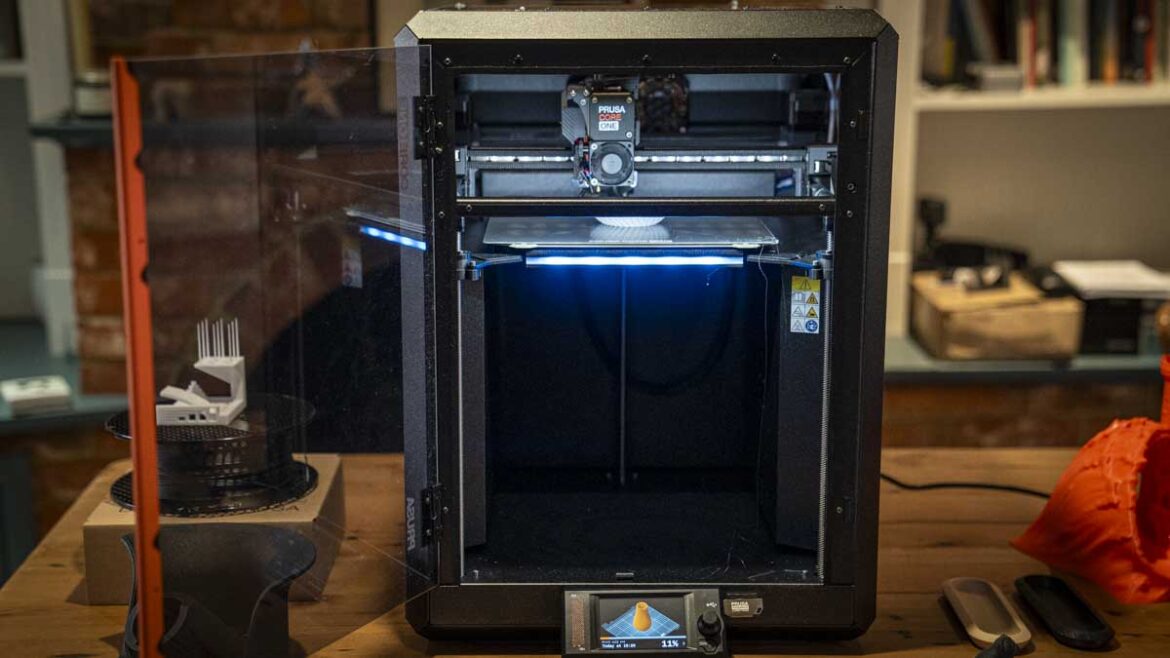
Original PRUSA CORE One
Gaming Gear

Open hardware dream collapses as Prusa slams China’s subsidies, patents, and aggressive tactics that reshaped 3D printing from an open playground into a corporate battlefield

by admin August 25, 2025


  • State-backed rivals have made open source 3D printing nearly impossible
  • Chinese subsidies shift global competition in desktop 3D printer production
  • Cheap Chinese patents create obstacles far beyond Europe’s market borders

The open source movement in 3D printing once thrived on shared designs, community projects, and collaboration across borders.

However, Josef Prusa, head of Prusa Research, has announced, “open hardware desktop 3D printing is dead.”

The remark stands out because his company long championed open designs, sharing files and innovations with the wider community.


You may like

Economic support and patent challenges

Prusa built his early business in a small basement in Prague, packing frames into pizza boxes while relying on contributions from others who shared his philosophy.

What has changed, he now argues, is not consumer demand but the imbalance created when the Chinese government labeled 3D printing a “strategic industry” in 2020.

In his blog post, Prusa cites a study from the Rhodium Group which describes how China backs its firms with grants, subsidies, and easier credit.

This makes it much cheaper to manufacture machines there than in Europe or North America.

Sign up to the TechRadar Pro newsletter to get all the top news, opinion, features and guidance your business needs to succeed!

The issue grows more complicated when looking at patents. In China, registering a claim costs as little as $125, while challenging one ranges from $12,000 to $75,000.

This gap has encouraged a surge of local filings, often on designs that trace back to open source projects.

Prusa’s earlier machines, such as the Original i3, proudly displayed components from partners like E3D and Noctua, embodying a spirit of community, but were also easy to copy, with entire guides appearing online just months after release.

The newest Prusa printers, including the MK4 and Core ONE, now restrict access to key electronic designs, even while offering STL files for printed parts.

The Nextruder system is fully proprietary, marking a clear retreat from total openness.

Prusa argues Chinese firms are effectively locking down technology the community meant to share – as while a patent in China does not block his company from selling in Europe, it prevents access to the Chinese market.

A bigger risk emerges when agencies like the US Patent Office treat such patents as “prior art,” creating hurdles that are expensive and time-consuming to clear.

Prusa cited the case of the Chinese company, Anycubic, securing a US patent on a multicolor hub that appears similar to the MMU system his company first released in 2016.

Years earlier, Bambu Lab introduced its A1 series, also drawing inspiration from the same concept.

Anycubic now sells the Kobra 3 Combo with this feature, raising questions about how agencies award patents and who holds legitimate claims.

Meanwhile, Bambu Lab faces separate legal battles with Stratasys, the American pioneer whose patents once kept 3D printing confined to costly industrial use.

Declaring the end of open hardware may be dramatic, but the pressures are real.

Between state subsidies, permissive patent rules, and rising disputes, the foundation of open collaboration is eroding.

Via Toms Hardware

You might also like


Source link

August 25, 2025 0 comments
0 FacebookTwitterPinterestEmail
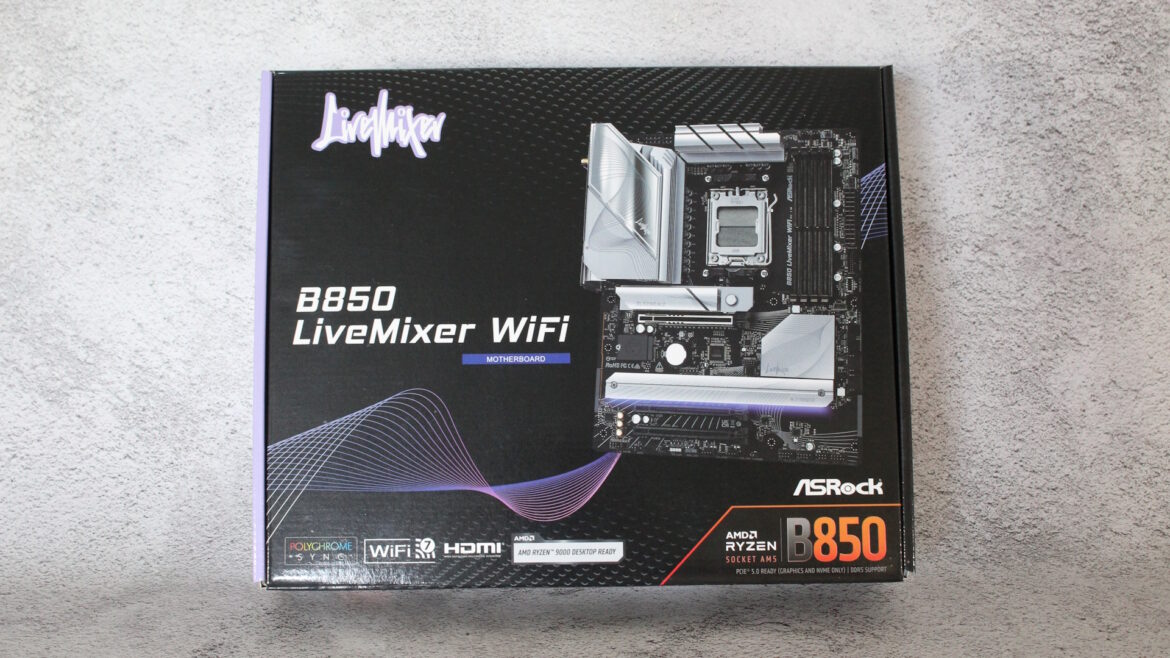
ASRock B850 Livemixer WiFi
Gaming Gear

ASRock B850 Livemixer WiFi motherboard review: a budget playground for content creators

by admin August 22, 2025


Why you can trust Tom’s Hardware


Our expert reviewers spend hours testing and comparing products and services so you can choose the best for you. Find out more about how we test.

AM5 and subsequent X870 and B850 motherboards have been a good generation for ASRock boards. From its fair pricing to boards packed with features like its flagship X870E Taichi, there’s a lot to like. We recently covered the B850 Steel Legend and walked away from there feeling positive overall as well. Sliding one level down the company’s product stack is the B850 Livemixer ($189.99).

The brightly colored B650-based Livemixer is long gone, replaced by a more mature black and silver look. Still focused on content creators, it offers a wide range of USB connectivity “…for streaming devices and multiple other auxiliary devices.”

ASRock packs 14 USB ports on the rear IO, offering more than some boards costing twice as much. Realtek chips manage the audio (last-gen flagship ALC1220) and networking duties (2.5 GbE and integrated Wi-Fi 7). While the power delivery isn’t the most robust we’ve seen, you can still drop a Ryzen 9 9950X (or X3D) in it and get every MHz out of your CPU. The reserved appearance still offers some bling with an RGB strip under the extended M.2 heatsink across the bottom.

The Livemixer performed adequately in most tests, demonstrating competence in both gaming and other functions. Similar to the Steel Legend, the Livemixer encountered issues with our Kingston memory kit. We had to substitute it with a different DDR5-6000 kit, which, while having the same speed, featured slightly looser (slower) timings. However, this difference would generally be imperceptible without a direct benchmark comparison. Overall, the motherboard is more than capable of any typical use case, offering room for additional tweaking if desired.

Below, we’ll examine the board’s details and determine whether it deserves a spot on our Best Motherboards list. But before we look at test results and discuss the details, check out the specifications below, provided by ASRock.

  • ASRock B850 Livemixer WiFi at Amazon for $189.99

Specifications of the ASRock B850 Livemixer Wifi

Swipe to scroll horizontally

Socket

AM5 (LGA 1718)

Chipset

B850

Form Factor

ATX

Voltage Regulator

17 Phase (14x 80A Dr.MOS MOSFETs for Vcore)

Video Ports

(1) HDMI (v2.1)

Row 5 – Cell 0

(1) DisplayPort (v1.4)

USB Ports

(1) USB 3.2 Gen 2 (10 Gbps) Type-C

Row 7 – Cell 0

(4) USB 3.2 Gen 2 (10 Gbps)

Row 8 – Cell 0

(4) USB 3.2 Gen 1 (5 Gbps)

Row 9 – Cell 0

(8) USB 2.0 (480 Mbps)

Network Jacks

(1) 2.5 GbE

Audio Jacks

(2) Analog + SPDIF

Legacy Ports/Jacks

✗

Other Ports/Jack

✗

PCIe x16

(1) v5.0 (x16)

Row 15 – Cell 0

(2) v4.0 (x4)

PCIe x8

✗

PCIe x4

✗

PCIe x1

✗

CrossFire/SLI

??

DIMM Slots

(4) DDR5-8000(OC), 256GB Capacity

M.2 Sockets

(1) PCIe 5.0 x4 (128 Gbps) / PCIe (up to 80mm)

Row 22 – Cell 0

(2) PCIe 4.0 x4 (64 Gbps) / PCIe (up to 80mm)
Supports RAID 0/1/10

SATA Ports

(4) SATA3 6 Gbps

Row 24 – Cell 0

Supports RAID 0/1

USB Headers

(1) USB v3.2 Gen 2×2 (20 Gbps) Type-C

Row 26 – Cell 0

(2) USB v3.2 Gen 2 (5 Gbps)

Row 27 – Cell 0

(2) USB v2.0 (480 Mbps)

Fan/Pump Headers

(6) 4-Pin (Accepts PWM and DC)

RGB Headers

(3) aRGB (3-pin)

Row 30 – Cell 0

(1) RGB (4-pin)

Diagnostics Panel

(1) Post Status Checker (4 LEDs)

Internal Button/Switch

✗

SATA Controllers

✗

Ethernet Controller(s)

(1) Dragon RTL8125 BG (2.5 GbE)

Wi-Fi / Bluetooth

Realtek RZ717 Wi-Fi 7 – 320 MHz, 6 GHz, 5.8 Gbps, BT 5.4

USB Controllers

ASMedia ASM1074, Genesys Logic GL852 (2), Redrivers

HD Audio Codec

Realtek ALC1220

DDL/DTS

✗ / ✗

Warranty

3 Years

Today’s best ASRock B850 Livemixer WiFi deals

Inside the Box of the ASRock B850 Livemixer WiFi

You receive the bare essentials in the box: two SATA cables, a Wi-Fi antenna, and a thermistor cable. This minimal accessory package is standard for motherboards in this price range.

Design of the Livemixer

Image 1 of 3

(Image credit: ASRock)(Image credit: ASRock)(Image credit: ASRock)

The B850 Livemixer features an 8-layer black PCB. Large silver heatsinks with a wavy-line pattern cover the VRMs, chipset, and all M.2 sockets, aesthetically integrating with the PCB. The sole RGB element, located under the extended bottom M.2 heatsink, is sufficiently bright, giving this budget-friendly motherboard an appealing and non-obtrusive appearance sure to blend in with most build themes.

Get Tom’s Hardware’s best news and in-depth reviews, straight to your inbox.

(Image credit: ASRock)

Starting in the upper left corner, we get a better look at the reflective and matte-finished VRM heatsink, featuring Livemixer branding. Between the two oversized heatsinks are an 8-pin (required) and a 4-pin EPS connector to power the processor. Nothing special here.

To the right of the socket are four unreinforced DRAM slots, with locking mechanisms on both sides. Like the Steel Legend, ASRock lists support for up to 256GB of RAM with two sticks running at speeds of up to DDR5-8000+, which is very fast for this cost-conscious chipset. Again, we experienced some issues with our Kingston DDR5-6000 kit and this BIOS, but our other, faster test kit, DDR5-7200, ran without any problems. Our best advice is to ensure your memory is on the QVL list for the best chance of compatibility.

Above the DRAM slots are the first three (of five) 4-pin fan/pump headers. Like the Steel Legend, it’s the CPU_FAN1/2 and the AIO pump. All headers work with DC- or PWM-controlled fans. The CPU_FAN1 header outputs up to 1A/12W, while the remainder outputs up to 3A/36W. CPU_FAN2, CHA_FAN1-3, and the AIO_PUMP header auto-detect whether they are connected to 3- or 4-pin devices.

Turning attention down the right edge, we first run into the Post Status Checker (PSC) LEDs, which light up during POST and remain lit if an issue occurs. Next are two 3-pin ARGB headers, followed by the 24-pin ATX connector to power the board. Last up here are the front panel 19-pin USB 3.2 Gen 1 (5 Gbps) and 3.2 Gen 2×2 Type-C (20 Gbps) headers, adding to the total on the rear.

(Image credit: Tom’s Hardware)

Power delivery is the same as that of the B850 Steel Legend, consisting of 17 phases, with 14 dedicated to Vcore. Power heads from the 8-pin EPS connector(s) to the Richtek RT3678BE controller (for Vcore, there’s another for the SOC/MISC). From there, it’s on to the 80A Vishay SiC659 Dr. MOS VRMs. While not the most robust, it’s still sufficient for a flagship-class processor, with cooling being the limiting factor.

(Image credit: ASRock)

At the bottom of the board, starting from the left, we can easily see the last-generation flagship Realtek ALC1220 audio chip. Flanking it are three dedicated audio capacitors and the audio separation line. It’s not the latest and greatest audio solution, but for the price, it’s a solid option. If it’s not good enough, there are enough PCIe slots to add a PCIe-based sound card.

Speaking of PCIe, the Livemixer offers three full-length slots, with the top slot reinforced for added stability. The top is the primary slot for graphics, connecting through the CPU, and supports up to PCIe 5.0 x16. The bottom two slots are connected via the chipset and operate at PCIe 4.0 x4 (M.2 supports RAID 0/1/10). The bottom slot, PCIe_3, does share lanes with an M.2 socket (M.2_3), so it’s one or the other.

Just above the PCIe slot is the large M.2 heatsink, featuring a DIY-friendly one-push latching mechanism. The socket supports up to PCIe 5.0 x4 (128 Gbps) and accommodates devices up to 80mm in length. The bottom two slots also support up to 80mm modules, but are the ‘slower’ PCIe 4.0 x4 (64 Gbps) speeds. Again, M.2_3 shares bandwidth with PCIE_3, so be aware if you need to use that bottom PCIe slot and a third M.2.

Past the chipset and along the right edge is another 19-pin USB 3.2 Gen 1 connector, and below that, four SATA ports (support RAID 0/1).

Across the bottom are several useful headers. From left to right, you get:

  • Front Panel audio
  • 3-pin UART
  • 2-pin Thermistor header
  • 4-pin RGB, 3-pin ARGB
  • (2) 4-pin Chassis Fan headers
  • 2-pin Clear CMOS jumper
  • (2) USB 2.0 headers
  • Front Panel

(Image credit: Tom’s Hardware)

The rearIO is laid out logically and labeled clearly, which makes things easy (if you can see behind your chassis). On the left is the HDMI video output for integrated graphics, and next to that are the standard Wi-Fi 7 antenna connections. A small BIOS Flashback button is next, followed by two stacks of four USB ports. On the left are four USB 2.0 ports, with two additional ports located on top. The USB 3.2 Gen 1 (5 Gbps) Lightning Gaming ports (on their own controller, free from other USB traffic) at the bottom, indicted by the orange ports. Next to these are the two 10 Gbps Type-C ports and another 5 Gbps Type-A port, both in light blue. Last but not least is the Realtek 2.5 GbE and audio stack, featuring two 3.5mm (mic in/line out) ports and an SPDIF port.

MORE: Best Motherboards

MORE: How To Choose A Motherboard

MORE: All Motherboard Content

ASRock B850 Livemixer WiFi: Price Comparison


Source link

August 22, 2025 0 comments
0 FacebookTwitterPinterestEmail

Categories

  • Crypto Trends (1,098)
  • Esports (800)
  • Game Reviews (772)
  • Game Updates (906)
  • GameFi Guides (1,058)
  • Gaming Gear (960)
  • NFT Gaming (1,079)
  • Product Reviews (960)

Recent Posts

  • This 5-Star Dell Laptop Bundle (64GB RAM, 2TB SSD) Sees 72% Cut, From Above MacBook Pricing to Practically a Steal
  • Blue Protocol: Star Resonance is finally out in the west and off to a strong start on Steam, but was the MMORPG worth the wait?
  • How to Unblock OpenAI’s Sora 2 If You’re Outside the US and Canada
  • Final Fantasy 7 Remake and Rebirth finally available as physical double pack on PS5
  • The 10 Most Valuable Cards

Recent Posts

  • This 5-Star Dell Laptop Bundle (64GB RAM, 2TB SSD) Sees 72% Cut, From Above MacBook Pricing to Practically a Steal

    October 10, 2025
  • Blue Protocol: Star Resonance is finally out in the west and off to a strong start on Steam, but was the MMORPG worth the wait?

    October 10, 2025
  • How to Unblock OpenAI’s Sora 2 If You’re Outside the US and Canada

    October 10, 2025
  • Final Fantasy 7 Remake and Rebirth finally available as physical double pack on PS5

    October 10, 2025
  • The 10 Most Valuable Cards

    October 10, 2025

Newsletter

About me

Welcome to Laughinghyena.io, your ultimate destination for the latest in blockchain gaming and gaming products. We’re passionate about the future of gaming, where decentralized technology empowers players to own, trade, and thrive in virtual worlds.

Recent Posts

  • This 5-Star Dell Laptop Bundle (64GB RAM, 2TB SSD) Sees 72% Cut, From Above MacBook Pricing to Practically a Steal

    October 10, 2025
  • Blue Protocol: Star Resonance is finally out in the west and off to a strong start on Steam, but was the MMORPG worth the wait?

    October 10, 2025

Newsletter

@2025 laughinghyena- All Right Reserved. Designed and Developed by Pro


Back To Top
Laughing Hyena
  • Home
  • Hyena Games
  • Esports
  • NFT Gaming
  • Crypto Trends
  • Game Reviews
  • Game Updates
  • GameFi Guides
  • Shop

Shopping Cart

Close

No products in the cart.

Close