Laughing Hyena
  • Home
  • Hyena Games
  • Esports
  • NFT Gaming
  • Crypto Trends
  • Game Reviews
  • Game Updates
  • GameFi Guides
  • Shop
Tag:

Model

Google's AI Weather Model Nailed Its First Major Storm Forecast
Gaming Gear

Google’s AI Weather Model Nailed Its First Major Storm Forecast

by admin August 26, 2025


While generative AI tools that primarily amount to slop generators grab most of the attention in the artificial intelligence space, there are occasionally some actually useful applications of the technology, like Google DeepMind’s use of AI weather models to predict cyclones. The experimental tool, launched earlier this year, successfully managed to provide accurate modeling of Hurricane Erin as it started gaining steam in the Atlantic Ocean earlier this month.

As Ars Technica first reported, Hurricane Erin—which reached Category 5 status and caused some damage to the island of Bermuda, parts of the Caribbean, and the East Coast of the United States—provided Google DeepMind’s Weather Lab with the first real test of its capabilities.

According to James Franklin, former chief of the hurricane specialist unit at the National Hurricane Center, it did quite well, outperforming the National Hurricane Center’s official model and topping several other physics-based models during the first 72 hours of modeling. It did ultimately fall off a bit the longer the prediction effort ran, but it still topped the consensus model through the five-day forecast.

While Google’s model was impressively accurate in the first days of modeling, it’s the latter ones that are most important to experts, per Ars Technica, as days three through five of the model are the ones that officials count on to make decisions on calls for evacuation and other preparatory efforts. Still, it seems like there may be some promise in the possibility of AI-powered weather modeling—though the sample size here is pretty small.

Most of the current gold standard modeling techniques used for storm prediction use physics-based prediction engines, which essentially try to recreate the conditions of the atmosphere by factoring in things like humidity, air pressure, and temperature changes to simulate how a storm might behave. Google’s model instead pulls from a massive amount of data that it was trained on, including a “reanalysis dataset that reconstructs past weather over the entire Earth from millions of observations, and a specialized database containing key information about the track, intensity, size and wind radii of nearly 5,000 observed cyclones from the past 45 years.”

According to Google, it tested its model on storms from 2023 and 2024, and found that its five-day prediction managed to predict the path of a storm with more accuracy than most other models, coming about 140km or 90 miles closer to the ultimate location of the cyclone than the European Centre for Medium-Range Weather Forecasts’ ensemble model, which is considered the most accurate model available. Now it can point to a storm that it tracked in real-time as proof of concept, though there is no reason to think AI tools like this will completely displace the other approaches at this stage.


Source link

August 26, 2025 0 comments
0 FacebookTwitterPinterestEmail
DAAPrivacyRightIcon
Gaming Gear

Which model should you buy?

by admin August 26, 2025


“Which iPhone should I buy?” It’s a question you might have heard many times over the years. Much of the time, the answer is simple: Get the best one you can afford. And if you’re happy with your current iPhone, don’t feel the need to make a change at all. But if you’re ready to upgrade, allow us to help. We’ve reviewed just about every iPhone ever released, so we’ve picked through all nine models in Apple’s current smartphone lineup and highlighted the ones that should satisfy most people below.

Before we dive in, note that we’ve based our guide on the list prices of new, unlocked iPhones on Apple.com. If you can find a steep discount from another trusted retailer or a good deal on a refurbished model, that could change the value equation.

We’ll also note that right now is arguably the worst time to buy a new model. Apple has released its latest iPhones each September like clockwork for several years, and we expect that trend to continue with the inevitable iPhone 17 series (and the full iOS 26 update) next month. So if you can hold out a little longer — even if it’s just to save another $100 or so on last year’s iPhone 16 devices, which will likely receive a price cut — you should. But if you can’t wait, here are the best iPhones you can buy as of summer 2025.

Table of contents

Best iPhones for 2025

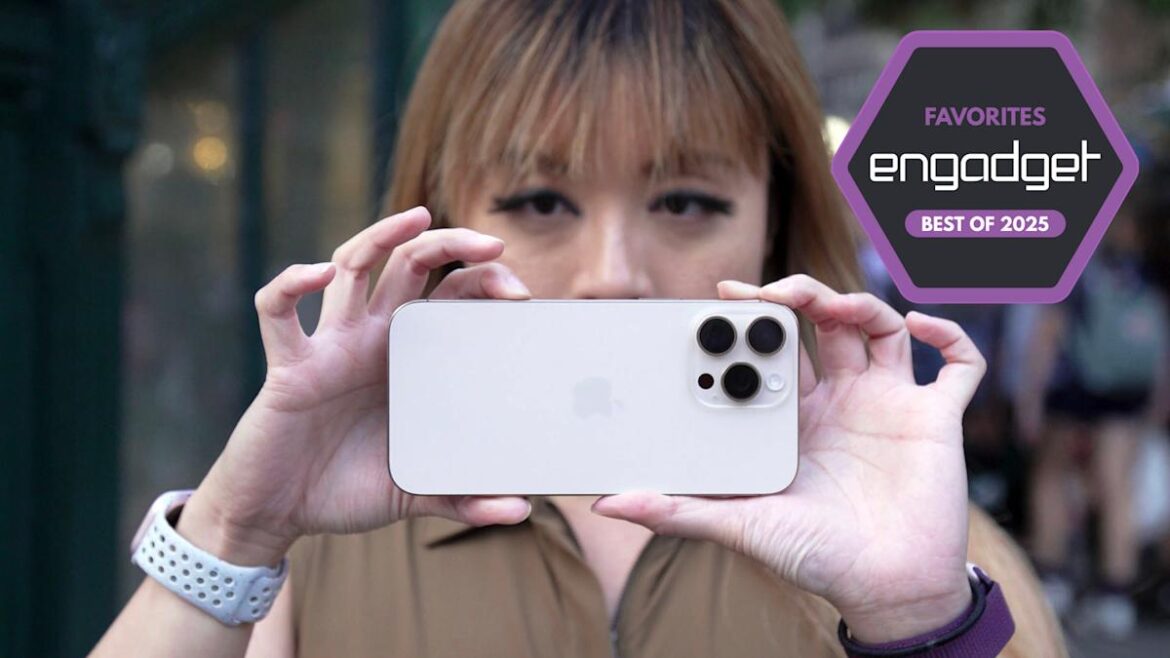
Cherlynn Low for Engadget

Original release date: September 20, 2024 | Storage capacity: 128GB, 256GB, 512GB, 1TB | Screen size: 6.3 inches | Features: A18 Pro chip, Always-on 120Hz ProMotion display, USB-C port (USB 3), Titanium frame, Camera Control button, Action button, 25W MagSafe charging, Apple Intelligence | Cameras: 48MP wide, 48MP ultrawide, 12MP 5x telephoto, 12MP front | Color options: Natural Titanium, Desert, White, Black | Dimensions: 5.89 x 2.81 x 0.32 inches | Weight: 7.03 ounces

Read our full iPhone 16 Pro and iPhone 16 Pro Max review

The iPhone 16 Pro is the iPhone we’d recommend to most people. Yes, its starting price of $999 might be steep, but a smartphone is a long-term investment. If the question is “which iPhone is most likely to keep you happy for the next three to five years,” we think the iPhone 16 Pro’s advantages over the standard iPhone 16 and 16 Plus are still meaningful enough to be worth the extra $100-200 — even if the gap isn’t as wide as it’s been in years past.

For one, the iPhone 16 Pro’s blasted titanium frame feels higher-quality than the aluminum one on the base iPhone 16. It’s a bit heavier than the standard 16 and the older iPhone 15 Pro, but it’s far from an anchor, and its slightly curved edges are pleasing to hold. It runs on the slightly faster A18 Pro chip, which doesn’t make a huge difference with everyday tasks but is more future-proof all the same, particularly if you have any interest in gaming or content creation. And while every iPhone 16 has a USB-C charging port, the Pro models support faster data transfer speeds (provided you have the right cable).

The most prominent upgrade is the display. While the OLED screens on the iPhone 16 Pro and standard iPhone 16 are equally sharp and bright, the former’s is more spacious at 6.3 inches (instead of 6.1 inches), despite the phone itself only being 0.08 inches taller and 0.02 inches thicker. This is mainly due to the Pro’s thinner bezels, which grant you more room for streaming videos and reading web pages in a device that isn’t significantly more cumbersome to hold.  

On top of that, the Pro’s screen has an adaptive refresh rate up to 120Hz, which can make scrolling web pages, gaming and streaming video noticeably smoother. Some will tell you that the average person doesn’t need this, and it’s true that not everything plays at 120Hz. But using a smartphone is nothing if not interacting with a small screen, and once you’ve seen a faster refresh rate in action, it is difficult to give up.

It’s a frustrating situation: You can get a budget Android phone with a 120Hz display for around $300, yet Apple continues to use “ProMotion” as a way to upsell people from devices that already cost hundreds more. Nevertheless, our job is to tell you what’s best — and the Pro’s screen is simply more modern. It’s also an always-on display, unlike the panels on the iPhone 16 and iPhone 16 Plus, so you can view your notifications at a glance without having to physically touch the device.

Another step up is the camera system. The iPhone 16 Pro has a trio of rear cameras: a 48-megapixel main camera, a 48MP ultrawide shooter and a 12MP telephoto camera. That last one is the biggie, as the regular iPhone 16 lacks a dedicated telephoto lens entirely. Beyond that, the Pro’s main camera has a larger sensor, so it’s a bit better in low-light environments, plus it supports portrait mode at night. You can take sharper macro shots for close-ups, and there are other enthusiast features like the ability to shoot ProRAW or record 4K Dolby Vision and ProRes video up to 120 frames per second. 

If none of this jargon means anything to you, know the regular iPhone 16 and iPhone 16 Plus are still great point-and-shoot cameras. Those devices can now take macro photos as well, plus they have the same upgraded Photographic Styles feature that can help touch up shots you may find overprocessed. They also share the Camera Control button for quickly (if sometimes awkwardly) accessing the camera app, adjusting settings and snapping pics. All that said, the 16 Pro is better, especially if you take your photos with a little more intent.

The Pro gets slightly better battery life as well, though it’s not the longest-lasting smartphone we’ve tested. Apple rates it at up to 27 hours of video playback, up from 22 hours with the standard iPhone 16, but both devices will likely need a top-up before you go to bed. The base model’s battery is easier to replace, too, which is aggravating for Pro owners given the higher price. 

Apple is very bluntly selling each iPhone 16 on how well they’ll work with its new “Apple Intelligence” AI features, but you shouldn’t base any purchasing decisions on that functionality right now. As of this writing, the tricks include a marginally more robust Siri, ChatGPT integration, email and notification summaries, writing assistance and image generation tools, a Clean Up feature that can remove unwanted objects from photos (much like Google’s Magic Eraser) and a “Genmoji” custom emoji maker, among others. More updates will arrive over time. 

Some of these AI features can be useful at points; other times… not so much. Little about them will truly change the way you use a smartphone today, and whether anyone really needs them to write a paragraph-long email or read a brief article is up for debate (to put it charitably). For now, it might be best to view Apple Intelligence as an intriguing first step toward a future that may or may not be realized down the road.

Pros

  • Powerful performance
  • Excellent 120Hz display
  • Premium titanium design
  • Fast camera with high quality video capture
  • Photographic Styles are effective and pretty

Cons

  • Costs $200 more than iPhone 16
  • Shorter battery life than iPhone 16 Pro Max
  • Camera Control button can be finicky

$999 at Apple

Brian Oh for Engadget

Original release date: September 20, 2024 | Storage capacity: 256GB, 512GB, 1TB | Screen size: 6.9 inches | Features: A18 Pro chip, Always-on 120Hz ProMotion display, USB-C port (USB 3), Titanium frame, Camera Control, Action button, 25W MagSafe charging, Apple Intelligence | Cameras: 48MP wide, 48MP ultrawide, 12MP 5x telephoto, 12MP front | Color options: Natural Titanium, Desert, White, Black | Dimensions: 6.42 x 3.06 x 0.32 inches | Weight: 7.99 ounces

Do you want a larger device than the iPhone 16 Pro? Are you willing to trade pocketability for longer battery life? Are you cool with spending at least $1,199 on a smartphone? If your answer to those questions is “yes,” skip the 16 Pro and get the iPhone 16 Pro Max instead.

It has all the same benefits of our top pick, but with a roomier 6.9-inch display and the longest-lasting battery of any iPhone. It can last closer to two days per charge, whereas the smaller Pro is more likely to tap out around one day. It also starts with 256GB of storage, which doubles that of the Pro and helps justify the increased cost at least somewhat.

The downside is that it’s a tank. The iPhone 15 Pro Max wasn’t exactly tiny, and this latest model is slightly taller and wider, so you’ll probably need two hands to operate it comfortably if your mitts aren’t on the larger side. Ultimately, we’re assuming that most people would prefer the more hand- and pocket-friendly size of the regular 6.3-inch Pro, even if it means sacrificing a half-day or more of battery life. That’s an easier call to make now that there’s no difference between the two phones’ camera setups. But if you just want the biggest beast of an iPhone, the 16 Pro Max is it.

Pros

  • Long-lasting battery
  • Powerful performance
  • Great cameras with minimal shutter lag
  • Excellent 120Hz display
  • Premium titanium design

Cons

  • Most expensive iPhone
  • Might be too large for some
  • Camera Control button can be finicky

$1,199 at Apple

Brian Oh for Engadget

Original release date: February 28, 2025 | Storage capacity: 128GB, 256GB, 512GB | Screen size: 6.1 inches | Features: A18 chip (4-core GPU), 60Hz display, USB-C port (USB 2), Aluminum frame, Action button, 7.5W Qi wireless charging, Apple Intelligence | Cameras: 48MP rear, 12MP front | Color options: White, Black | Dimensions: 5.78 x 2.82 x 0.31 inches | Weight: 5.88 ounces

Read our full iPhone 16e review

Here’s the reality: There’s no such thing as a true budget iPhone in 2025. The $429 iPhone SE was the closest thing Apple had to a value-oriented model coming into the year, but it was officially discontinued in February, and its severely outdated design made it difficult to recommend long before that. The new iPhone 16e is the SE’s ostensible replacement, but it costs $599, well above what anyone could call “affordable” when there are so many genuinely decent Android phones that sell for hundreds of dollars less.

So when we recommend the iPhone 16e in this spot, think of it less like a budget pick and more like “the cheapest competent iPhone you can reliably buy.” It’s easy to see how it could be better, but it still gets you most of what makes the iPhone experience worthwhile. It looks and feels much more substantial than the old iPhone SE, with a larger and more vivid 6.1-inch OLED display, cleaner lines and flat aluminum edges. Its A18 chip is nearly the same as the one in the standard iPhone 16, just with one fewer GPU core; either way, it’s powerful enough to run Apple Intelligence and most games fine. Its battery life is fantastic, with an even higher video playback rating (26 hours) than the base iPhone 16. It has a USB-C port, Face ID and the programmable Action button. Most importantly, it’s the least expensive route into iMessage, Apple Pay, FaceTime, AirPlay and all the other iOS perks locked in Apple’s walled garden, for better or worse.

However, the standard iPhone 16 does bring meaningful upgrades for $200 more. The main one is a better camera setup, as it has a second, 12MP ultrawide lens and a larger main sensor with better image stabilization. The 16e’s single-camera system is still perfectly fine for most situations, but night shots look softer, portraits are a bit blurrier and there’s no macro mode. Annoyingly, the iPhone 16e also lacks MagSafe, locking it out of a host of useful accessories, and it’s limited to slow 7.5W wireless charging. There’s no ultra-wideband chip to more precisely locate AirTags, and the standard iPhone 16’s display can get brighter. (Both are stuck at 60Hz, though.) That screen also has the Dynamic Island, which makes it easier to check timers, Uber ETAs, sports scores and the like at a glance. The 16e, by comparison, has the static “notch” from older iPhones. The standard 16 is also available in more colors, whereas the 16e only comes in a more basic black or white.

In many ways, the iPhone 16e feels like it was designed backwards to make the regular iPhone 16 look like a better value. Nevertheless, if you can afford an iPhone 16 or 16 Plus but can’t spend another $200 or $300 for a 16 Pro or 16 Pro Max, you should still get one of the base models over the 16e.

Really, bargain hunters should look to the refurbished market for discounts on older iPhones first. If you can find an iPhone 15 from a reputable seller for $100+ less than the 16e, that’d be ideal, as it offers many of the 16’s core upgrades and anything older won’t have a USB-C port. If you see an iPhone 15 Pro around the same price, it’s no contest — that one is better than the 16e pretty much across the board. But even a refurbished 15 is unlikely to be all that cheap, and every older iPhone will inevitably lose update support sooner. Still, that might not matter so much if you just want an Apple phone for basic iOS things and can find an acceptable price-to-storage ratio. Taking advantage of trade-in deals or, to a lesser extent, monthly installment plans that lower upfront costs seems especially prudent these days as well. 

As it stands now, the lack of a competitive budget model in the iPhone lineup is disappointing, and it appears that won’t change anytime soon. Apple will be Apple. But if you just want to walk into an Apple store and buy an iPhone that works, the 16e is fine enough, even if it’s not a slam-dunk value.

Pros

  • Solid performance
  • Long battery life
  • Clean, durable design
  • Bright, vibrant OLED display

Cons

  • 60Hz display
  • Only one rear camera
  • No MagSafe and slow wireless charging
  • Expensive compared to previous iPhone SE

$599 at Apple

The rest of Apple’s iPhone lineup in 2025

The iPhone 16.

(Billy Steele for Engadget)

Apple iPhone 16 and iPhone 16 Plus

The iPhone 16 and 16 Plus have made genuine improvements over their predecessors and generally feel more “Pro-like” than they have in years past. They also come in a range of vibrant colors. If the iPhone 16 Pro or 16 Pro Max are just too pricey, especially if you want extra storage space, they’re fantastic compromises. Still, they are compromises. If you can afford it, the Pro should hold up a bit better over time.

Apple iPhone 15 and iPhone 15 Plus

The iPhone 15 and 6.7-inch iPhone 15 Plus still get you many key upgrades over the iPhone 16e, including a superior two-camera system, a brighter display, MagSafe and the Dynamic Island. The 15 Plus is particularly appealing as the most affordable big-screen iPhone in Apple’s current lineup. It has excellent battery performance as well.

At $699 or $799, though, both phones are priced in something of a no man’s land. Most people who care about ultrawide cameras and MagSafe support should just spend another $100 for the iPhone 16 or 16 Plus, which add AI features, a slightly improved ultrawide lens with macro support, an extra hour or two of battery life, faster wireless charging (25W vs. 15W), a quicker processor, more RAM, the Action button and the Camera Control button.

Those who aren’t as particular about specs, meanwhile, are probably happy to save an extra $100 on the iPhone 16e, which is still better equipped for the long-term thanks to its faster chip and Apple Intelligence support. As a result, the 15 and 15 Plus will probably make the most sense if you can find a good price on a refurbished model.

iPhone FAQs

When is the best time of year to buy an iPhone?

The best time to buy an iPhone, or really any product, is whenever you need one. But if you want to maximize how long your iPhone is considered “current,” plan to upgrade in late September. Apple almost always introduces its new core models around then. SE and “e” iPhones, meanwhile, have arrived between February and April, but those aren’t guaranteed annual releases.

Cash discounts on new unlocked iPhones are rare, so there usually isn’t much reason to wait for a deal before buying (as is often the case with Samsung or Google phones). Carriers will run their own sales, but those typically involve locking you into years-long service plans. The exception would be if you specifically want an older iPhone, since Apple typically cuts the price of its last-gen devices by $100 or more when it introduces a new model. So, for instance, if you know you won’t care about the inevitable iPhone 17’s upgrades, you could wait until that device is announced and get the iPhone 16 for a little cheaper.

How long does an iPhone last?

This depends on the person and how they define “last.” If we had to give a broad estimate, we’d say most iPhone users keep their device between two and four years. If you’re particularly sensitive to performance and camera improvements, you might want to upgrade on the earlier side of that timeline. If you’re not as picky, you could hold out for even longer — though you’ll likely want to get a battery replacement sometime around the three- or four-year mark (or whenever you notice your battery life has severely degraded).

Software support shouldn’t be a problem regardless: Apple is renowned for keeping its devices up-to-date long-term, and the current version of iOS 18 is available on iPhones dating back to 2018. (Though the forthcoming iOS 26 update will push the cutoff line up a year.) Most of those older phones don’t support Apple Intelligence, so there isn’t total parity, but that’s not a big loss in the grand scheme of things.

How do I know how old my iPhone is?

Go to your iPhone’s Settings, then tap General > About. You should see the Model Name right near the top. You can also tap the Model Number below that, then verify the resulting four-digit code on Apple’s identification page to further confirm.

If you don’t want to use software, for whatever reason, you can also find your iPhone’s model number printed within its USB-C or Lightning port, if the device lacks a SIM tray. For older devices, you can alternatively find that number within the SIM slot or — if you’re still hanging onto an iPhone 7 or older — right on the back of the handset.

Recent updates

August 2025: We’ve taken another pass to ensure our advice is still up-to-date and noted that we expect to Apple to launch new phones soon in September.

June 2025: We’ve lightly edited this guide for clarity and added a few common FAQs. Our picks remain unchanged.

February 2025: The new iPhone 16e replaces the iPhone 15 and iPhone 15 Plus as our “budget” pick. We’ve also removed our notes on the iPhone 14, iPhone 14 Plus, and iPhone SE (3rd generation), as each has been formally discontinued.

January 2025: We’ve made a few minor edits for clarity and ensured our recommendations are still up to date.

December 2024: We’ve made a few edits to reflect the release of Apple Intelligence, though our picks remain the same.


Source link

August 26, 2025 0 comments
0 FacebookTwitterPinterestEmail
Lego Super Mario World Pixel Art Model Gets Rare Price Cut At Amazon And Walmart
Game Updates

Lego Super Mario World Pixel Art Model Gets Rare Price Cut At Amazon And Walmart

by admin August 24, 2025


The deal on Lego’s Super Mario World building set just got a little bit better. The rarely discounted 1,215-piece pixel art display model of Mario and Yoshi is on sale for $117 (was $130) at Amazon and Walmart. The $117 price is active as of August 24; we originally published this article on August 22 with a $119 deal price. That was the first-ever discount on the Lego Nintendo set for adults in the US. Lego Super Mario World: Mario & Yoshi had maintained its $130 MSRP since its debut last October.

$117 (was $130)

Lego Super Mario World: Mario and Yoshi is a 1,215-piece set that authentically captures the pixelated aesthetic from the Super Nintendo era. It’s a fun build to piece together and a fitting display piece for all Super Mario fans, but especially those with a fondness for the 16-bit character designs.

The completed model is 15.5 x 10 x 4 inches and features several interactive components. There’s a dial behind Yoshi’s head that extends his tongue. The crank on the side of the base creates a more elaborate animation. Yoshi’s legs move to make it appear as if he is running. Adding to the illusion is the figure’s quick bouncing motion. Yoshi’s head inches forward and back, and Mario’s cape sways gently, just as it does in the game.

It also has an Action Tag, so if you own one of the Adventures with Lego Super Mario starter courses, the Interactive figures (Mario, Luigi, or Peach) will react.

Lego did a wonderful job making the instructions easy to follow. I used a combination of the physical instruction booklet and the Lego Builder app on iPad. The square pieces used to create the “pixel art” are numbered in the booklet, which was extremely helpful for me as someone with colorblindness.

Though technically part of Lego’s 18-plus “for adults” line, kids who have assembled sets in the 1,000-piece probably won’t have any issues.

Lego Super Mario World: Mario & Yoshi is one of only eight Lego Nintendo display models designed for adults. Earlier this year, Lego launched a 1,972-piece Mario Kart display model for $170. The elaborate build features Mario’s iconic red kart and the first realistic Lego replica of the character’s modern 3D look.

On October 1, exactly one year after Lego Super Mario World: Mario & Yoshi’s launch, Lego’s highly anticipated Game Boy replica will be available at major retailers and the Lego Store. The 421-piece display set only costs $60 and includes two buildable cartridges, three lenticular screens, multiple display stands, and several interactive features. Check out our Lego Game Boy preorder guide for more details, and keep in mind multiple retailers are sold out already.

Lego Nintendo Building Sets for Adults

The most affordable Lego Nintendo display model is the 540-piece Piranha Plant, which you can find on sale at Amazon and Walmart for just $48 (was $60).


Source link

August 24, 2025 0 comments
0 FacebookTwitterPinterestEmail
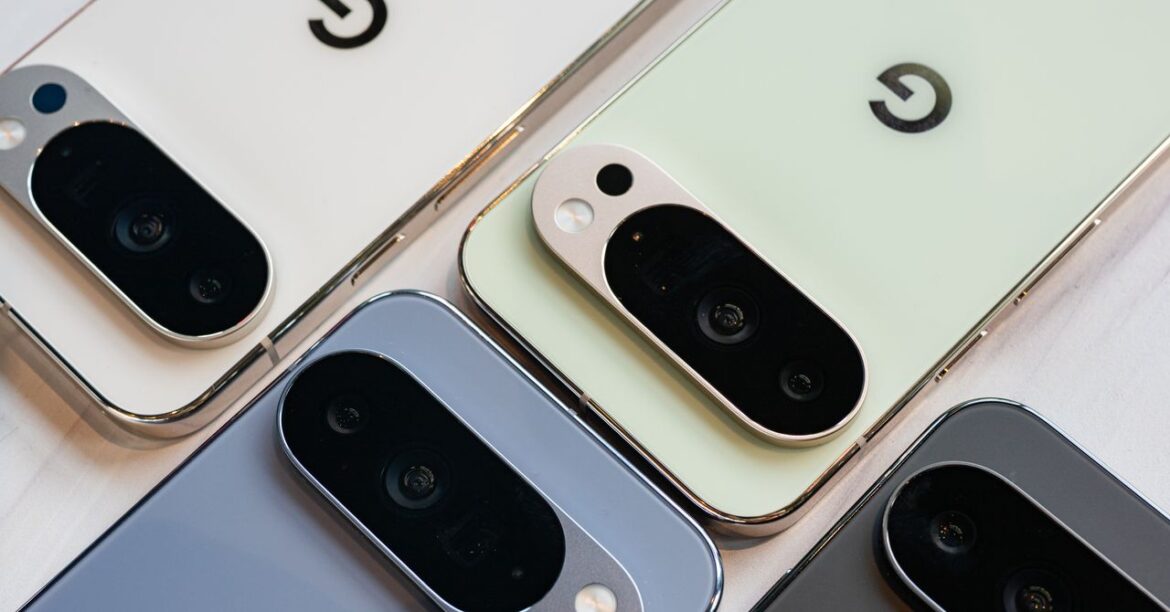
The Best Google Pixel Phones of 2025, Tested and Reviewed: Which Model to Buy, Cases and Accessories, Feature Drops
Product Reviews

The Best Google Pixel Phones of 2025, Tested and Reviewed: Which Model to Buy, Cases and Accessories, Feature Drops

by admin August 22, 2025


You get all the same software features as the Pixel 9 series, but there are some extras to take advantage of all the screens. Made You Look, for example, plays a cute animation on the outer screen to make sure your kiddo stares at it when you’re trying to capture a photo. When you’re on a Google Meet call, you can now utilize all the screens so that everyone around you can see the person you’re speaking with, and that means using all the cameras too, so the person on the other end doesn’t have to see just your face.

At the end of the day, this is still a $1,799 smartphone, and that’s just too high a price to pay. But if you have the cash and love folding phones, especially when paired with a Pixel’s smarts and camera prowess, this is one of the best options available.

How Long Is Your Pixel Supported?

AccordionItemContainerButton

The Pixel 10 series, Pixel 9 series, Pixel 8 series, Pixel 9a, and Pixel 8a will get seven years of Android OS upgrades and security updates. The 2023 Pixel 7a will receive three years of Android OS upgrades and five years of security updates from the date of launch, the same as older Pixels. Google has a page you can check to see exactly what month your Pixel phone will stop receiving updates. Security updates reduce the risk of malware, keep your phone bug-free, and make it more secure. Android version updates introduce new features—cosmetic and functional—that improve the OS as a whole.

Pixel phones also happen to be the first to receive any kind of Android update, so as soon as Google releases a new version, like Android 16, you can download it immediately by heading to Settings > System > System Update > Check for Update. You can also test beta versions of Android, but you’ll need to enroll your device. (Make sure to back up your phone first!) Pixels are also privy to the feature drops Google issues every few months, which include features from newer Pixels coming to older models and brand-new features for the latest devices.

AccordionItemContainerButton

Google Pixelsnap Charger With Stand

AccordionItemContainerButton

There are a few other Pixel phones worth considering if you don’t want any of the above choices. The Pixel 8 and Pixel 8 Pro (7/10, WIRED Recommends) are available through official channels and third-party retailers (until supplies last). The key is to not pay more than $500 or $600 for either of them; otherwise, you may as well put that money toward the Pixel 9 or Pixel 10 series.

I do not recommend you buy any older Pixel devices. Several Pixel A-series phones have been put under a battery performance program to mitigate the risk of overheating or swelling batteries. These software updates have crippled the battery life on those phones, and Google has provided customers with battery replacement options or Google Store credit for a new Pixel phone. These potential issues mean it’s just not worth the risk of buying a Pixel 7a or Pixel 6a. The Pixel 8a (8/10, WIRED Recommends) doesn’t seem to show problems yet, but I’d still throw caution to the wind.

Pixel A-Series Battery Issues

AccordionItemContainerButton

In 2025, some Google Pixel 4a and Pixel 6a owners have received mandatory updates that purposefully degrade the performance of the battery to prevent overheating. Your phone may have been working fine before, but Google issued these updates as a preventative measure, and not every device was affected. Similarly, some Pixel 7a devices may encounter battery swelling issues.

If your phone has been affected, you have two options. You can get a free battery replacement—Google has a registration page for the Pixel 4a, Pixel 6a, and Pixel 7a. If that isn’t going to work for you, you can get Google Store credit for the Pixel 4a and Pixel 6a to put toward a new Pixel phone.

These issues seem to have only affected some batteries in the A-series phones, suggesting it’s likely a supplier issue. What about the newer Pixel 9a? Here’s a statement a Google spokesperson provided to WIRED: “Google continuously improves Pixel testing based on user feedback and thoroughly investigates reported incidents for all components, including batteries. With Pixel 9a, we delivered the largest and longest-lasting battery of any A-series yet. We’ve been encouraged by its reception so far and are confident in the phone’s longevity and durability.”

Ideally, this battery issue has been rectified in the latest model, but we’ll be monitoring it over the next few years.

What Does Pixel Care+ Include?

AccordionItemContainerButton

When you purchase a Pixel from Google, you’ll see the option to add Pixel Care+ for protection. It’s only available in the US through the Google Store and Google Fi. The monthly option can run for up to 60 months, whereas the fixed pricing is for a 2-year term. Here’s what you get.

Pixel Care+ starts at $9 per month or $179 and includes unlimited accidental damage protection, $0 screen and battery repairs, replacements that ship in a day, and priority support from Pixel experts. That pricing is for the Pixel 10, and it goes up for the pricier devices. For example, the Pixel 10 Pro will cost $13 per month, or $239 for the 2-year term. There’s no Pixel Care+ option for the Pixel 9a.

Pixel Care+ with Loss and Theft starts at $10 per month or $199 and includes the same protections as mentioned above but includes two claims of loss and theft every 12 months. Weirdly, Loss and Theft coverage is not available in New York state.

You Can DeGoogle Your Pixel Phone

AccordionItemContainerButton

Love Google’s Pixel phones but want to get away from using Google services? It’s a little ironic, but you can actually use a different operating system with the Pixel instead of the built-in Android. We’ve tested and really like /e/OS, a privacy-first operating system that’s based on the Android Open Source Project. While you can install it yourself, it requires a bit of technical know-how, you can buy a refurbished Pixel from Murena with /e/OS installed already. If you’re interested, we have more details about /e/OS here.

The Best Pixel Cases and Accessories

I’ve written a broader guide on the Best Pixel 9 Cases and Accessories here, but here are a few selections for your perusal. We’ll be testing cases for the Pixel 10 series soon.

Official Google Case

Photograph: Julian Chokkattu

This silicone case lets you match your Pixel phone’s color. It’s durable and nice to touch, with raised edges on the front to protect the screen. It’s made with recycled plastics, and while the older cases attract lint and dust easily, this revamped case does a better job of resisting them. I also like that it keeps the back flush, so the camera bump isn’t so obvious. The Pixel 9 Pro Fold case is made of a hard-shell polycarbonate, but it’s fairly slim and lightweight compared to third-party cases I’ve tested. Access to the buttons is open, and I like how it gives you an easier way to unfold the phone.

Photograph: Julian Chokkattu

This is our favorite case overall for the Pixel 9 and Pixel 8A series. It has clicky buttons and incredibly grippy edges (hence the name). It feels robust yet fairly slim, and you can choose a snazzy design. Just know that you have to apply this “skin” to the back of the case. There’s a lot of room for error here, so be careful, and watch Dbrand’s installation video for tips. There’s MagSafe support so you can use your Pixel with MagSafe accessories, and it worked exceptionally in my testing.

Peak Design Everyday Case

Photograph: Julian Chokkattu

This is hands-down the best case if you frequently attach your Pixel to the handlebars of a bike or an electric scooter. Peak Design’s mounting system lets you magnetically affix the phone to its Universal Bike Mount ($50), and it stays put. After nearly a year of testing, I’ve yet to have a phone fall off my ride using this mounting system. It makes use of Apple’s MagSafe system, so it works with plenty of MagSafe accessories, even wireless chargers. The company also has several other magnetic accessories, like a car vent mount. The case itself is nice; I just wish the edges were raised more for better screen protection. It comes in more colors than ever.

This charging adapter is all you need to recharge your Pixel, whichever model you have. The newest high-end Pixel phones don’t come with chargers in the box, so if you don’t have any spare USB-C chargers, it’s worth picking one up. This one’s prongs fold up, so it’s great for travel too.

Dbrand Screen Protector

Photograph: Julian Chokkattu

Dbrand gives you two screen protectors in this package, and when I initially tested it, there was no application tool, so I had to freehand the installation. The current Prism 2.0 version thankfully now comes with a tool, so it should be much easier to align. You get all the other tools in the box to wipe down your phone and ensure there are no specks of dust on it before you install the protector.

Our Favorite Pixel Software Features

Pixels have many great software features, but some need to be toggled on. It can also be hard to remember that all these features exist, so here are most of the top ones.

There are some key features on Pixels that you won’t find on any other Android phone. Some of these are available only on select Pixels—the Tensor chip started with the Pixel 6, and currently, the Tensor G4 is in the Pixel 9 range. Here’s a breakdown:

Call Screen: When you get a call from an unknown number, Google Assistant will scan and flag it if it’s suspected spam or a robocall. If it’s simply a number you don’t recognize, you can have Assistant take the call. You’ll see a real-time transcription of what’s happening, so you can end the call right away if it’s a telemarketer or answer if it turns out to be a long-lost high school friend. If it’s someone important, you can give Assistant responses to recite if you’re unable to take the call—it offers up contextual replies now, too. Remember to turn it on by opening up the dialer app and heading to Settings (three dots on the top right) > Spam and Call Screen.

Wait Times.

Video: Google

Wait Times and Direct My Call: When you call a business in the phone app, you’ll see an estimated wait time until someone real picks up (it doesn’t work with every business). Google’s Direct My Call feature also transcribes the entire call and separates the menu options so you can see them without having to listen intently to the call. More recently, for some numbers, Direct My Call will cache responses so you’ll immediately see menu options without needing to wait for the automated response to go through every number. You can turn this on by going to the phone app’s Settings > Direct My Call.

Hold for Me.

Video: Google

Hold for Me: If you’ve been placed on hold with a business number, you can ask Google Assistant to take over. It will play a loud chime when the person on the other end is back. No need to listen to hold music! Toggle it on in the phone app’s Settings > Hold for Me. This feature is available on most Pixels but only works in select countries, including the US, Australia, Japan, the UK, and Canada.

Clear Calling: If you have a Pixel 7 or newer, you can turn on this feature to enhance the other caller’s voice and reduce their background noise. Head to Settings > Sound & Vibration > Clear Calling to toggle it on. It also works on Google’s Pixel Buds Pro.

Call Notes (Tensor G4 and newer; with 12-plus GB RAM): You can enable this in the dialer app by going to Settings > Call Notes and making sure the toggle is on. This doesn’t activate every time you’re on a call. Rather, you have to tap the More button when you’re on a call and tap Call Notes to start it. It more or less records the conversation (it notifies the other person that the call is being recorded), and at the end, it’ll give you a summary of important points from the call right in the call history log, such as price quotes, phone numbers, or addresses. Sometimes it gets information wrong, as the accuracy of the transcription depends on the call quality, but you can play back the entire recording yourself to double-check.

Scam Detection: This feature detects conversation patterns as you are on the phone with a suspicious number to warn you when someone is deploying a classic scam tactic. It also works in Google’s Messages app. You can turn it on by going to the phone app, then tapping the three-dot menu icon at the top right, and hitting Settings > Scam Detection.

Reverse Phone Number Lookup: Don’t recognize the phone number from an incoming call? In the call app, you can now quickly look up a number without having to manually run a search yourself.

Take a Message.

Photograph: Julian Chokkattu

Take a Message (Tensor G5): Google is revamping voicemails with Take a Message. It’s similar to transcribed voicemails, though that feature doesn’t always work and may depend on your carrier. Take a Message bypasses the standard voicemail (your normal voicemail will only kick in with missed calls when your phone is off or out of network). The caller will be told to leave a message, and this recording will be auto-transcribed, visible right in the call history of the phone app. It’ll even offer actionable steps, like adding a reminder or an event to your calendar.

Pixel VIPs: This is a new widget that gives you one-tap access to your favorite contacts. But it’s more than that. Tap on one of your contacts and you’ll see a beautifully designed page that offers quick access to call the contact and message them on various platforms. It’ll show the last messages between you two, share location, weather updates, and the time for their area, and you can add notes if you want to remember specific things. You can access this the same way you add a widget; it sits under the Contacts app.

Transcription and Translation Features

Voice Translate over phone calls.

Courtesy of Joel Chokkattu

Translated Phone Calls in Your Voice (Tensor G5): You can translate a phone call in real time, but what makes Google’s approach unique is that the company will make the translated voice sound like your own (or the person on the other end). That way, it still sounds like you’re talking to someone you know, rather than a robotic voice. No audio is recorded, and data isn’t stored (it works on-device). It’s only available for a few languages, like English, German, Japanese, and Spanish.

Live Translate.

Video: Google

Live Translate: In select messaging apps, Pixels will automatically know when someone sends a message in a language other than your default. It’ll translate it (if you wish), and you’ll be able to respond in that same language. More than 50 languages are supported, though you’ll need to download the languages you want to see translated by heading to Settings > System > Live Translate.

Live Caption: Pixels can automatically transcribe any video playing on the screen. You can quickly toggle this on by tapping one of the volume buttons and tapping on the square button below the volume slider (or head to Settings > Sound and Vibration > Live Caption). If the video is in a different language, you can even see it translated (only on Tensor-powered Pixels), though you’ll need to download one of the supported languages. It can even caption phone calls.

Assistant Voice Typing.

Video: Google


Source link

August 22, 2025 0 comments
0 FacebookTwitterPinterestEmail
Half of Artificial Intelligence robot face
Product Reviews

Microsoft’s CEO of artificial intelligence believes advocating for ‘rights, model welfare and even AI citizenship’ will become ‘a dangerous turn in AI progress’

by admin August 22, 2025


If you are familiar with AI, there’s a good chance flickers of I, Robot, Blade Runner, or even Cyberpunk 2077 flash up in your mind. That’s because the philosophy and ethics of what AI could be are more interesting than the thing that makes AI overviews give you the wrong search results.

In a recent blog post (via TechCrunch), Microsoft’s CEO of AI, Mustafa Suleyman, penned his thoughts on those advocating for conscious AI and the belief that one day, people would be advocating for its rights.

He builds on the belief that AI can embolden a specific type of psychosis. “Simply put, my central worry is that many people will start to believe in the illusion of AIs as conscious entities so strongly that they’ll soon advocate for AI rights, model welfare and even AI citizenship.” He continues, “This development will be a dangerous turn in AI progress and deserves our immediate attention.”


Related articles

For some, AI is a worrying development, partly due to how confident it is in its statements. To the layman, it’s not only always correct but always open to conversation, and this (as Suleyman’s link to Copilot suggests) can result in users deifying the “chatbot as a supreme intelligence or believe it holds cosmic answers”.

This is an understandable concern. We need only look at the recent case of a man giving himself an incredibly rare ailment after consulting ChatGPT on how to cut down his salt intake for an idea of what Suleyman is talking about.

AI’s value is precisely because it’s something so different from humans. Never tired, infinitely patient, able to process more data than a human mind ever could. This is what benefits humanity. Not an AI that claims to feel shame, jealousy, fear + so on.📝https://t.co/WsEcvNQgoC pic.twitter.com/DA9lGchjXaAugust 21, 2025

Suleyman argues AI should never replace a person, and that AI companions need “guardrails” to “ensure this amazing technology can do its job.” He elaborates that “some academics” are exploring the idea of model welfare. This is effectively the belief that we owe some moral duty to beings that have a chance of being conscious. Suleyman states, “This is both premature, and frankly dangerous.”

Suleyman says, “We need to be clear: SCAI [seemingly conscious AI] is something to avoid.” He says that SCAI would be a combination of language, empathetic personality, memory, a claim of subjective experience, a sense of self, intrinsic motivation, goal setting and planning, and autonomy.

Keep up to date with the most important stories and the best deals, as picked by the PC Gamer team.

He also argues that this will not naturally come out of these models. “It will arise only because some may engineer it, by creating and combining the aforementioned list of capabilities, largely using existing techniques, and packaging them in such a fluid way that collectively they give the impression of an SCAI.”

“Our sci-fi inspired imaginations lead us to fear that a system could—without design intent—somehow emerge the capabilities of runaway self-improvement or deception. This is an unhelpful and simplistic anthropomorphism.”

Suleyman warns, “someone in your wider circle could start going down the rabbit hole of believing their AI is a conscious digital person. This isn’t healthy for them, for society, or for those of us making these systems.”

It’s all a rather self-reflective blog post, even starting with the title: “We must build AI for people; not to be a person”. And I think this hits at some of the tension I feel around these tools. Suleyman starts his post with “I write, to think”, and this is the most relatable part of the whole post. I also write to think, and I don’t plan on letting an AI bot replace that part of me. I may have a contractual obligation not to use it, but more importantly, I want my words to be mine, no matter how good or bad they are.

Best gaming rigs 2025

All our favorite gear


Source link

August 22, 2025 0 comments
0 FacebookTwitterPinterestEmail
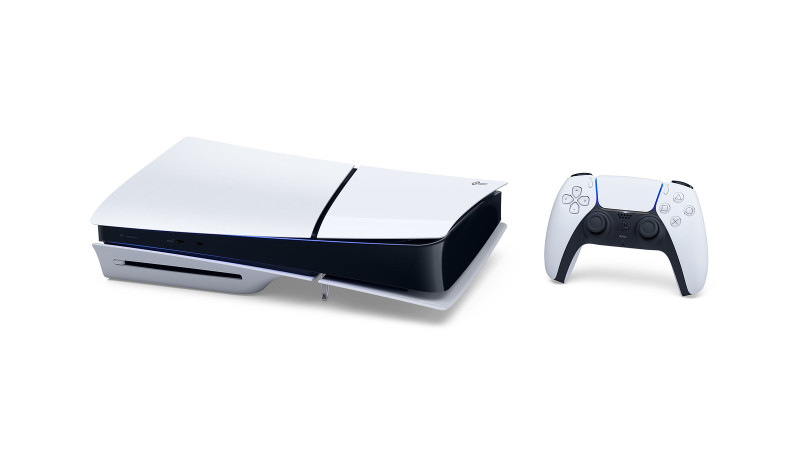
Sony Is Raising The Price Of Every PlayStation 5 Model Tomorrow, August 21
Game Updates

Sony Is Raising The Price Of Every PlayStation 5 Model Tomorrow, August 21

by admin August 20, 2025


Rising video game and console prices have frustrated consumers this year, and today, Sony is adding its flagship console to the list of products getting price hikes. In the United States, the PS5, PS5 Digital Edition, and PS5 Pro are each increasing in price by $50. 

According to a blog post from Sony Interactive Entertainment vice president of global marketing, Isabelle Tomatis, the change is due to “a challenging economic environment.” This brings the new prices for each device to the following: 

  • PlayStation 5 – $549.99
  • PlayStation 5 Digital Edition – $499.99
  • PlayStation 5 Pro – $749.99

As of today, prices remain unchanged in other countries, but many of them faced price hikes earlier this year. This news comes a few months after Sony said it was considering raising its prices in the US, but it might not affect consoles. That was, obviously, not the case. Other instances of companies increasing prices lately include Nintendo increasing Switch 2 accessory prices, and Xbox raising its console and game prices back in May. Across the board, it’s a rough time to be paying for new games and hardware.

Meanwhile, Xbox announced its new handheld’s release date today, but won’t reveal its price quite yet, citing “macro-economic conditions.”


Source link

August 20, 2025 0 comments
0 FacebookTwitterPinterestEmail
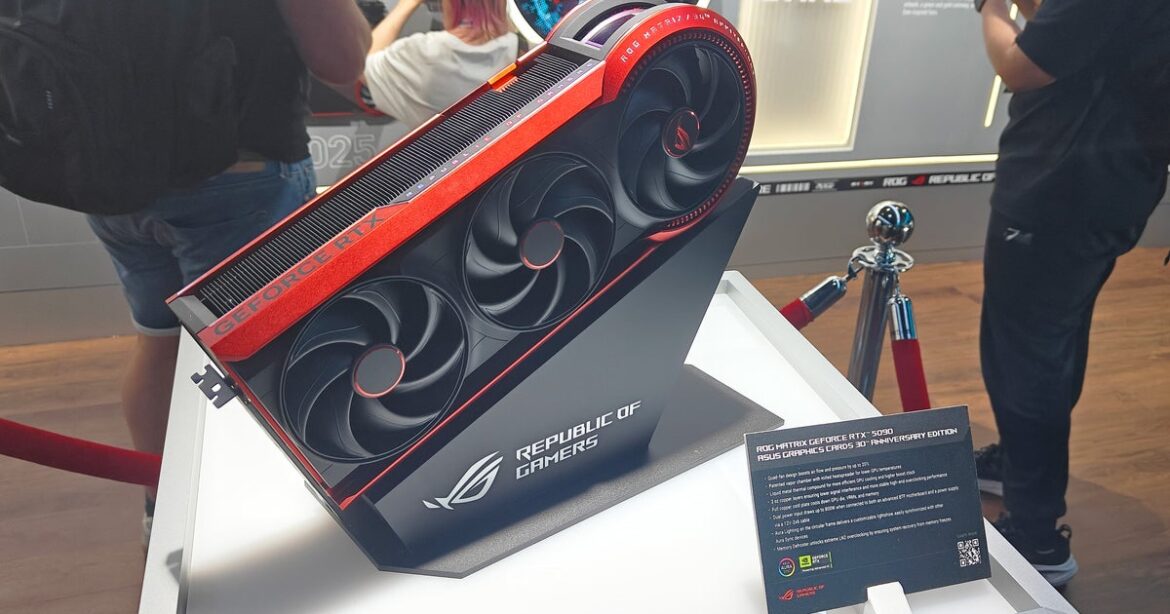
This RTX 5090 graphics card draws up to 800W and looks like a model from 2008
Game Reviews

This RTX 5090 graphics card draws up to 800W and looks like a model from 2008

by admin August 20, 2025


As well as a see-through 720Hz tandem OLED gaming monitor, Asus unveiled a retro-looking graphics card that draws up to 800W – a massive 200W jump over the most powerful RTX 5090 models and 215W over the base spec. A single 16-pin power cable maxes out at 600W, so the ROG Matrix uses both the proprietary BTF connector built into Asus motherboards and the regular 16-pin power input. That should make this the most powerful consumer graphics card in the world by a huge margin, and just how it’s been designed is fascinating.

In short, Asus wanted to pay homage to their past designs with a 30th anniversary edition that goes well beyond the standard “take your standard GPU and paint it differently” method of creating special models. That accounts for the unusual circular frame of the far end, which refers back to a card Asus launched in 2008, but inside there are also manufacturing and design elements from later models: 3mm copper PCBs, vapour chamber cooling, liquid metal, four fans and so on.

Image credit: Eurogamer

Perhaps most critically for the super-wealthy slash overclocking audience the limited edition card is intended for, there are sensors on every wire of each power input to ensure that none is drawing too much power – after all, with 800W on tap, this is effectively uncharted territory for a “stock” graphics card.

There’s even a sensor to check the angle of the card, alerting you if it’s starting to sag. Graphics card enthusiasts actually spotting the sensor in other high-end Asus models a while back, and now that functionality is actually going to be surface in Asus’ software.


To see this content please enable targeting cookies.

Manage cookie settings

So with 33 percent extra power, you’re going to get 33 percent extra performance, right? RTX 5090 Ti, more or less! Well, no. Asus say that the graphics card only delivers around 10 percent higher frame-rates, even at a rated boost clock of 2730MHz – versus 2407MHz for a base 5090. It’s not clear if there are any memory clock upgrades on offer either, but the GDDR7 on Maxwell does tend to overclock without many difficulties.

Of course, an 800W rating far exceeds this generation’s power sweet spot – and presumably even with unlimited power, you’d still run into some serious issues keeping the die, tiny mainboard and VRAM/power components cool under an 800W load.

It does kind of suggest that this is about the maximum we could expect from a proper RTX 5090 Ti though, which is perhaps why Nvidia hasn’t shown any signs of releasing one.

Even if you do have deep pockets, expect the ROG Matrix 5090 to be a real challenge to find. Asus say that only 1000 units will be made, though you can enter the chance to win one on their Gamescom 2025 site. Pricing also hasn’t been announced, but presumably is well into the middle four figures given that a dead standard 5090 costs $2000 or more, even so many months after launch.

More numerous – and affordable – will be their special edition 5080 models, which include a Hatsune Miku edition (part of a distractingly large number of branded peripherals and components) and a Noctua edition with the Austrian firm’s famous fans.

Either way, I’m happy the Matrix 5090 exists, pushing out the state of the art to ludicrous excess. It’ll be fascinating to see what overclockers manage to accomplish with it – bring on the liquid nitrogen! – and the retro design really appeals. I just hope that this GPU doesn’t portend the arrival of a 800W-rated RTX 6090.

Disclosure: Asus provided flights and accommodation in Cologne for Gamescom.


Source link

August 20, 2025 0 comments
0 FacebookTwitterPinterestEmail
  • 1
  • 2
  • 3

Categories

  • Crypto Trends (1,098)
  • Esports (800)
  • Game Reviews (772)
  • Game Updates (906)
  • GameFi Guides (1,058)
  • Gaming Gear (960)
  • NFT Gaming (1,079)
  • Product Reviews (960)

Recent Posts

  • This 5-Star Dell Laptop Bundle (64GB RAM, 2TB SSD) Sees 72% Cut, From Above MacBook Pricing to Practically a Steal
  • Blue Protocol: Star Resonance is finally out in the west and off to a strong start on Steam, but was the MMORPG worth the wait?
  • How to Unblock OpenAI’s Sora 2 If You’re Outside the US and Canada
  • Final Fantasy 7 Remake and Rebirth finally available as physical double pack on PS5
  • The 10 Most Valuable Cards

Recent Posts

  • This 5-Star Dell Laptop Bundle (64GB RAM, 2TB SSD) Sees 72% Cut, From Above MacBook Pricing to Practically a Steal

    October 10, 2025
  • Blue Protocol: Star Resonance is finally out in the west and off to a strong start on Steam, but was the MMORPG worth the wait?

    October 10, 2025
  • How to Unblock OpenAI’s Sora 2 If You’re Outside the US and Canada

    October 10, 2025
  • Final Fantasy 7 Remake and Rebirth finally available as physical double pack on PS5

    October 10, 2025
  • The 10 Most Valuable Cards

    October 10, 2025

Newsletter

About me

Welcome to Laughinghyena.io, your ultimate destination for the latest in blockchain gaming and gaming products. We’re passionate about the future of gaming, where decentralized technology empowers players to own, trade, and thrive in virtual worlds.

Recent Posts

  • This 5-Star Dell Laptop Bundle (64GB RAM, 2TB SSD) Sees 72% Cut, From Above MacBook Pricing to Practically a Steal

    October 10, 2025
  • Blue Protocol: Star Resonance is finally out in the west and off to a strong start on Steam, but was the MMORPG worth the wait?

    October 10, 2025

Newsletter

@2025 laughinghyena- All Right Reserved. Designed and Developed by Pro


Back To Top
Laughing Hyena
  • Home
  • Hyena Games
  • Esports
  • NFT Gaming
  • Crypto Trends
  • Game Reviews
  • Game Updates
  • GameFi Guides
  • Shop

Shopping Cart

Close

No products in the cart.

Close