Laughing Hyena
  • Home
  • Hyena Games
  • Esports
  • NFT Gaming
  • Crypto Trends
  • Game Reviews
  • Game Updates
  • GameFi Guides
  • Shop
Tag:

Microsofts

Half of Artificial Intelligence robot face
Product Reviews

Microsoft’s CEO of artificial intelligence believes advocating for ‘rights, model welfare and even AI citizenship’ will become ‘a dangerous turn in AI progress’

by admin August 22, 2025


If you are familiar with AI, there’s a good chance flickers of I, Robot, Blade Runner, or even Cyberpunk 2077 flash up in your mind. That’s because the philosophy and ethics of what AI could be are more interesting than the thing that makes AI overviews give you the wrong search results.

In a recent blog post (via TechCrunch), Microsoft’s CEO of AI, Mustafa Suleyman, penned his thoughts on those advocating for conscious AI and the belief that one day, people would be advocating for its rights.

He builds on the belief that AI can embolden a specific type of psychosis. “Simply put, my central worry is that many people will start to believe in the illusion of AIs as conscious entities so strongly that they’ll soon advocate for AI rights, model welfare and even AI citizenship.” He continues, “This development will be a dangerous turn in AI progress and deserves our immediate attention.”


Related articles

For some, AI is a worrying development, partly due to how confident it is in its statements. To the layman, it’s not only always correct but always open to conversation, and this (as Suleyman’s link to Copilot suggests) can result in users deifying the “chatbot as a supreme intelligence or believe it holds cosmic answers”.

This is an understandable concern. We need only look at the recent case of a man giving himself an incredibly rare ailment after consulting ChatGPT on how to cut down his salt intake for an idea of what Suleyman is talking about.

AI’s value is precisely because it’s something so different from humans. Never tired, infinitely patient, able to process more data than a human mind ever could. This is what benefits humanity. Not an AI that claims to feel shame, jealousy, fear + so on.📝https://t.co/WsEcvNQgoC pic.twitter.com/DA9lGchjXaAugust 21, 2025

Suleyman argues AI should never replace a person, and that AI companions need “guardrails” to “ensure this amazing technology can do its job.” He elaborates that “some academics” are exploring the idea of model welfare. This is effectively the belief that we owe some moral duty to beings that have a chance of being conscious. Suleyman states, “This is both premature, and frankly dangerous.”

Suleyman says, “We need to be clear: SCAI [seemingly conscious AI] is something to avoid.” He says that SCAI would be a combination of language, empathetic personality, memory, a claim of subjective experience, a sense of self, intrinsic motivation, goal setting and planning, and autonomy.

Keep up to date with the most important stories and the best deals, as picked by the PC Gamer team.

He also argues that this will not naturally come out of these models. “It will arise only because some may engineer it, by creating and combining the aforementioned list of capabilities, largely using existing techniques, and packaging them in such a fluid way that collectively they give the impression of an SCAI.”

“Our sci-fi inspired imaginations lead us to fear that a system could—without design intent—somehow emerge the capabilities of runaway self-improvement or deception. This is an unhelpful and simplistic anthropomorphism.”

Suleyman warns, “someone in your wider circle could start going down the rabbit hole of believing their AI is a conscious digital person. This isn’t healthy for them, for society, or for those of us making these systems.”

It’s all a rather self-reflective blog post, even starting with the title: “We must build AI for people; not to be a person”. And I think this hits at some of the tension I feel around these tools. Suleyman starts his post with “I write, to think”, and this is the most relatable part of the whole post. I also write to think, and I don’t plan on letting an AI bot replace that part of me. I may have a contractual obligation not to use it, but more importantly, I want my words to be mine, no matter how good or bad they are.

Best gaming rigs 2025

All our favorite gear


Source link
August 22, 2025 0 comments
0 FacebookTwitterPinterestEmail
Microsoft’s Xbox handheld is a good first step toward a Windows gaming OS
Product Reviews

Microsoft’s Xbox handheld is a good first step toward a Windows gaming OS

by admin August 21, 2025


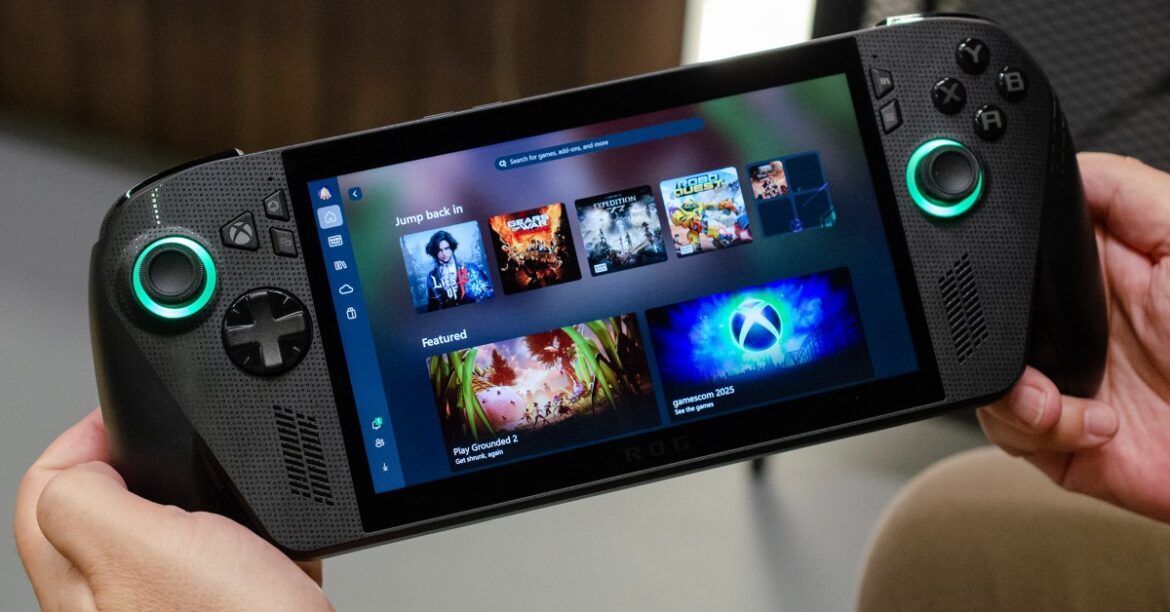
The first thing I did when I got my hands on the Xbox Ally was reboot it. I wanted to see exactly how Microsoft manages to hide Windows beneath the Xbox interface that’s debuting on these handheld devices.

After a short startup, I was met with the standard Windows login prompt. But I could use the controller to input the PIN code, an immediate improvement over what’s available right now. And as soon as Windows 11 loaded up, the interface immediately disappeared. The Xbox PC app took over and went full-screen — and for the most part, I didn’t have to leave.

I’ve spent enough time with Microsoft and Asus’ Xbox Ally devices this week to get a better understanding of how Windows and Xbox are moving closer together. Microsoft has created what it calls an Xbox full-screen experience for these new handheld devices, which essentially takes over for Windows and hides the OS away. It’s exactly what I’ve been wanting for Windows-powered handheld gaming PCs for years now, but it still feels like a small first step in a grand next-gen Xbox plan.

The Game Bar drives a lot of Microsoft’s Xbox full-screen experience.

The main interface on the Xbox Ally is similar to what can be found in the current Xbox app on Windows 11, Microsoft’s Steam competitor on PC. This app integrates with the Game Bar, Microsoft’s PC gaming overlay, to form this full-screen Xbox experience. Just like an Xbox console, you activate this Game Bar from a single tap of the Xbox button, and it’s what keeps you far away from the complexities of the Windows desktop hidden underneath.

Microsoft doesn’t load the desktop wallpaper, the taskbar, or a bunch of other processes that you don’t need for gaming. It’s essentially not loading the Explorer shell and saving around 2GB of memory by suppressing all the unnecessary parts of a typical Windows 11 installation. It’s surprisingly easy to get back to a regular Windows experience on these Xbox Ally devices, though.

You can exit out of the Xbox full-screen experience through the Game Bar or hold the Xbox button down to access the task switcher and a shortcut to the Windows desktop. Microsoft warns that you’re exiting to the Windows desktop and that you should use touch or a mouse and keyboard “for the best experience.”

The new Xbox task switcher lets you get to the Windows desktop quickly.

The Windows desktop experience is exactly the same as any regular handheld, and the Xbox team hasn’t done much additional work here to improve this side of the Xbox Ally. You’ll still have to use this part of the device to install and configure Windows apps like Discord and Steam, but once they’re up and running, you can mostly stay within the handheld-optimized confines of the Xbox full-screen experience. It’s easy to connect to Bluetooth devices or Wi-Fi networks here, and if all you’re doing is gaming, then Microsoft has nailed most of the basics, thanks to the widgets in the Game Bar.

Switching back and forth between Windows and Xbox modes is relatively quick, but after switching into the Windows desktop mode just once, you’ll need to fully reboot the device to regain the 2GB of allocated RAM. You also have the option to keep switching between both modes without those performance savings.

While the handheld-optimized Xbox UI on the Xbox Ally devices is a great improvement over what exists today, I still fear the complexity of Windows will creep through during daily use. This is still a Windows 11 device after all, which means there are OS updates and notifications from other apps or storefronts to install that might break the immersion.

For example, while the Xbox app takes over the left-hand swipe gesture to activate the Game Bar, the right-hand swipe still activates the Windows 11 notification center, which looks out of place in the Xbox UI. The Xbox team is working to improve this, but it highlights the challenges of trying to hide Windows beneath a console-like UI.

You can switch between the Xbox and Windows modes easily.

There’s also an interesting setting that suggests you’ll be able to set something other than the Xbox app as the default boot experience on the Xbox Ally devices, potentially opening the door for Steam or other launchers to become the home app here. Microsoft wouldn’t comment on what this setting is for just yet.

Due to my limited time with the Xbox Ally devices, it’s difficult to judge just how much switching between the Windows desktop and this full-screen Xbox experience you’d have to do on a daily basis. If you install Steam, then Microsoft brings any games you install from Valve’s store into the library interface of the Xbox app, making it a launcher for these PC games and keeping you in the handheld-friendly UI. But I did play some Gears of War: Reloaded on one of the demo units on the floor and noticed the game crash, leaving me with a broken game app window instead of a more gracious home screen like you see when games crash on an Xbox Series X console.

I also ran into a UI bug switching into the Windows desktop, which Microsoft assures me will be fixed by the time these devices ship on October 16th. Asus’ own devices on the Gamescom floor also had some weird bugs, including not being able to use the Xbox button at times. There’s clearly some work needed ahead of release.

Unfortunately, I didn’t get a chance to fully test how Windows standby and hibernation work with games on the Xbox Ally. I love the experience of turning my Xbox Series X off and then being able to immediately resume a game hours or days later, and Microsoft doesn’t have the equivalent of Quick Resume on Windows devices.

This experience feels like a first step in Microsoft’s plans for the next-gen Xbox, and seeing it in action makes it even clearer to me that Windows will be at the heart of the next Xbox console. Microsoft still has a tremendous amount of work ahead to blend all the best parts of Windows and Xbox together, but it’s about to ship some improvements that will hopefully lead to a gaming-optimized Windows operating system that spans across handhelds, consoles, and PCs.

  • Microsoft is finally improving Windows 11’s dark mode. Nearly a decade after a full dark mode was introduced in Windows 10, the latest preview build of Windows 11 now includes even more darkened UI elements. If you’re copying files or deleting them, these file operation dialogs will finally have a dark mode instead of light-themed prompt. Hopefully this signals that more dark mode improvements are coming with the 25H2 update to Windows 11 later this year.
  • Microsoft employee arrested at headquarters while protesting Israel contracts. Microsoft employee Anna Hattle, a software engineer in Microsoft’s cloud and AI team, has been arrested at the company’s headquarters during protests against Microsoft’s cloud contracts with Israel. Hattle’s arrest was part of 18 arrests by Redmond Police, including former Microsoft employees who joined the protest for a second day. The No Azure for Apartheid group continues to protest Microsoft’s cloud contracts with Israel, calling on the company to cut ties after reports emerged that the Israeli government uses Azure to power a surveillance network of Palestinian phone calls.
  • Microsoft hints at “more affordable” Xbox Cloud Gaming plan. Microsoft has dropped hints about a potential dedicated Xbox Cloud Gaming plan multiple times before, but it feels like we’re getting closer to an announcement. Jason Ronald, Microsoft’s VP of Next Generation, appeared on the company’s official Xbox podcast earlier this week and hinted that Microsoft wants to make its Xbox Cloud “much more affordable” and accessible to players. Microsoft is currently building a next-generation Xbox console and cloud network, so not having to buy Xbox Game Pass Ultimate just for cloud gaming access would certainly be a welcome move.
  • Microsoft Excel adds Copilot AI to help fill in spreadsheet cells. Microsoft has started testing a new AI-powered function in Excel that can automatically fill cells in spreadsheets. It’s similar to the feature that Google Sheets rolled out in June, and allows you to call up a “COPILOT” function to generate summaries, create tables, and more.
  • Indiana Jones and the Great Circle is heading to Nintendo Switch 2. I’ve been patiently waiting for Microsoft’s first Switch 2 game, and at Gamescom this week, the company announced that it’s bringing Bethesda’s Indiana Jones to Nintendo’s latest console in 2026. It’s one of the first PC games to require ray tracing, so it’ll be interesting to see what Bethesda does with the Switch 2 port.
  • Windows 11 test brings AI file search to the Copilot app. Microsoft has started testing the ability to use AI to search through your files and images directly from the Copilot app on Windows 11. The test is rolling out to Windows Insiders on Copilot Plus PCs and allows you to use more descriptive language when conducting your search. Microsoft is also making it easier to jump into “guided help” sessions with Copilot Vision.
  • Microsoft Teams is getting a microphone volume indicator. I can’t be the only person who asks “Can you hear me?” on a Microsoft Teams meeting, but that might be a thing of the past soon. Microsoft is adding a volume indicator to Teams on macOS and Windows that makes it easy to see if your microphone is working. This new feature is currently in testing before it rolls out to Teams users in the coming months.
  • Microsoft’s AI chief wants to “build AI for people, not to be a person.” Microsoft AI CEO Mustafa Suleyman has written a blog post where he shares his concerns about AI models becoming too humanlike to the point where people will believe they are conscious entities. “My central worry is that many people will start to believe in the illusion of AIs as conscious entities so strongly that they’ll soon advocate for AI rights, model welfare and even AI citizenship,” says Suleyman. “This development will be a dangerous turn in AI progress and deserves our immediate attention.”
  • Microsoft and Asus’ new Xbox Ally handhelds launch on October 16th. We finally got a date for the new Xbox Ally handhelds this week: October 16th. Weirdly there was no price or preorders, though. That didn’t stop Best Buy from accidentally listing the Xbox Ally at $549.99 and the Xbox Ally X at $899.99. I do wonder if Asus and Microsoft can subsidize this hardware a little further to bring those price points down, and we’re going to find out if that’s possible in the coming weeks.
  • Xbox on PC is getting a highlights reel and Auto SR. Alongside the Xbox Ally release date announcement, Microsoft also revealed this week that it’s bringing Automatic Super Resolution (Auto SR), which uses an NPU to upscale games, to the Xbox Ally X in early 2026. It will be joined by a new highlights reels feature that uses AI models to automatically capture gameplay moments and make them easily shareable with friends or on social networks.
  • Microsoft is improving the game shader experience on Windows. The DirectX team at Microsoft is working on a new “advanced shader delivery” system that’s designed to preload game shaders during download on the Xbox Ally devices. It’s launching on these handhelds first, to make games launch faster and run a lot smoother without stutters. It’s similar to Valve’s own efforts to improve the shader situation, and Microsoft says it will eventually expand this to more games and more devices over time.

I’m always keen to hear from readers, so please drop a comment here, or you can reach me at [email protected] if you want to discuss anything else. If you’ve heard about any of Microsoft’s secret projects, you can reach me via email at [email protected] or speak to me confidentially on the Signal messaging app, where I’m tomwarren.01. I’m also tomwarren on Telegram, if you’d prefer to chat there.

Thanks for subscribing to Notepad.

Photos by Tom Warren / The Verge

16 CommentsFollow topics and authors from this story to see more like this in your personalized homepage feed and to receive email updates.

  • Tom WarrenClose

    Tom Warren

    Posts from this author will be added to your daily email digest and your homepage feed.

    PlusFollow

    See All by Tom Warren

  • GamingClose

    Gaming

    Posts from this topic will be added to your daily email digest and your homepage feed.

    PlusFollow

    See All Gaming

  • Hands-onClose

    Hands-on

    Posts from this topic will be added to your daily email digest and your homepage feed.

    PlusFollow

    See All Hands-on

  • MicrosoftClose

    Microsoft

    Posts from this topic will be added to your daily email digest and your homepage feed.

    PlusFollow

    See All Microsoft

  • NotepadClose

    Notepad

    Posts from this topic will be added to your daily email digest and your homepage feed.

    PlusFollow

    See All Notepad

  • PC GamingClose

    PC Gaming

    Posts from this topic will be added to your daily email digest and your homepage feed.

    PlusFollow

    See All PC Gaming

  • ReviewsClose

    Reviews

    Posts from this topic will be added to your daily email digest and your homepage feed.

    PlusFollow

    See All Reviews

  • TechClose

    Tech

    Posts from this topic will be added to your daily email digest and your homepage feed.

    PlusFollow

    See All Tech

  • XboxClose

    Xbox

    Posts from this topic will be added to your daily email digest and your homepage feed.

    PlusFollow

    See All Xbox


Source link

August 21, 2025 0 comments
0 FacebookTwitterPinterestEmail
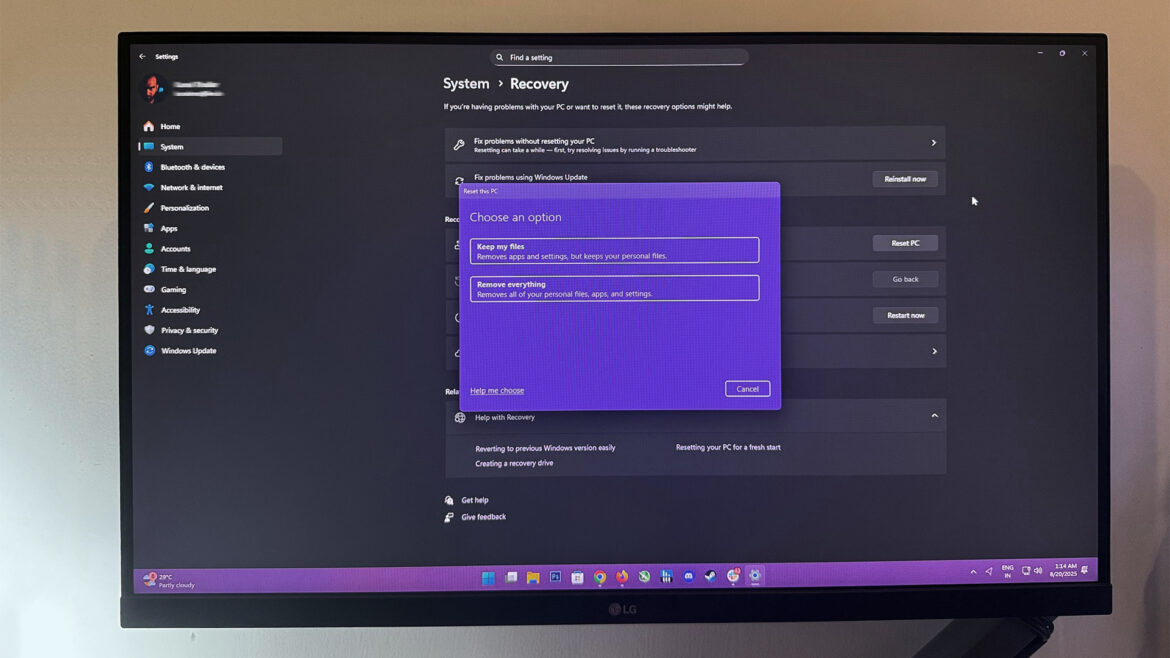
Windows 11 Reset this PC feature
Product Reviews

Microsoft’s August 2025 security updates are breaking recovery tools on Windows 10 and Windows 11 PCs

by admin August 20, 2025


Microsoft has acknowledged an issue with its recent August 2025 security updates that prevent users from resetting or recovering their systems using built-in Windows tools. According the company, the bug affects older versions of Windows 11 including 23H2 and 22H2 as well as Windows 10 22H2, Windows 10 Enterprise LTSC 2019/2021, and Windows 10 IoT Enterprise LTSC 2019/2021.

Installing this month’s security updates can potentially break the Windows recovery options for users. Those attempting to reinstall Windows without losing their personal files through the Reset this PC feature may run into failures. Similarly, the Fix problems using Windows Update feature, which attempts to reinstall the current version of the OS on your device while preserving all your apps, documents, and settings, is also broken. Microsoft has also warned that the bug could affect IT administrators who rely on the RemoteWipe configuration service provider to reset devices remotely.

According to testing by Windows Latest, attempts to reset a PC on Windows 11 23H2 using the Reset this PC feature causes the process to start and then roll back immediately, leaving the reset incomplete. After this failure, no personal files are lost, but the recovery feature becomes unusable. Additionally, Windows doesn’t give any warning that the reset process can fail, meaning most people won’t realize there’s a problem until they actually try to reset their PC.


You may like

Microsoft has confirmed that it is working on an out-of-band update to fix the issue on all affected platforms. Expect an emergency patch to roll out in the coming days, with further details to be shared once they become available.

While the Windows recovery bug does not affect users on the Windows 11 24H2 update, another serious issue has surfaced with August’s security patch which targets storage drives. The latest Windows 11 update KB5063878 is said to be causing storage drives to vanish under heavy workloads, particularly during large file transfers of 50GB or more. While most drives recover after a system reboot, in certain cases the SSDs are completely inaccessible with corrupted data partitions.

According to early analysis done by X user Nekorusukii (@Necoru_cat), the bug is possibly linked to how a storage device handles caching and metadata mapping. Microsoft is yet to formally recognize the flaw. leaving users that regularly deal with large data transfers in limbo.

Until Microsoft acknowledges and patches these issues, users should wait to reset or restore their systems. We can only hope that this new update rolls out soon.

Get Tom’s Hardware’s best news and in-depth reviews, straight to your inbox.

Follow Tom’s Hardware on Google News to get our up-to-date news, analysis, and reviews in your feeds. Make sure to click the Follow button.


Source link

August 20, 2025 0 comments
0 FacebookTwitterPinterestEmail
  • 1
  • 2

Categories

  • Crypto Trends (1,098)
  • Esports (800)
  • Game Reviews (772)
  • Game Updates (906)
  • GameFi Guides (1,058)
  • Gaming Gear (960)
  • NFT Gaming (1,079)
  • Product Reviews (960)

Recent Posts

  • This 5-Star Dell Laptop Bundle (64GB RAM, 2TB SSD) Sees 72% Cut, From Above MacBook Pricing to Practically a Steal
  • Blue Protocol: Star Resonance is finally out in the west and off to a strong start on Steam, but was the MMORPG worth the wait?
  • How to Unblock OpenAI’s Sora 2 If You’re Outside the US and Canada
  • Final Fantasy 7 Remake and Rebirth finally available as physical double pack on PS5
  • The 10 Most Valuable Cards

Recent Posts

  • This 5-Star Dell Laptop Bundle (64GB RAM, 2TB SSD) Sees 72% Cut, From Above MacBook Pricing to Practically a Steal

    October 10, 2025
  • Blue Protocol: Star Resonance is finally out in the west and off to a strong start on Steam, but was the MMORPG worth the wait?

    October 10, 2025
  • How to Unblock OpenAI’s Sora 2 If You’re Outside the US and Canada

    October 10, 2025
  • Final Fantasy 7 Remake and Rebirth finally available as physical double pack on PS5

    October 10, 2025
  • The 10 Most Valuable Cards

    October 10, 2025

Newsletter

About me

Welcome to Laughinghyena.io, your ultimate destination for the latest in blockchain gaming and gaming products. We’re passionate about the future of gaming, where decentralized technology empowers players to own, trade, and thrive in virtual worlds.

Recent Posts

  • This 5-Star Dell Laptop Bundle (64GB RAM, 2TB SSD) Sees 72% Cut, From Above MacBook Pricing to Practically a Steal

    October 10, 2025
  • Blue Protocol: Star Resonance is finally out in the west and off to a strong start on Steam, but was the MMORPG worth the wait?

    October 10, 2025

Newsletter

@2025 laughinghyena- All Right Reserved. Designed and Developed by Pro


Back To Top
Laughing Hyena
  • Home
  • Hyena Games
  • Esports
  • NFT Gaming
  • Crypto Trends
  • Game Reviews
  • Game Updates
  • GameFi Guides
  • Shop

Shopping Cart

Close

No products in the cart.

Close