Laughing Hyena
  • Home
  • Hyena Games
  • Esports
  • NFT Gaming
  • Crypto Trends
  • Game Reviews
  • Game Updates
  • GameFi Guides
  • Shop
Tag:

Master

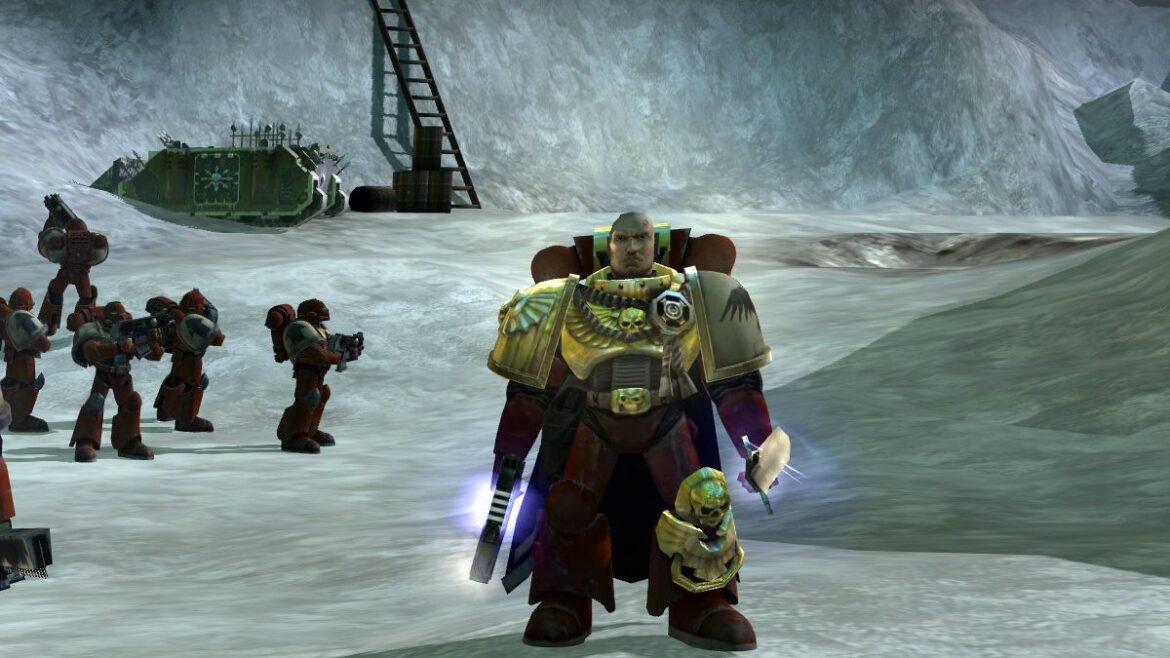
Gabriel Angelos and some of his Blood Ravens
Product Reviews

The Blood Ravens’ Chapter Master Gabriel Angelos won’t be in Dawn of War 4 so it can focus on relatively ‘normal’ heroes instead

by admin September 1, 2025


Jan Theysen, creative director of Dawn of War 4 at King Art Games, recently told IGN that Dawn of War’s original protagonist Gabriel Angelos won’t be returning for their sequel. “That was actually one of the decisions we made relatively early. We don’t want Gabriel Angelos in the game,” he said.

Gabriel Angelos was the star of the story campaign in the original Dawn of War, though he didn’t feature in all of the sequels and expansions. If you played Dark Crusade as the Blood Ravens they were commanded by Davian Thule, and in Soulstorm by Indrick Boreale. For Dawn of War 2 you played a nameless force commander known only as “Commander,” though Angelos did eventually appear at the head of your reinforcements, and took over in Dawn of War 3—though the less said about that the better.

“For us, he felt a little bit overpowered,” Theysen said. “It’s a little bit weird to have either this slightly overpowered character from the beginning of the game, which is a little bit off, or you have to do, ‘Oh, well, he lost his memory and he lost all his power,’ which is also a weird trope.”


Related articles

The trailer for Dawn of War 4 does show the return of other Blood Ravens. It’s narrated by Scout Sergeant Cyrus, who seems to die at the end—though if he stays that way I’ll be shocked. (He probably crosses the Rubicon Primaris, though if he became a dreadnought that would be neat too.) The chapter’s Chief Librarian Jonah Orion is back as well.

“We basically said we want more ‘normal’ heroes,” Theysen explained. “So we have Cyrus and we have Jonah coming back, but they’re all, power level-wise, more similar to normal units.”

Warhammer 40,000: Dawn of War IV Official Announce Trailer | Gamescom Opening Night 2025 – YouTube

Watch On

Which is neat. Dawn of War 4 does seem like it’s toning down the disparity between wildly OP characters and paper-thin troops in Dawn of War 3 to return to something more like the original, where your heroes were badass, but if you didn’t keep an eye on them could suddenly find themselves in a world of hurt.

As our Fraser Brown said after a few hours going hands-on with Dawn of War 4, “Blood Ravens—even their Terminators—ain’t immortal. The relentless green tide can whittle them down, and the orks have some mean machines that can crack open space marines like tins of beans.”

Keep up to date with the most important stories and the best deals, as picked by the PC Gamer team.

Best gaming mouse 2025

All our current recommendations



Source link

September 1, 2025 0 comments
0 FacebookTwitterPinterestEmail
Shinobi: Art Of Vengeance Review - Ninja Master
Game Reviews

Shinobi: Art Of Vengeance Review – Ninja Master

by admin August 25, 2025


You spend years waiting for a new 2D action platformer starring ninjas to come along, and then two show up within a month of each other. Both Ninja Gaiden: Ragebound and Shinobi: Art of Vengeance revitalize their respective, long-dormant franchises by successfully harkening back to their roots. There are obvious similarities between the two games, but they’re also wildly different. While Ragebound is deliberately old-school, Art of Vengeance feels more modern, paying homage to the past while dragging the absent series into the current gaming landscape.

From its luscious hand-drawn art style to its deep, combo-laden action, developer Lizardcube has accomplished with Shinobi what it previously achieved with Wonder Boy and Streets of Rage. The Parisian studio knows how to resurrect Sega’s past hits with remarkable aplomb, and Art of Vengeance is no different.

Shinobi: Art of Vengeance

Equipped with a katana in one hand and a sharpened batch of kunai in the other, Art of Vengeance reintroduces legendary protagonist Joe Musashi after an extended exile. As the game’s title suggests, this is a story about Joe’s quest for vengeance, as the opening moments see his village burned to the ground and his ninja clan turned to stone. ENE Corp, an evil paramilitary organisation led by the antagonistic Lord Ruse and his demonic minions, is behind the attack, setting in motion a straightforward tale that sees you hunt down Lord Ruse while disrupting his various operations.

There’s more of a narrative here than in the original 1987 Shinobi, but that’s not saying much. In fact, it feels more akin to a video game story from the ’90s, providing an impetus for the game’s action but mostly staying out of the way–offering no compelling characters and even fewer surprises.

Shinobi: Art of Vengeance

Despite this, it’s difficult not to be enraptured by Art of Vengeance’s world thanks to a striking aesthetic that looks beautiful in screenshots and dazzles in motion. Creating vibrant hand-drawn art is Lizardcube’s forte, after all. The studio isn’t a one-trick pony, though, impressively adapting its style to fit the needs of each new game. Art of Vengeance still looks distinctly European, but it’s imbued with Japanese flavor in its use of expressive brushstrokes, drawing inspiration from both French and Japanese artists to create a unique style that’s endlessly captivating.

Very few games even attempt to achieve a similar look–instead, comics and movie/TV animation are a more fitting reference point for its gorgeous art style. It does, however, feel like there’s a direct throughline to Sega’s past and the Genesis games of the ’90s, such as Earthworm Jim, Comix Zone, Aladdin, and The Lion King; retro games that aped the style of the movies, TV shows, and comics they were either based on or inspired by. With this, Art of Vengeance manages to evoke a sense of nostalgia while still being unmistakably modern.

Shinobi: Art of Vengeance

You only need to look at the depth and attention to detail in each frame to come to this conclusion. When it calls for it, Lizardcube utilizes the game’s backdrops to create a fantastic sense of scale as additional details trail off into the distance. What would otherwise be a fairly dreary shipyard is elevated by the towering cargo ships and cranes looming in the background, while the extent of a congested fish market ensures that you can almost smell the stench. Elsewhere, a scorching desert stretches for as far as the eye can see, with the bones of long-slain beasts and buried temples protruding from the sand dunes.

Each stage is visually distinct, too, whether you’re dashing through the pummeling rain of a neon-soaked city–the innards of its derelict buildings doused in colorful graffiti–or exploring an underwater military base that darkens the deeper you submerge, with bioluminescent jellyfish providing the only source of light beyond its giant reinforced windows. Art of Vengeance is the definition of eye candy, although there are occasions where it can be tough to see yourself when the screen is filled with enemies.

Shinobi: Art of Vengeance

Some stages keep things simple in terms of level design, adopting the classic left-to-right formula with the occasional branching path for you to explore in search of secrets. Others are more expansive, offering multiple routes with different objectives to complete before returning to a central area. The city I mentioned earlier, for instance, requires you to rescue hostages before moving on–a nod to the original Shinobi–whereas a later level challenges you to fight your way from one end of a moving train to the other. Throw in some intricate platforming, environmental puzzles, and compelling exploration, and variety isn’t just a facet of the game’s visuals.

Navigating these levels is also a joy thanks to Joe’s responsiveness and fluid movement. You initially start with a few basic traversal options, but it doesn’t take too long before you’re chaining together double jumps, wall jumps, and mid-air dashes; climbing up walls with Ninja Claws, using grapple points to propel yourself forward, and blasting through breakable walls with Joe’s Cannon Punch. The gradual unlocking of these abilities also gives you an incentive to revisit previous stages and access areas you couldn’t before. Each level has a checklist of secrets to discover, from chests filled with money you can spend to unlock new attacks and abilities, to elite enemy units that are tough to take down but reward you handsomely when you do so.

Shinobi: Art of Vengeance

There’s a delectable flow to Art of Vengeance’s platforming that directly translates to its combat, allowing you to seamlessly chain together various attacks to create potentially never-ending combos that reward experimentation and creativity. The fluidity and responsiveness of Joe’s movement is something that continues to stand out when engaging in combat, making the act of slicing through enemies with Joe’s katana consistently satisfying.

There’s a fantastic sense of progression, too, as you gradually add to your repertoire of attacks, building combos with a mixture of light and heavy strikes that let you dodge enemies, juggle them in the air, and then finish them off with a dramatic execution that sees their lifeless body explode in a fountain of blood, money, and healing orbs.

Shinobi: Art of Vengeance

Beyond the katana and kunai, Joe also has access to a variety of powerful moves known as Ninpo and Ninjutsu. You can equip up to four of the former and unleash these magic abilities to transform into a giant snake, launch fireballs, and engulf yourself in water to parry incoming attacks. Ninjutsu, on the other hand, are even more potent moves that see Joe power up like he’s turning Super Saiyan before, say, dealing massive damage to every enemy on screen or replenishing a large amount of your health. Each of these abilities operates on a type of gauge that charges when you attack enemies or sustain damage. They’re powerful, but aren’t readily available, and feel appropriately balanced to the point where using them feels strategic.

You can also find and equip different amulets that grant bonuses based on their type. Passive amulets are always active in the background, altering heavy attacks so that they deal more damage to shields or modifying your kunai to pierce through multiple enemies at twice the ammo cost. Combo amulets activate once your combo reaches a specific number, so you might hit harder after your combo reaches 30, earn a gold coin with every hit after 25, or launch a larger, more powerful fireball Ninpo after racking up 20 kills on the bounce. Art of Vengeance completely nails the fundamentals of a 2D action platformer, but there’s also a ton of depth churning away below the surface that elevates its phenomenal combat to new heights.

Shinobi: Art of Vengeance

At around eight hours in length, the campaign wraps up before a slight hint of tedium creeps in. For those who still want more, however, finishing the game also unlocks a boss rush and arcade mode, challenging you with a gauntlet of the game’s most formidable foes or letting you return to previous levels to try and beat them as quickly and efficiently as possible to achieve the highest rank. Continuing beyond the final credits only reaffirms just how enjoyable the game is, that retreading old ground is still so captivating.

Shinobi: Art of Vengeance has few equals when it comes to 2D combat. It’s a thrilling triumph, emblazoned by a striking art style that confirms Lizardcube is at the top of its game. After a prolonged absence, this is the perfect way to reintroduce the world to Shinobi and Joe Musashi, instantly revitalizing one of Sega’s earliest heroes with his best game to date. There’s still a clear reverence for the past here, but Art of Vengeance also pushes the genre forward with an emphasis on deep combat that flows just as smoothly as water and has the looks to back it up. Ninjas are eating well.


Source link

August 25, 2025 0 comments
0 FacebookTwitterPinterestEmail
Thermal Master P3
Product Reviews

Thermal Master P3 thermal camera review

by admin August 18, 2025


Why you can trust TechRadar


We spend hours testing every product or service we review, so you can be sure you’re buying the best. Find out more about how we test.

Thermal Master P3: 30-second review

Thermal imaging has come a long way from bulky, industrial-grade gear to sleek, smartphone-powered tools. The Thermal Master P3 is a prime example of that evolution. Building on the success of its predecessors, particularly the ultra-compact P2 Pro, the P3 refines the formula with sharper resolution, manual focus, and a more tactile, professional-grade build. It’s a device that doesn’t just fit in your pocket; it earns its place in your toolkit.

At its core, the P3 is a plug-in thermal camera designed for Android and iOS devices, offering a native 256×192 infrared resolution that can be digitally enhanced to 512×384 using the brand’s X³ IR software. That’s a notable leap from the P2 Pro’s fixed-focus setup, which, while impressively portable, lacked the precision needed for close-up diagnostics. The addition of manual focus and a macro lens transforms the P3 into a serious contender for professionals who need more than just a thermal snapshot.

The build quality also marks a shift in tone. Where the P2 Pro leaned into minimalism with its featherweight plastic shell, the P3 opts for an aerospace alloy body that feels solid and premium without sacrificing portability. It’s still light enough to carry anywhere, but now rugged enough to survive the kind of environments where thermal imaging is most useful.

So who’s this for? The P3 is ideal for engineers, HVAC technicians, electricians, and anyone working in diagnostics or maintenance. It’s particularly well-suited to electronics professionals who need to spot micro-heating anomalies on PCBs, thanks to its macro lens and manual focus. It’s also a smart pick for field inspectors who want a reliable thermal tool without the bulk or battery anxiety of standalone imagers.

In short, the Thermal Master P3 isn’t just an upgrade — it’s an evolutionary step. It takes the portability of the P2 Pro and adds the kind of precision and build quality that professionals demand. If you’ve been waiting for a thermal camera that’s as serious about detail as you are, the P3 might be the one to beat.

(Image credit: Mark Pickavance)

Thermal Master P3: price and availability

  • How much does it cost? $299/£299/€299
  • When is it out? It is available now
  • Where can you get it? You can get it in most regions from an online reseller and directly from Thermal Master.

Thermal Master P3 offers one of the best balances of resolution, manual focus, and build quality at the $299 mark. It’s available direct from the Thermal Master official site here.

At that price, it is comfortably below flagship models like the FLIR One Pro, yet offers superior thermal resolution and control. While it lacks a visible light overlay and requires sideloading on Android, these trade-offs are minor compared to the imaging clarity and build quality it provides.

Sign up to the TechRadar Pro newsletter to get all the top news, opinion, features and guidance your business needs to succeed!

It can be bought on Amazon.com, but the price there is the MSRP of $349.

The Thermal Master P2 Pro is cheaper and more portable, but the lack of manual focus makes it less suitable for detailed inspections.

I’d position the P3 as a mid-range powerhouse that punches above its weight in precision and build quality, especially for professionals in electronics and HVAC. 

(Image credit: Mark Pickavance)

Thermal Master P3: Specs

Swipe to scroll horizontally

Feature

Specification

Model

Thermal Master P3

Infrared Sensor

RazorX? IQ+

IR Resolution

256×192 (native), 512×384 (via X³ IR? upscaling)

Temperature Range

-20°C to 600°C

Accuracy

±2°C or ±2% (whichever is greater)

NETD (Sensitivity)

Estimated

Focal Length

4.3 mm

Focus Type

Manual focus + macro lens

Digital Zoom

Up to 15×

Frame Rate

Image Enhancement

X³ IR™ software upscaling

Colour Palettes

12 options (e.g. whitehot, ironred, red hot)

Compatibility

Android (USB-C), iOS (Lightning/USB-C), Windows PC

App Availability

iOS App Store; Android via sideload

Body Material

Aerospace alloy

Dimensions

59 × 27 × 17.2 mm

Weight

26.3g

Power Consumption

Low (powered via phone connection)

Use Cases

PCB inspection, HVAC, automotive, pipelines

Thermal Master P3: Design

  • Tiny camera
  • PC and phone
  • 50mK NETD

If cuteness played a part in this evaluation, then the P3 would score highly.

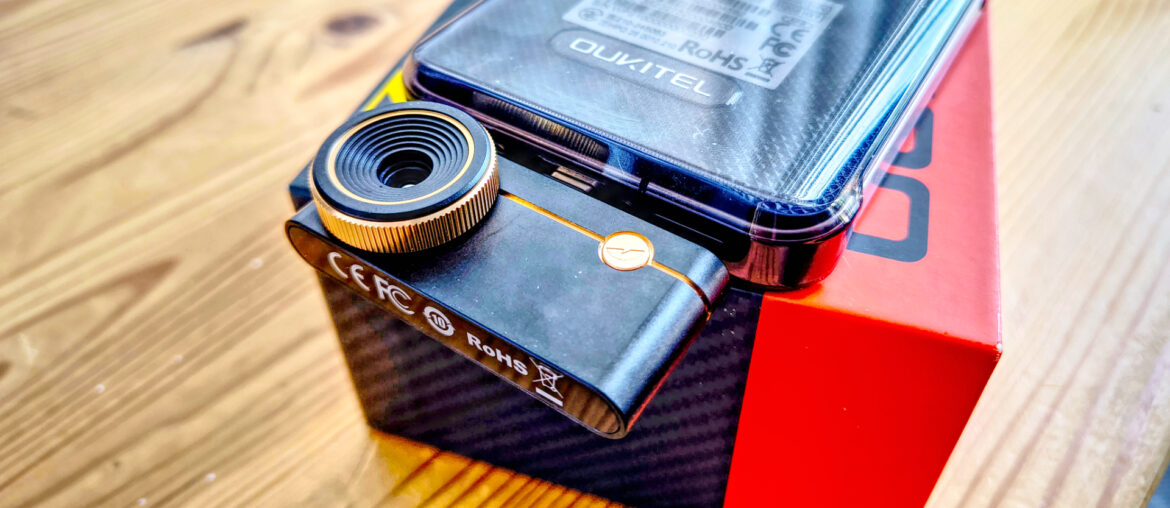
This tiny camera measures just 59mm across, is 27mm high, and only 17.2mm thick, with most of that thickness being the length of the lens.

There is only a single control on it, that being the twisting lens to focus, everything else is done from the phone or PC app.

What’s less endearing is that the thermal sensor is exposed, as Thermal Master didn’t include a lens cap for this device. What you do get is a soft carry case that includes a short 27mm adapter to use it with an Apple Lightning connector.

Included in the box is a longer, 45cm cable that connects the P3 to a PC using either USB-C or USB-A. Disappointingly, those at Thermal Master responsible for creating the soft carry case weren’t informed about this cable, and it won’t fit with the camera in the case.

That’s annoying, and another consideration is that using it with a Laptop or desktop PC means there’s no tripod or other way to position it without holding the camera.

If you are using this device to analyse a motherboard for hot spots, you’ll need to rig something temporary up, or print your own mounting system with a 3D printer.

Those using it with a phone might also have issues, since the USB-C blade on the camera is deeper than some phone ports, causing a gap between the two. Obviously, since it’s USB-C, it is possible to put the camera in either facing the user or away, but as it’s necessary to see the screen, away is the most useful.

When it’s inserted, the P3 draws power from the phone or PC, which might reduce battery life if the exercise is a prolonged one.

(Image credit: Mark Pickavance)

In terms of the thermal technology in this camera, the P3 uses the same RazorX IQ+ sensor that Thermal Master used in the P2 Pro. Its native resolution is 256×192, but on this device, Thermal Master has implemented X³ IR upscaling to deliver 512×384 by combining the data from multiple passes.

That’s much better than the 160×200 offered by the FLIR Lepton 3.5 sensor, and the sensitivity is similar. These sensors are rated by NETD, defined as the smallest temperature difference a thermal sensor can detect before the signal becomes indistinguishable from noise. Typically, it’s measured in millikelvin (mK), and the RazorX IQ+ is rated as better than 50mK. The best devices are <25mK, good are <50mK, and some less desirable choices can only register 70mK.

The other vital specification for this sensor is its temperature range, which is -20°C to 600°C, with an accuracy of plus or minus 2°C. That probably makes it unsuitable for those forging metals that have high melting points, but it’s fine for heating systems and vehicle repairs.

(Image credit: Mark Pickavance)

Design score: 4/5

Thermal Master P3: User experience

  • Android and iOS
  • Good quality captures
  • Limited PC connection

While it does work with a PC, the P3 was made with smartphone users in mind.
For those using an Apple phone, on the iPhone 15 and newer models, a Lightning Port or USB-C is required. The P3 includes a USB-C to Lightning adapter for older models. The device should run on iOS version 13 or higher to ensure app compatibility and feature support. Additionally, the device should be an iPhone 7 or newer, as older models may struggle with resolution upscaling and frame rate.

For Android users, ensuring compatibility with the P3 app and stable performance, a device must have a USB-C port for direct connection and OTG (On-The-Go) support enabled. The device should run on Android version 8.0 or higher. A Snapdragon 660 or equivalent processor and above is recommended for smooth image rendering and upscaling. Additionally, the device should have at least 3GB of RAM to handle high-resolution thermal data and ensure app responsiveness.

I’ll talk about performance later, but the first significant irritation of this platform is that for Android users, the app must be downloaded and then sideloaded. Why it isn’t on the Google Play Store is a mystery, since the iOS version is on Apple’s store.

This isn’t a straightforward exercise for an average Android user, as it involves configuring the phone to accept sideloaded apps, and then finding the right version on the Thermal Master website. The file actually comes via Dropbox, and for some inexplicable reason “.1” was added to the file extension, meaning that Android phones won’t identify this as an app.

To install the app, it needs to be renamed to the “.apk” extension.

Did anyone at Thermal Master test this? It’s just a magnet for support calls in its current form.

Once installed, the app correctly identified the P3, but confusingly, the app is called the Thermal Master P2 app. I presume this is because this app was written for the P2 Pro, and the developers assumed it would never be used with any other hardware.

That said, it did enable the X³ IR upscaling on the P3, a feature missing from the P2 Pro.

This multi-pass mode generates better resolution images, but it significantly reduces the framerate, regardless of the phone’s power. That makes it harder to use, unfortunately.

I suspect that the real issue here is that USB-C ports on Android devices are normally USB 2.0, and the amount of data that needs to flow back probably hits the transfer speed limits.

But whatever the reason, if high-quality images are required, then it’s something you may be forced to work around. For thermal images, the results are good, better than the Thor002 I recently reviewed.

However, there is a missing piece to this puzzle that phones with inbuilt sensors can do, but this system doesn’t offer. Phones with a thermal camera in their sensor often have a mode that captures a conventional light image with a thermal one. These are either stored alongside each other or combined to form a hybrid image.

(Image credit: Mark Pickavance)

The P3 software doesn’t offer the hybrid option to use the phone camera to show the location in conventional light, but it does have a picture-in-picture option. In this mode, it captures a smaller version of the rear camera image and floats it above the thermal image. The problem here is that the zoom levels between the two images are massively different, and while you can zoom the P3 sensor, there is no control over the normal light camera.

It also doesn’t work if you have the P3 inserted to look forward, and it doesn’t save both images individually when you snap a shot.

Images are saved at 1440 x 1080, which is at least a proper ratio of the natural 256 x 192 sensor. They both have a 1.33 ratio, which is an improvement over the Thor002 captures, which were stretched by arbitrary numbers.

For those wondering, the capture resolution appears to be unrelated to the screen of the capture phone, since in my tests I used the Oukitel WP210, and that has the curious resolution of 1080 x 2412.

Overall, this is an excellent thermal camera. My only reservation about it is that to use the X³ IR upscaling seems to require an inordinate amount of processing power, slowing updates markedly. That’s even on a relatively powerful phone.

I suspect that GPU acceleration in many SoCs could make its use less demanding if Thermal Master recoded the application to make better use of those chips.

A word of warning. If you get one of these and use it with a phone, don’t forget to remove it after use, as the power consumption of the camera will drain the battery if you leave it connected.

(Image credit: Mark Pickavance)

The PC application is exclusively on Windows, and it defaults to Chinese on installation, so you will need to alter that to English if, like me, you don’t speak that language.

Interestingly, the PC tool is a cut-down version of the phone application, missing some of the more exotic features. There is no X³ IR upscaling toggle, as it appears to be active all the time, and supporting that assertion, the output of captured files is 512 x 384 resolution.

The big issue I encountered with the PC software is that the camera is on the USB cable, so it needs to be held by the user all the time. After a very short time, this becomes exceedingly frustrating, since manually focusing something you are holding is a fraught exercise. On the PC, this hardware so badly needs a tripod or at least something that enables the camera to be mounted.

That there is no Apple Mac OS or Linux tool is disappointing for those who use those platforms. There also isn’t a ChromeOS app, but it might be possible to use the Android software in that context.

Overall, the software could be better, but it works.

(Image credit: Mark Pickavance)

  • User experience score: 3.5/5

(Image credit: Mark Pickavance)

Thermal Master P3 Camera samples

Image 1 of 13

(Image credit: Mark Pickavance)(Image credit: Mark Pickavance)(Image credit: Mark Pickavance)(Image credit: Mark Pickavance)(Image credit: Mark Pickavance)(Image credit: Mark Pickavance)(Image credit: Mark Pickavance)(Image credit: Mark Pickavance)(Image credit: Mark Pickavance)(Image credit: Mark Pickavance)(Image credit: Mark Pickavance)(Image credit: Mark Pickavance)(Image credit: Mark Pickavance)

Thermal Master P3: Final verdict

This product is tantalisingly close to being brilliant, but it needs a stand/tripod/mount, and the software needs refinement. Undoubtedly, the part that Thermal Master nailed was the hardware of the camera, which could only be bettered with software-controllable focus.

Overall, the P3 is a significant improvement over the P2, and the best add-on thermal solution I’ve seen so far.

If Thermal Master could come up with a tripod, it would stand head and shoulders above the competitor offerings.

Should I buy a Thermal Master P3?

Swipe to scroll horizontallyThermal Master P3 Score Card

Attributes

Notes

Rating

Value

High quality at a reasonable price

4/5

Design

Highly engineered and portable

4/5

User experience

Needs a tripod and improved software

3.5/5

Overall

Excellent quality and easy to carry

4/5

Buy it if…

Don’t buy it if…

Also Consider

Thermal Master P3: Price Comparison


Source link

August 18, 2025 0 comments
0 FacebookTwitterPinterestEmail
  • 1
  • 2

Categories

  • Crypto Trends (1,098)
  • Esports (800)
  • Game Reviews (772)
  • Game Updates (906)
  • GameFi Guides (1,058)
  • Gaming Gear (960)
  • NFT Gaming (1,079)
  • Product Reviews (960)

Recent Posts

  • This 5-Star Dell Laptop Bundle (64GB RAM, 2TB SSD) Sees 72% Cut, From Above MacBook Pricing to Practically a Steal
  • Blue Protocol: Star Resonance is finally out in the west and off to a strong start on Steam, but was the MMORPG worth the wait?
  • How to Unblock OpenAI’s Sora 2 If You’re Outside the US and Canada
  • Final Fantasy 7 Remake and Rebirth finally available as physical double pack on PS5
  • The 10 Most Valuable Cards

Recent Posts

  • This 5-Star Dell Laptop Bundle (64GB RAM, 2TB SSD) Sees 72% Cut, From Above MacBook Pricing to Practically a Steal

    October 10, 2025
  • Blue Protocol: Star Resonance is finally out in the west and off to a strong start on Steam, but was the MMORPG worth the wait?

    October 10, 2025
  • How to Unblock OpenAI’s Sora 2 If You’re Outside the US and Canada

    October 10, 2025
  • Final Fantasy 7 Remake and Rebirth finally available as physical double pack on PS5

    October 10, 2025
  • The 10 Most Valuable Cards

    October 10, 2025

Newsletter

About me

Welcome to Laughinghyena.io, your ultimate destination for the latest in blockchain gaming and gaming products. We’re passionate about the future of gaming, where decentralized technology empowers players to own, trade, and thrive in virtual worlds.

Recent Posts

  • This 5-Star Dell Laptop Bundle (64GB RAM, 2TB SSD) Sees 72% Cut, From Above MacBook Pricing to Practically a Steal

    October 10, 2025
  • Blue Protocol: Star Resonance is finally out in the west and off to a strong start on Steam, but was the MMORPG worth the wait?

    October 10, 2025

Newsletter

@2025 laughinghyena- All Right Reserved. Designed and Developed by Pro


Back To Top
Laughing Hyena
  • Home
  • Hyena Games
  • Esports
  • NFT Gaming
  • Crypto Trends
  • Game Reviews
  • Game Updates
  • GameFi Guides
  • Shop

Shopping Cart

Close

No products in the cart.

Close