
Laughing Hyena
  • Home
  • Hyena Games
  • Esports
  • NFT Gaming
  • Crypto Trends
  • Game Reviews
  • Game Updates
  • GameFi Guides
  • Shop
Tag:

haptic

Logitech’s MX Master 4 adds haptic feedback, mostly just for fun
Gaming Gear

Logitech’s MX Master 4 adds haptic feedback, mostly just for fun

by admin September 30, 2025


If you saw the leaks, you probably already know that haptics are the big, new thing in Logitech’s $119.99 MX Master 4 wireless mouse, coming in October. No, it’s not adding rumble effects to YouTube videos or to your favorite websites (on second thought, I’d like to try that). And, it’s different from Logitech’s haptics-based click system in its Pro X2 Superstrike gaming mouse coming in 2026.

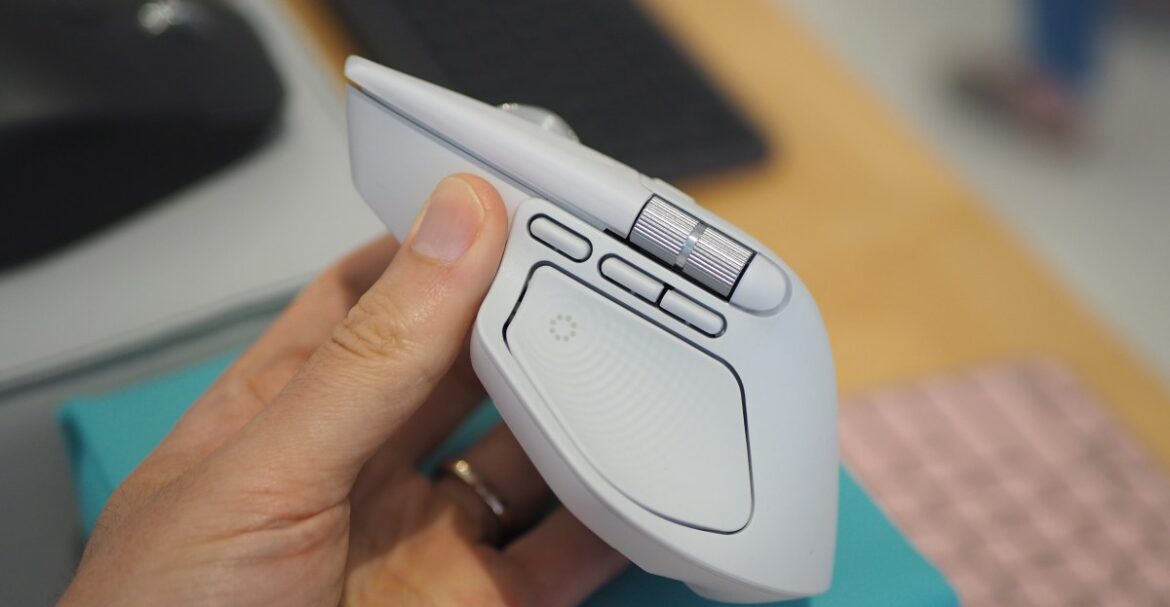
The Haptic Sense Panel embedded in its grippy thumb rest vibrates when pressed, opening Logitech’s Action Ring overlay. That overlay can be filled with whatever app- and system-level shortcuts you want. You can even nest multiple Action Rings within one, if you want, letting you drill down to extremely specific commands. The haptics is a hardware feature that, unsurprisingly, requires you to engage pretty heavily with the company’s software, Logi Options Plus.

The haptics punctuate every engagement you make with Logitech’s features, from gestures and Action Rings to its Smart Actions (pre-made or custom macros to automate certain tasks). My favorite use case for the haptics was one that’s switched off by default; you can enable a setting that provides a small jolt of haptic feedback when you move between screens, reducing the amount of “where on earth is my cursor?” moments each day.

Image: Logitech via The Verge

Before digging into the app integration, it’s worth sharing what’s new about the MX Master 4 itself. It has frosted, semi-transparent main buttons that add in a dash of elegance. Some people might be happy to hear that this model includes a USB-C Bolt transmitter, which the other compatible Logitech products (including the new Signature Slim Solar Plus keyboard) can connect to as well.

In terms of battery life, Logitech claims it can last up to 70 days on a full charge (although, setting haptics to “high” intensity in the app will yield a shorter lifespan per charge).

Lastly, its gesture button has moved from the thumb grip, where it was in the MX Master 3S from 2022, to a dedicated button next to the other two thumb buttons, just below the horizontal scroll wheel. When held, you then move the mouse in a cardinal direction to execute a desired action.

Back to the app, Logitech bills the Action Ring as a time-saving feature, an alternative to keyboard shortcuts and moving your cursor across the screen to click something. You don’t have to be a power user to get a lot out of this functionality. For instance, I programmed an Action Ring with a button that auto-launches The Verge, and one that opens WordPress, where we produce articles. There are plugins within Logitech’s app for many third-party apps. Affinity Photo has a version of the Action Ring that appears when I press the Haptic Sense Panel while using the app. It shows some commands that I’m likely to take advantage of, like showing line guides to properly align objects, or simpler stuff like copying and pasting assets.

To be clear, Action Rings aren’t new. The haptic sensations derived from navigating them, on the other hand, are. Clicking the haptics button makes it jolt, as does moving the cursor between the Action Ring’s bubbles. It’s a small, but delightful touch that I appreciate — that is, when I use Action Rings, which I still haven’t trained my brain to rely on when I’m in a flow state at work. I’m sorry to my employer, Vox Media, for all of the time I wasted at work when I could have used Action Rings to enhance my productivity!

With haptics being the main new hardware feature in the MX Master 4, I don’t necessarily think it’s worth upgrading to if you have the MX Master 3S, as it’s similar in many ways. But it’s certainly worth getting instead of the 3S if you’re shopping for a mouse, since the 4 is launching at the same $119.99 price that its predecessor sells for. And, as for those who haven’t used an MX Master-series mouse before, it’s hard to overstate the value of an ergonomically-friendly mouse with a stellar scroll wheel, quiet clicks, and solid battery life. Haptics are just a nice add-on.

Follow topics and authors from this story to see more like this in your personalized homepage feed and to receive email updates.

  • Cameron FaulknerClose

    Cameron Faulkner

    Posts from this author will be added to your daily email digest and your homepage feed.

    PlusFollow

    See All by Cameron Faulkner

  • GadgetsClose

    Gadgets

    Posts from this topic will be added to your daily email digest and your homepage feed.

    PlusFollow

    See All Gadgets

  • LogitechClose

    Logitech

    Posts from this topic will be added to your daily email digest and your homepage feed.

    PlusFollow

    See All Logitech

  • NewsClose

    News

    Posts from this topic will be added to your daily email digest and your homepage feed.

    PlusFollow

    See All News

  • TechClose

    Tech

    Posts from this topic will be added to your daily email digest and your homepage feed.

    PlusFollow

    See All Tech



Source link

September 30, 2025 0 comments
0 FacebookTwitterPinterestEmail
DAAPrivacyRightIcon
Gaming Gear

The Logitech MX Master 4 is here with haptic feedback, less rubber and the same shape

by admin September 30, 2025


If you’ve shopped around for a wireless mouse at any point in the past decade, you’ve probably seen lots of people recommending a Logitech MX Master. There’s good reason for that: They aren’t cheap, but they’re usually comfortable, versatile and loaded with features designed to make working in front of a monitor all day a little less annoying. The current MX Master 3S has sat at the top of our own wireless mouse buying guide for some time now.

Now, three years after releasing the 3S, Logitech is rolling out the new MX Master 4, which costs $120 and will ship in October. I’ve been able to test it out for the past few weeks.

For the most part, this is an iterative update, with the same general shape, battery life, 8K DPI sensor and ultra-quiet clicks as the MX Master 3S before it. It is a touch heavier (150 grams vs. 141g), wider (3.48 inches vs 3.32 in.) and taller (5.05 inches vs. 4.92 in.) than the last model, but if you found the 3S or older MX Master 3 comfortable, you should have few issues here. That said, it’s still a hefty mouse designed for palm grippers and right-handed users: Its gentle contours, generous hump, ample thumb rest and large buttons will fit like a glove if that describes you, but lefties and those with especially petite hands won’t agree.

The flashiest change here is the addition of haptic feedback, which is built into a small panel within the mouse’s thumb rest. You can customize the intensity of this effect through Logitech’s Options+ software — or turn it off entirely — but it essentially brings a modicum of smartphone-style feedback to your desktop. When you first pair the mouse, for one, you’ll feel a little bump. The same goes if you move between devices using Logitech’s “Flow” feature. When battery is low, it’ll vibrate. If you’re trying to precisely line up a graphic in an app like Photoshop, you’ll get a little buzz when you’ve moved it to the exact right spot.

You’ll also feel it when you hover over options in the Actions Ring, a customizable overlay that presents different shortcuts depending on the app you’re using. This pops up when you click the side panel; you could use it quickly access the screenshot tool while in Chrome, for instance, or the brightness and contrast sliders in Photoshop.

If all of this sounds like a gimmick, well, yeah it kind of is. It’s not the kind of thing anyone needs. But the effect is surprisingly subtle on the default “medium” setting, and there’s a level of reassurance that comes with feeling a confirmed action instead of just seeing it. I found it more pleasant than distracting. The catch is that only a few apps will natively support the MX Master 4’s haptics at launch: Photoshop, Lightroom and Zoom, with Adobe Premiere Pro to follow soon after. You’ll still be able to utilize the haptic feedback on a system level on Windows and macOS, and Logitech is releasing an SDK for more developers to integrate the functionality, but we’ll have to see how many do so.

Customizing the Actions Ring in Logitech’s Options+ app.

(Logitech/Jeff Dunn for Engadget)

Another change is with the mouse’s coating, which trades the 3S’ rubbery finish for a lightly textured plastic around the top. (The thumb rest and right side still use rubber.) Some users have complained about older MX Master mice peeling and wearing down after extended use; time will tell how well the new model holds up, but it should avoid the same sort of sweat-induced degradation. Either way, I’ve found it smooth to the touch without being slippery. I also haven’t been able to replicate the accuracy issues some 3S buyers have had with that mouse’s electromagnetic scroll wheel, which is still made of a high-quality metal and lets you conveniently swap between a notched and free-spin scroll on the fly.

There are other minor tweaks and improvements. The receiver included with the Windows model is now USB-C instead of USB-A. The horizontal scroll wheel on the side — which remains a blessing for navigating spreadsheets — extends a little farther with each spin. The PTFE feet on the bottom are a bit larger for a smoother glide. The dedicated gesture button is no longer awkwardly integrated into the thumb rest; instead, it’s been pulled out ahead of the two programmable side buttons. Logitech says there’s a more powerful chip inside the mouse to improve connection quality. The edges around the main click buttons are now translucent: nothing major, but a bit more stylish. The screws on the bottom are now exposed, too, which Logitech says should be helpful for recycling purposes down the road.

The rest is largely the same as before, which isn’t a bad thing. The best feature here is still the virtually silent main buttons, which keep a pleasing level of travel but will never bother anyone around you. Battery life is still rated at a solid 70 days, which seems about right — I haven’t charged the mouse in about a month and the Options+ app says I still have about 50 percent juice left. The design still feels super sturdy, with no flexing or creaking. The side buttons feel firm and tactile. Options+ is resource-heavy but still intuitive enough for reprogramming buttons and customizing app-specific settings. It can still track on a variety of surfaces, including glass or the fabric of my couch. You can still connect to three devices simultaneously and switch between them with a button on the bottom, too.

On the downside, there’s no USB-C cable included in the box anymore, and the polling rate is still set at a basic 125Hz, which means tracking isn’t quite as buttery smooth as it could be. The Mac version doesn’t come with a USB receiver, and there’s still no built-in storage compartment for the dongle with either model. You also need to keep Options+ open to feel the haptic feedback, which is annoying. Some of those complaints have been issues for a while, so it’s frustrating to see them three years later. Still, they’re probably not dealbreakers. The MX Master 4 may not be a essential upgrade if you’re happy with an older MX Master mouse, and if those didn’t work for you before, this one probably won’t work for you now. But if you’re a power user in the market for a new productivity mouse, we’d expect this newest iteration to be as popular as its predecessors.


Source link

September 30, 2025 0 comments
0 FacebookTwitterPinterestEmail

Categories

  • Crypto Trends (1,098)
  • Esports (800)
  • Game Reviews (772)
  • Game Updates (906)
  • GameFi Guides (1,058)
  • Gaming Gear (960)
  • NFT Gaming (1,079)
  • Product Reviews (960)

Recent Posts

  • This 5-Star Dell Laptop Bundle (64GB RAM, 2TB SSD) Sees 72% Cut, From Above MacBook Pricing to Practically a Steal
  • Blue Protocol: Star Resonance is finally out in the west and off to a strong start on Steam, but was the MMORPG worth the wait?
  • How to Unblock OpenAI’s Sora 2 If You’re Outside the US and Canada
  • Final Fantasy 7 Remake and Rebirth finally available as physical double pack on PS5
  • The 10 Most Valuable Cards

Recent Posts

  • This 5-Star Dell Laptop Bundle (64GB RAM, 2TB SSD) Sees 72% Cut, From Above MacBook Pricing to Practically a Steal

    October 10, 2025
  • Blue Protocol: Star Resonance is finally out in the west and off to a strong start on Steam, but was the MMORPG worth the wait?

    October 10, 2025
  • How to Unblock OpenAI’s Sora 2 If You’re Outside the US and Canada

    October 10, 2025
  • Final Fantasy 7 Remake and Rebirth finally available as physical double pack on PS5

    October 10, 2025
  • The 10 Most Valuable Cards

    October 10, 2025

Newsletter

About me

Welcome to Laughinghyena.io, your ultimate destination for the latest in blockchain gaming and gaming products. We’re passionate about the future of gaming, where decentralized technology empowers players to own, trade, and thrive in virtual worlds.

Recent Posts

  • This 5-Star Dell Laptop Bundle (64GB RAM, 2TB SSD) Sees 72% Cut, From Above MacBook Pricing to Practically a Steal

    October 10, 2025
  • Blue Protocol: Star Resonance is finally out in the west and off to a strong start on Steam, but was the MMORPG worth the wait?

    October 10, 2025

Newsletter

@2025 laughinghyena- All Right Reserved. Designed and Developed by Pro


Back To Top
Laughing Hyena
  • Home
  • Hyena Games
  • Esports
  • NFT Gaming
  • Crypto Trends
  • Game Reviews
  • Game Updates
  • GameFi Guides
  • Shop

Shopping Cart

Close

No products in the cart.

Close