Laughing Hyena
  • Home
  • Hyena Games
  • Esports
  • NFT Gaming
  • Crypto Trends
  • Game Reviews
  • Game Updates
  • GameFi Guides
  • Shop
Category:

Gaming Gear

Google just asked the Supreme Court to save it from the Epic ruling
Gaming Gear

Google just asked the Supreme Court to save it from the Epic ruling

by admin September 25, 2025


“The Supreme Court is Google’s last hope to avoid an Epic reckoning in October,” I wrote last week. Google apparently agrees. Today, it’s finally elevated its Epic v. Google case, the one that might fracture its control over the entire Android app ecosystem, to the Supreme Court level. Google has now confirmed it will appeal its case to the Supreme Court, and in the meanwhile, it’s asking the Court to press pause one more time on the permanent injunction that would start taking away its control.

On September 12th, the Ninth Circuit Court of Appeals affirmed that permanent injunction and gave Google until October to stop forcing app developers to use its Google Play Billing for payments, allow them to link to other ways to pay and other places to download apps, set their own prices, and more.

But the Supreme Court might see it differently. It might agree with Google’s argument that the lower courts overstepped, or that Apple’s win in Epic v. Apple is relevant to the Google case, or any number of other arguments that you can read in the full document below.

Google says it will fully appeal to the Supreme Court for certiorari by October 27th, 2025, and is asking the Supreme Court to decide whether it’ll press pause on the injunction by October 17th. Meanwhile, the district court judge who issued the injunction, Judge James Donato, is asking Google and Epic to explain how they’ll comply with it in his courtroom on October 30th.

Source link

September 25, 2025 0 comments
0 FacebookTwitterPinterestEmail
Yakuza Kiwami 3
Gaming Gear

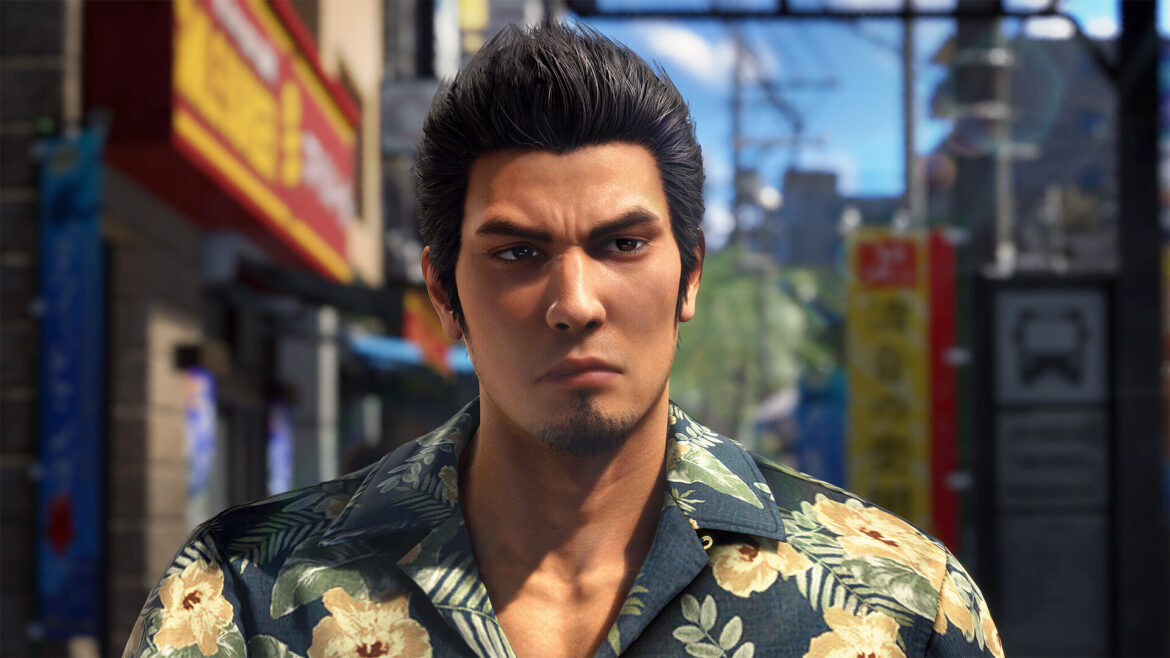
Yakuza Kiwami 3 might not be a surprise, but Kiryu’s new Ryukyu move set certainly is

by admin September 25, 2025


I went hands-on with the recently revealed Yakuza Kiwami 3, and my first thought was that the game felt like a refreshingly grounded experience. Especially off the back of the madcap Like a Dragon: Pirate Yakuza in Hawaii and the irreverent turn-based shenanigans of Like a Dragon: Infinite Wealth.

Yakuza Kiwami 3 is a modern remake of Yakuza 3, which was originally released for PlayStation 3 back in 2009. An action RPG with a heavy emphasis on brutal fist fighting combat and a strong element of virtual tourism thanks to developer Ryu Ga Gotoku Studios’ faithfully realistic map design, you’ll do everything from taking down goons in the street to solving the problems of the local populace via heart warming side quests.

And when you’re not uncovering political and criminal conspiracies in the main story, you’re more than welcome to take a break by partaking in Kamurocho or Okinawa’s many delights. That includes darts, pool, shogi, or partaking in Club Sega’s many arcade games.


You may like

The original Yakuza 3 is the only game in the series that I hadn’t previously played, but I’m loving Kiwami 3’s glow-up so far. As with previous Kiwami titles, there’s plenty new on offer here besides a graphical upgrade, so let’s dive in.

Ryukyu master

(Image credit: Sega)

The Yakuza Kiwami 3 demo I played began with a cutscene close to the start of the game. As in the original, protagonist Kazuma Kiryu travels to Okinawa in order to save the orphanage he runs from criminal interests. After a brief tutorial fight, which also introduces the brand new Ryukyu fighting style, we’re unleashed on the streets of the island prefecture.

Kiryu is able to swap between two distinct move sets in combat. His traditional style is accompanied by the new Ryukyu style, inspired by Okinawan martial arts. Ryukyu employs eight (yes, eight) different weapons and/or household objects, all assigned to their own button. For example, pressing Triangle (heavy attack) can swipe groups of foes with a large oar. Meanwhile, holding Circle (usually the grab button) makes Kiryu swing a flail in a wide area. And that’s just surface level stuff, as Kiryu also has nunchaku, tonfa, tekko and more at his disposal.

Some of these can be chained together for various combos, going from weapon to weapon as you dish out damage, though I didn’t quite have enough time to figure out the most optimal combinations. Ultimately, Kiryu’s ‘Dragon of Dojima’ style feels better configured to single-target fights, while Ryukyu is effective at keeping multiple foes at bay. Like Pirate Yakuza in Hawaii and Like a Dragon Gaiden: The Man Who Erased His Name, this dual style system supports swapping between both at any time during combat.

Sign up for breaking news, reviews, opinion, top tech deals, and more.

Ryukyu is great fun, and certainly different from Kiryu’s usual repertoire, being a guy who typically answers calls to combat with his fists. Then again, Ryukyu feels like a wonderful complement to Yakuza 3’s shift in tone. Especially for Kiryu, who attempts to lead a quieter, rustic life at the orphanage.

Keeping busy

(Image credit: Sega)

Combat isn’t everything in Yakuza Kiwami 3, though, and it wouldn’t feel quite like a Yakuza game without dozens of optional side activities. In an utterly wonderful pang of late 2000s nostalgia, Kiryu owns a stylish flip phone that you can customize with stickers, rhinestones, color schemes, and wallpapers.

You can change up Kiryu’s look at clothing stores, too. As in Pirate Yakuza in Hawaii, you’re able to save several sets of clothes here, from the casual to the completely ridiculous. And fear not, if you’re not keen on Kiryu’s default Hawaiian shirt getup, you can change into his iconic suit at any time.


You may like

As for other side activities, the Club Sega arcade returns. It has the usual UFO Catcher machines (which are still an absolute scam, by the way), as well as a handful of classic Sega arcade titles. In Kiwami 3, there’s nothing new here – with the selection being pulled from Judgment – but it’s a great little set in Virtua Fighter 2, Fighting Vipers, and Motor Raid.

Elsewhere, you’ve got the usual Yakuza suspects of golf, darts, billiards, and of course, karaoke. I didn’t have time to sample every single one here, but you can likely expect them to be their usual implementations here, perhaps with a few spins on the formula as we saw with Pirate Yakuza in Hawaii.

Overall, my time with Yakuza Kiwami 3 was unfortunately quite short, but it’s made a great first impression. Visually, the game is looking fantastic, though I certainly can’t help but feel that daytime Okinawa looks just a little washed out. It could’ve been the monitor I played the game on, but this may be one you want to tone down the brightness on a touch or two.

Yakuza Kiwami 3 is set to launch on February 12, 2026 for PS5, PS4, Xbox Series X and Series S, Nintendo Switch 2, and PC.

It’ll be accompanied by the all-new Dark Ties game which comes bundled with Kiwami 3 and offers an original story with fan-favorite Yoshitaka Mine as the protagonist.

You might also like…


Source link

September 25, 2025 0 comments
0 FacebookTwitterPinterestEmail
Wordle answers
Gaming Gear

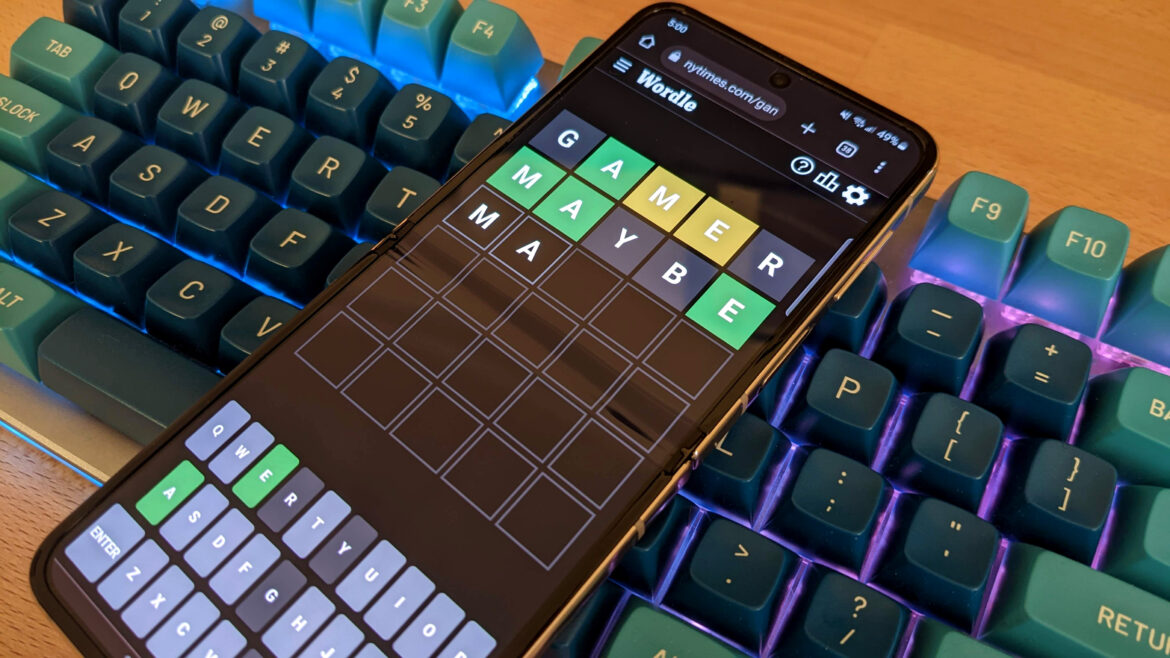
Today’s Wordle clues, hints and answer for September 25 #1559

by admin September 25, 2025


Whether you’re looking for a few tailored hints for the September 25 (1559) puzzle or you’d really, really like someone to stop talking and just hand you the answer to today’s Wordle, you’ll find everything you could wish for below. Skim our clues if you’re feeling confident, safe in the knowledge that we’ve got plenty of extra help ready if you need it.

A clue for today’s Wordle

Stuck on today’s Wordle? Here’s a clue that pertains to the meaning of the word.

If you’re still just as stuck after our clue, scroll down for further hints.


Related articles

Hints for the September 25 (#1559) Wordle

Our Wordle hints will start vague so as to just give you a bit of a nudge in the right direction at first.

As you scroll down, they’ll offer more and more help towards figuring out today’s word without fully giving it away.

Are there any repeated letters in today’s Wordle?

Five spaces for five completely different letters.

How many vowels are in today’s Wordle?

Two unique vowels are waiting to be found.

Keep up to date with the most important stories and the best deals, as picked by the PC Gamer team.

What letter does today’s Wordle begin with?

Begin with a “D” if you want to win.

Hey, you look like someone who needs the answer to today’s Wordle. Here you go.

The September 25 (#1559) Wordle answer is…

This is it. No turning back now!


Related articles

The solution to today’s Wordle puzzle is…

The meaning behind today’s Wordle answer

It’s not enough to hang or cover, drape implies a sort of relaxed and casual fold. Ah, lovely.

Previous Wordle answers

Past Wordle answers can give you some excellent ideas for fun starting words that keep your daily puzzle-solving fresh. They are also a good way to eliminate guesses for today’s Wordle, as the answer is unlikely to be repeated.

Here are the last 10 Wordle answers:

  • September 15: ALONG
  • September 16: LEFTY
  • September 17: TEETH
  • September 18: KNIFE
  • September 19: LATER
  • September 20: DEFER
  • September 21: COVEN
  • September 22: QUILL
  • September 23: MOUTH
  • September 24: BLUNT

Learn more about Wordle 

(Image credit: Future)

How to play Wordle

Wordle’s a daily guessing game, where the goal is to correctly uncover today’s five letter word in six goes or less. An incorrect letter shows up as a grey box. A correct letter in the wrong space turns up yellow. And the correct letter in the right place shows up as green. There’s no time limit to worry about, and don’t forget that some letters might be used more than once.

Get better at Wordle!

What’s the best Wordle starting word?

Generally you want to pick something with a good mix of common consonants and vowels in it as your Wordle opener, as this is most likely to return some early green and yellow letters. Words like SLATE, CHIME, and REACT all work, but feel free to find your own favourite.

Is Wordle getting harder?

(Image credit: Valve)

Wordle is not getting harder!

There will always be the occasional day where the answer is the name of a body part, has a sneaky double vowel, or a word obscure enough to send everyone rushing off to a dictionary. But the daily answers, edited by Tracy Bennett, are still a good mix of common terms and tougher challenges.

Remember that if you’re craving more of a challenge, you can enable Hard Mode under the ⚙️ options menu. This option doesn’t make the words themselves harder, but it requires that “any revealed hints must be used in subsequent guesses.”

How did Wordle begin?

Wordle is the creation of Josh Wardle, and began life as a small personal project before its public release in 2021. From there it’s gone on to become a global phenomenon, attracting a dedicated daily audience, billions of plays, a whole host of competitors, and even a seven-figure sale to the New York Times where it’s become a mainstay of daily games alongside the crosswords and Connections.


Source link

September 25, 2025 0 comments
0 FacebookTwitterPinterestEmail
Biggest Is Best, Except If It’s Not
Gaming Gear

Biggest Is Best, Except If It’s Not

by admin September 25, 2025


This past April marked the 10-year anniversary of the Apple Watch. Those early aluminum, stainless steel, and—yes—18k gold models launched without a clear idea of what they were for. Apple wanted its smartwatch to be a fashionable timepiece, a fitness tracker, a cellphone, a music player, a turn-by-turn navigator, and more. It seemed obvious that the Apple Watch could eventually replace the iPhone. A decade later, that is not only not the case, it’s looking like it may never be, though the Apple Watch Ultra 3 is ever closer (but still a far way off) from that dream.

Starting at $800, the Apple Watch Ultra 3 is not cheap. That’s the same price as an iPhone 17—a whole damn computer with great cameras, not an accessory for your phone. The first Apple Watch Ultra targeted adventurers and outdoorsy types like divers, justifying the price and large size as fitting for these groups of people who want a bigger screen, longer battery life, more precise GPS, and a customizable Action button.

Apple Watch Ultra 3

The Apple Watch Ultra 3 is the biggest and most feature-packed smartwatch that Apple sells, but that doesn’t necessarily mean you need to upgrade.

Pros

  • Big screen
  • Satellite connectivity is useful for emergencies
  • Even longer battery life
  • Rugged and durable
  • Sleep Score is great

Cons

  • Too still huge
  • Still $800
  • Only two colors

Fast forward three years, and I see people donning Apple Watch Ultras on their wrists even if they’re not going mountain climbing or scuba diving. My sister gifted her husband an Apple Watch Ultra because he’s got a big wrist. I have several friends with dainty wrists, and yet they don’t seem to care that the Apple Watch Ultra looks massive because the screen is large and the battery lasts for 2 to 3 days on a single charge. The Apple Watch Ultra is no longer just for enthusiasts; Ultra just means you get the most features in Apple’s smartwatch lineup.

That pretty much sums up the Apple Watch Ultra 3. It’s still the same design as the first and second-generation Apple Watch Ultra, except now it has some more stuff. Do you need all the new features? Read my helpful little guide here. Otherwise, the Apple Watch Ultra 3 is just a better version.

Same Ultra design, now 3D-printed

© Raymond Wong / Gizmodo

I am not an Apple Watch Ultra user. I understand its appeal and, hell, I even like some chonky watches like G-Shocks, but I find the Apple Watch Ultra just too bulky; the case is too thick and the screen is too big. More power to you if these are things you want. The 49mm titanium case—in natural or black—is rugged, and the display is big by design. The Apple Watch Ultra 3 is better at surviving unpredictable outdoor weather and conditions compared to non-Ultra models, but anybody who simply wants the durability or easier-to-see display could appreciate it. Who am I to tell you that a smartwatch is too big if you want it? For the same reasons some people prefer the tank-like iPhone 17 Pro Max over the super slim iPhone Air and its tradeoffs, I’m more a regular Apple Watch “Series” guy than Ultra.

Invisible to the naked eye is how the Apple Watch Ultra 3 is produced. This time, instead of being CNC’d out of a block of aluminum, Apple is 3D-printing the cases using 100% recycled titanium, which not only wastes less of the metal, but is more environmentally friendly since it doesn’t require new mining. I’m not out here bashing my ​​Apple Watch Ultra 3 review unit against rocks, so I can’t confirm the rigidity of the 3D-printed case, but I did have some startling contact with my kitchen cabinet doors and a pile of 40-pound cat litter boxes, where I thought I might have scuffed or chipped the black case. But nope, the Apple Watch Ultra 3 suffered no damage. Not even a scrape.

© Raymond Wong / Gizmodo

On the whole, the Apple Watch Ultra 3 is virtually the same smartwatch as the Ultra 2. The screen is so minimally bigger because Apple thinned the black bezel around it that it’s not even measurable with a ruler. Nor does Apple even have an official display size spec for it. All of that’s to say you won’t be seeing more content on the sapphire crystal display. The screen is also equally as bright as the Ultra 2. The Apple Watch Ultra 3 display uses a more advanced LTPO 3 display technology versus LTPO 2, but that’s really more for power efficiency than making the screen any more visible.

There’s a new “Waypoint” watch face with a compass that I like the look of, even though I don’t need to know which direction I’m facing riding on the subway from Queens to Manhattan or Brooklyn. The watch face is also not exclusive to the Ultra 3; Ultra and Ultra 2 owners can get it with the watchOS 26 update.

Inside is a new S10 chip, but nobody is begging for more performance in the Apple Watch Ultra 3. watchOS 26 is as zippy and responsive as on my Apple Watch Series 9. If there’s anything the S10 chip enables, it’s 5G and satellite communications—two firsts for Apple Watches.

If you cannot entertain the idea of a big smartwatch on your wrist, even with the upsides of a larger screen and longer battery life, Apple is happy to sell you an Apple Watch Series 11 or an SE 3. Smartwatch size, after all, is a matter of personal preference. Though, you will only get the highest water-resistance rating (100m) on the Ultra models.

More health tracking features

© Raymond Wong / Gizmodo

Even though the Apple Watch Ultra 3 is mostly a spec bump update, there are two features—hypertension notifications and Sleep Score—that may sway you if you have a first-gen Ultra or an Apple Watch model that isn’t getting the two features via watchOS 26.

I went into more detail on hypertension notifications and Sleep Score in a previous write-up. I’ve found both features to be very useful. Hypertension notifications work in the background after initial setup and are something you hope to never receive. Essentially, your Apple Watch Ultra 3 will send you a notification if it detects signs that you may have high blood pressure. The smartwatch isn’t measuring your blood pressure (it’s not a medical diagnosis), but merely using data from the optical heart rate sensor to correlate it against a “machine learning-based algorithm” for patterns typical of hypertension. The feature is FDA-cleared, which is different from FDA-approved, and means that Apple has demonstrated that hypertension notifications are safe and effective compared to other similarly marketed devices.

© Raymond Wong / Gizmodo

The same way I hope my Apple Watch will never have to call emergency services to alert them that I’ve fallen down, there is no reason not to turn on hypertension notifications. It’s a precautionary feature that could mean the difference between life and death. Since Series 4, Apple has positioned the Apple Watch not as a healthcare provider replacement, but as a health guardian. Hypertension notifications are just another addition to the Apple Watch’s, er, watchful eye.

Sleep Score is also the sleep tracking function that I think everybody has been waiting for. It’s catching up to other wearables and smartwatches, but in typical Apple fashion, presented better in every way. Sleep Score automatically kicks in when you fall asleep while wearing your Apple Watch Ultra 3. It measures duration, bedtime, and interruptions, and then presents them in a donut-shaped sleep ring along with a score. You’ll see your sleep classified as very low, low, OK, high, or excellent. You can scroll to see more detailed sleep data or open up the Health app on your paired iPhone to get even more in-depth metrics. All of this information is presented very clearly and in easy-to-understand charts.

© Raymond Wong / Gizmodo

I likened Sleep Score to Activity Rings. Seeing a “low” Sleep Score every morning really did make me want to achieve “OK” or even “high.” I’ll be impressed if I ever see “excellent,” given how erratic my sleep is. But that’s the whole point of Sleep Score—to help you build daily routines that improve your sleep. We commoners may think burning the midnight oil is the way to get ahead, but sleep is health, and health is wealth. Billionaire Bill Gates and multimillionaire Arianna Huffington attribute good, consistent sleep as the secret to living longer and healthier lives. Huffington even wrote a whole book on sleep and its unappreciated powers. (My cats, Lemons and Kiwi, who sleep 12+ hours every day, also corroborate that good sleep is essential to happiness.)

© Raymond Wong / Gizmodo

Now, am I saying the Apple Watch Ultra 3 has been successful at bullying me into winding down at my set schedule every night and getting enough shuteye? I wish it were, but I’m only human, and I’d be lying if I said I wasn’t prone to ignoring my Sleep Score on some days to stay up and rot my brain with Netflix and Switch 2. Maybe you’re more disciplined than I am. I have tons of friends who are addicted to closing their Activity Rings because it’s gamified in a way. If seeing a number and a donut that gets thicker or thinner helps you sleep better, then why the hell not?

You don’t need to buy an Apple Watch Ultra 3 to get hypertension notifications or Sleep Score. Hypertension notifications are free in watchOS 26 for Apple Watch Series 9 and later, or Ultra 2. If you have an Apple Watch Series 6 and later, SE 2, or Ultra and later, the update also adds Sleep Score.

Peace of mind with 5G and satellite comms

© Raymond Wong / Gizmodo

Some half a decade after 5G promised to revolutionize smartphones with wicked fast data speeds and make poor connections a thing of the past, the cellular connection is finally available on all three 2025 Apple Watch models. Unfortunately, that doesn’t really translate to any noticeable real-world benefit. Cellular connectivity on the Apple Watch Ultra 3 is not considerably faster than on my Apple Watch Series 9. Built-in 5G is more for futureproofing. One day, 4G networks will be turned off the same way 2G and 3G networks were sunset. But that’s many years ahead, and who knows if the Ultra 3 will even be functional by then.

However, the new wireless connection exclusive to the Apple Watch Ultra 3 that you might appreciate is satellite connectivity. Like the feature on iPhones, the satellite connection on the Ultra 3 works the same. You can use it to communicate with emergency services (Emergency SOS), send messages to contacts, or share your location via Find My app. How you access satellite services on the Apple Watch Ultra 3 tells you how Apple intends people to use the feature: not often, and likely only when you can’t connect to a 4G or 5G cell tower. There’s no satellite app on the honeycomb “home screen.” Instead, you access satellite services by adding a shortcut button within Control Center.

© Raymond Wong / Gizmodo

Using satellite services on the Ultra 3 works just like on a supported iPhone. First, you need to be outside to establish a connection to a satellite in the sky. Then, you move your wrist left and right to connect, which can take a few seconds depending on where you are and what your line of sight to the sky is. Once connected, you can tap through buttons for the three features; you don’t need to keep your wrist aimed at the sky anymore. It works well, and contacts you send messages or your location to will see a label that you communicated via satellite. This is for them to know that you’re out of civilization range and may need aid if you haven’t made it safely back.

Again, the fact that satellite services is an opt-in setting, not an app, that you need to turn on within Control Center tells you it’s for either emergencies or just check-ins. You won’t be using satellite services daily, unless you’re living off the grid all the time. But even then, satellite connections are not as fast as cellular. It’s a nice feature to have for those just-in-case moments, but you have to ask yourself whether it’s worth buying a gadget with reassurance features you’ll hopefully never need to use.

Apple’s biggest and best smartwatch, but it may not necessarily be yours

© Raymond Wong / Gizmodo

The same way an iPhone 17 Pro Max is just a newer iPhone with improved features, an Apple Watch Ultra 3 is still just an Apple Watch. You get some new stuff because it’s the shiny new smartwatch, but it’s fundamentally the same device. It’s no longer like the early days of the Apple Watch when new features felt foundational with each generation or two.

Do you really need a big, thick smartwatch with all its features? Could you make do with fewer features to save some money? The Apple Watch Ultra 3, specifically, has everything that Apple could fit into a 49mm case design. But that doesn’t necessarily mean it’s the right fit for your needs and wrist size. If my Apple Watch Series 9 didn’t work just fine (and get hypertension and Sleep Score with watchOS 26), I would consider the Apple Watch Series 11 over the Ultra 3 simply because of its smaller size (I don’t need an Action button or up to 42 hours of battery life). The Apple Watch SE 3 is an incredible value for $250 if you want just the basics, but it’d be a downgrade from my model. Before I picked up a Series 9, I had a Series 4, and before that, the original “Series 0.” That’s the thing about Apple Watches—they last several years until software updates make them too slow or incompatible with iPhones.

The Apple Watch Ultra 3 is an excellent smartwatch if its size and feature set appeal to you. But you absolutely don’t need to upgrade if you have a model from recent years. Get the Apple Watch size that literally fits your wrist best or has the features you want the most. As for Android users, you’re out of luck again since you still need an iPhone to set up any Apple Watch. Fortunately, there are great Wear OS options like Samsung’s Galaxy Watch 8, Google’s Pixel Watch 4, and the OnePlus Watch 3 series.


Source link

September 25, 2025 0 comments
0 FacebookTwitterPinterestEmail
Two iPhones connected by a cable.
Gaming Gear

New iPhone 17? Transfer Your Old Phone’s Information With Zero Hassles

by admin September 25, 2025


Did you just unbox a new iPhone 17, iPhone 17 Pro or iPhone Air? You’re almost ready to dive into your new iPhone and everything iOS 26 offers — after moving all your existing information from the old phone, which can take time and dampen that initial excitement. But it’s not all a waiting game: I’m here to explain the four ways to easily transfer your data, even if you’re coming from an Android phone, and do it without stressing about losing any of it.

For more, explore a bunch of hidden iOS 26 features, and see just how thin the iPhone Air is.

1. The convenient method: Restore from iCloud

During the setup process, you’ll be asked if you want to directly transfer apps and information from your old iPhone to your new one using Quick Start. This feature was first rolled out with iOS 12.4, so if it’s been several years since you’ve upgraded phones, it’ll be the first time you’ve seen the option. 

The easiest and quickest method to set up your new iPhone is to restore from a recent iCloud backup. As you walk through the initial setup process, tap Restore from iCloud Backup, sign in with your Apple Account (previously called Apple ID before iOS 18) and then pick the most recent backup of your old iPhone. 

If the backup is more than a day or two old, take an extra few minutes to create a new backup. To do so, open the Settings app on your old phone, search for iCloud Backup in the Search field at the top of the screen and then click the matching result. Click Back Up Now to update the cloud backup.

Once that finishes, go back to your new iPhone and select the backup you just created as what you want to use to restore from. 

Your phone will then restore your settings and preferences, and you’ll be able to start using it in about 15 minutes. It will continue downloading your installed apps in the background. 

Once everything is restored, you’ll need to sign back into any accounts you added to your phone, as well as go through your apps and make sure you’re still signed in. 

You’ve got several options when it comes to setting up your new iPhone.

James Martin/CNET

2. The speediest method: Apple direct transfer

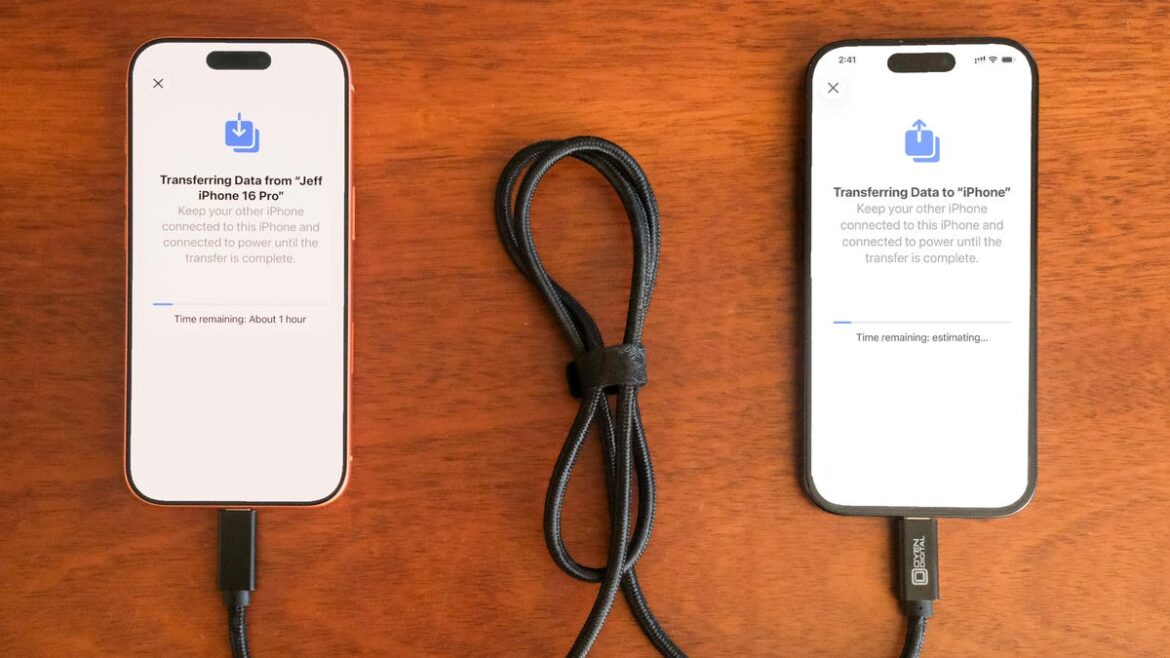
If you do not have a recent iCloud backup or your internet connection is slow, you can transfer everything from iPhone to iPhone, either wirelessly or via cable. When the Quick Start process asks for the source, choose the direct transfer option.

Using a cable rated for fast data speeds, the process can be surprisingly swift, and is my preferred way to upgrade to a new iPhone. Connect both phones via the cable; note that you might need an adapter if your current phone is an iPhone 14 or earlier with a Lightning port. Apple has more details on how to make a wired transfer work.

If you opt for the wireless route, make sure both phones are plugged in and charging to ensure they don’t run out of battery, and that they are connected to your Wi-Fi network (it’s part of the setup process on the new phone). And also make sure you have enough time for the process to finish — it could take over an hour.

The more information you have on your phone, like photos in your library, the longer it will take. When the transfer starts, the phones will show you a time estimate. Every time I’ve used this tool, that estimate has been accurate within a couple of minutes. It’s worth taking the time if you don’t use Apple’s iCloud service to back up your phone.

3. The longer, comprehensive method: Use a Mac or PC

A longer but safer method is to restore from an encrypted backup using a Mac or PC. Not only does this process transfer all of your apps, settings and preferences, but it also means you don’t have to sign into the countless apps you have on your phone. 

Before you can use this method, you’ll need to create an encrypted backup of your current iPhone. I know that may sound intimidating or overly complicated, but it only means you have to check an extra box and enter a password. 

On a Mac, you’ll use Finder to back up your old iPhone — and make sure you take the steps to make an archive backup. Check the Encrypt backup box and enter a password you’ll remember when prompted. Then let your Mac go to work, creating a backup file. It will let you know when it’s done. 

Restore your data from a backup of your old iPhone using your computer.

Jeff Carlson/CNET

On a PC, you’ll need to use iTunes (it’s not completely dead) or the Apple Devices app to create a backup, as explained here. Again, you’ll need to make sure the Encrypt backup box is checked and enter a password. 

To restore your new phone, open Finder or iTunes, and connect your phone to your computer. Click Trust when prompted, and then follow the prompts, selecting the backup you just created as what you want to use to restore the phone. You will need to enter the backup’s password before the process begins, so make sure you don’t forget it. 

Once it’s done, your new phone will be an exact copy of your old phone and you won’t have to spend any time signing into apps or random accounts. 

4. For Android users: Move to iOS

Apple doesn’t have many Android apps listed in Google’s Play Store, but Move to iOS is one of them. This free app will connect your Android phone to a new iPhone and allow you to transfer the most important information from one phone to the other. 

Here’s the entire step-by-step process, as well as some caveats, like the fact that it won’t transfer any locally stored music or PDF files. 

Apple made an Android app called Move to iOS that makes moving your messages, photos, videos and more from an Android phone to an iPhone easy.

Patrick Holland/CNET

Apple said it has redesigned Move to iOS to make it faster and easier to migrate from your Android phone to your new iPhone. The company goes on to say it has sped up Wi-Fi migration with transfer speeds up to 5GHz, and you can use Wi-Fi on your iPhone to connect to your Android phone. You can also connect your Android phone to your new iPhone with a USB-C or USB-C to Lightning cable to move everything over more quickly, Apple said.

No matter the process you used to set up your new phone, you’re in for excitement and fun as you explore what it can do.

Your iPhone Wants These 11 Essential Accessories in the New Year

See all photos


Source link

September 25, 2025 0 comments
0 FacebookTwitterPinterestEmail
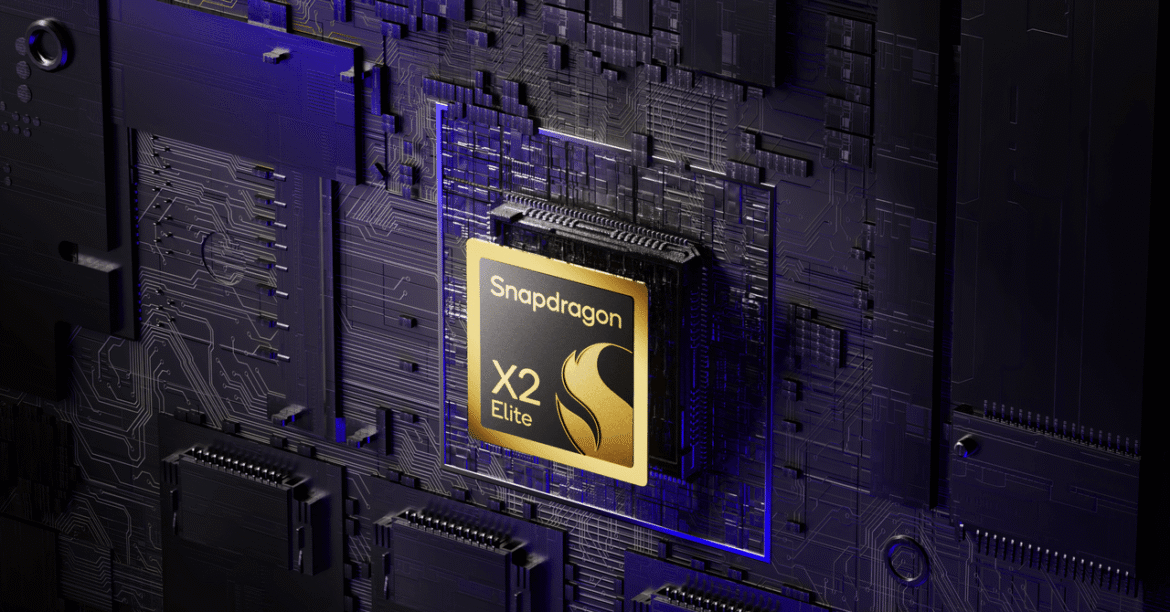
Qualcomm Debuts Snapdragon X2 Elite and X2 Elite Extreme, Its Next-Gen Laptop Chips
Gaming Gear

Qualcomm Debuts Snapdragon X2 Elite and X2 Elite Extreme, Its Next-Gen Laptop Chips

by admin September 24, 2025


Perhaps the most exciting part of the chip is the graphics performance: The Snapdragon X2 Elite and X2 Elite Extreme both use a new Adreno GPU architecture. Qualcomm says power efficiency has improved by 2.3X, so hopefully that means these laptops can scale up performance when it’s needed, in games or creative applications. Qualcomm says gaming will take a big step forward in this next generation. Qualcomm showed a chart with 2.2X faster frame rates in Hitman World of Assassination and 2.1X faster in Black Myth Wukong. Of course, these Qualcomm laptops continue to rely exclusively on integrated graphics, meaning the discrete GPUs in dedicated gaming laptops are still on another level of performance. Snapdragon X2 chips will also support higher refresh rate screens, now up to 144 Hz and up to three external 5K monitors.

Lastly, the company claims there’s a much more powerful neural processing unit (NPU) with 80 TOPS (trillions of operations per second) of on-device AI processing performance. The Snapdragon X set the initial bar with 50 TOPS, which Apple, Intel, and AMD then had to match in their next chips. We’ve yet to see the explosion of on-device AI processing be relevant for the average person, but hopefully, more performance will provide an incentive for developers to build more unique AI experiences that can utilize the NPU.

Qualcomm still boasts “multi-day” battery life on these new chips, though performance was the priority in the company’s product presentation. This is a change from the original marketing around the first-generation Snapdragon X chips, which centered battery life as its primary selling point.

As always, it helps to go first. These second-generation PC chips have been announced months ahead of devices from competitors, which may not arrive until the first quarter of 2026, making it easier to compare with previous-gen chips. Intel is expected to launch its highly anticipated A18 chips (also known as Panther Lake) later this year, and Nvidia’s $5 billion investment in Intel could change everything in the world of PCs. Apple is also expected to debut an M5 chip next month.

A New Smartphone Chip

Alongside new PC chips, Qualcomm also detailed its recently announced mobile chips, the Snapdragon 8 Elite Gen 5. These were officially unveiled last week, but at the company’s Snapdragon Summit conference, it shared new details on how these chips will perform.

Barely a week has gone by since Apple’s A19-powered iPhones hit the market, but Qualcomm is already claiming that its Snapdragon 8 Elite Gen 5 is the “fastest mobile CPU in the world,” with a record clock speed of 4.6 GHz (Apple’s A19 Pro has a clock speed of 4.26 GHz). Like the PC chips, graphics and AI processing have the largest leaps in performance, with a purported 23 percent faster GPU and 37 percent faster NPU. Some slightly faster single-core performance in your next phone might not be noticeable, but the significantly faster GPU could have a bigger impact on mobile gaming.


Source link

September 24, 2025 0 comments
0 FacebookTwitterPinterestEmail
DAAPrivacyRightIcon
Gaming Gear

Check out the intricate, inky world of PS5 game Chronoscript: The Endless End

by admin September 24, 2025


One of the surprise announcements during Sony’s State of Play presentation today was the debut of a literary-themed game titled Chronoscript: The Endless End. It’s an action-adventure game with a very cool hand-drawn art aesthetic. Players will navigate the 3-dimensional world of a mysterious manor as well as the 2-dimensional world of illustrated manuscript pages.

The trailer mostly focused on those 2D sections, showing combat and platforming and seriously did I mention the very cool hand-drawn art? I would have been interested in this for the visuals alone, but throw in a story about writers and editors and I’m hooked.

Perhaps fittingly for this writerly endeavor, the game’s publisher is Shueisha, which is a heavyweight in publishing manga, including the popular Shonen Jump. The developer is DeskWorks, and the studio’s last project also boasted a lovely, illustrative style. We’ll have a little longer to wait before we can dive into the inky world of Chronoscript, however, because this game isn’t expected to arrive on the PlayStation 5 until some time in 2026.


Source link

September 24, 2025 0 comments
0 FacebookTwitterPinterestEmail
Bowers & Wilkins says the Px8 S2 are the best headphones it’s ever made
Gaming Gear

Bowers & Wilkins says the Px8 S2 are the best headphones it’s ever made

by admin September 24, 2025


British audio brand Bowers & Wilkins (B&W) is launching the second generation of its flagship Px8 wireless headphones, which claim to have better sound, noise cancellation, and maintenance. The $799 Px8 S2 is available starting today, featuring an aluminum and Nappa leather design in black or grey-beige color options. B&W says the new flagship is slimmer than its predecessor, with the ear cushions and headband now replaceable to help preserve its premium appearance.

The Px8 S2 promises 24-bit / 96 kHz resolution sound quality, and supports aptX Adaptive and aptX Lossless for hi-res audio streaming over Bluetooth. The headphones also support both 3.5mm jack and USB-C for wired connections. Eight microphones are located around each earcup for active noise cancellation (ANC) and calls, two more than the older Px8 model. B&W says you can expect 30 hours of battery life with ANC enabled, and that a 15-minute charge provides up to seven hours of listening time.

“We are incredibly proud to launch the Px8 S2, the best headphone we have ever created,” B&W brand marketing head Giles Pocock said in a press release statement. B&W is one of several audio brands that have just been acquired by Samsung subsidiary Harman. A software update for the Px8 S2 that adds support for spatial audio will be released later this year, with Bluetooth LE audio to follow.


Source link

September 24, 2025 0 comments
0 FacebookTwitterPinterestEmail
A hacker in a Guy Fawkes mask using an Apple MacBook.
Gaming Gear

Fraudulent GitHub Pages impersonate trusted companies to trick Mac users into installing malware, leaving financial and personal data at risk

by admin September 24, 2025


  • Atomic Stealer malware installs silently via fake GitHub Pages targeting Mac users
  • Attackers create multiple GitHub accounts to bypass platform takedowns repeatedly
  • Users copying commands from unverified websites risk serious system compromise

Cybersecurity researchers are warning Apple Mac users about a campaign using fraudulent GitHub repositories to spread malware and infostealers.

Research from LastPass Threat Intelligence, Mitigation, and Escalation (TIME) analysts found attackers are impersonating well-known companies to convince people to download fake Mac software.

Two fraudulent GitHub pages pretending to offer LastPass for Mac were first spotted on September 16 2025 under the username “modhopmduck476.”


You may like

How the attack chain works

While these particular pages have been taken down, the incident suggests a broader pattern that continues to evolve.

The fake GitHub pages included links labeled “Install LastPass on MacBook,” which redirected to hxxps://ahoastock825[.]github[.]io/.github/lastpass.

From there, users were sent to macprograms-pro[.]com/mac-git-2-download.html and told to paste a command into their Mac’s terminal.

That command used a CURL request to fetch a base64-encoded URL that decoded to bonoud[.]com/get3/install.sh.

Sign up to the TechRadar Pro newsletter to get all the top news, opinion, features and guidance your business needs to succeed!

The script then delivered an “Update” payload that installed Atomic Stealer (AMOS malware) into the Temp directory.

Atomic Stealer, which has been active since April 2023, is a known infostealer used by financially motivated cybercrime groups.

Investigators have linked this campaign to many other fake repositories impersonating companies ranging from financial institutions to productivity apps.


You may like

The list of targeted names includes 1Password, Robinhood, Citibank, Docker, Shopify, Basecamp, and numerous others.

Attackers appear to create multiple GitHub usernames to bypass takedowns, using Search Engine Optimization to push their malicious links higher on search results in Google and Bing.

This technique increases the chances that Mac users searching for legitimate downloads will encounter the fraudulent pages first.

LastPass states it is “actively monitoring this campaign” while working on takedowns and sharing indicators of compromise to help others detect threats.

The attackers’ use of GitHub Pages reveals both the convenience and the risks of community platforms.

Fraudulent repositories can be set up quickly, and while GitHub can remove them, attackers often return under new aliases.

This cycle raises questions about how effectively such platforms can protect users.

How to stay safe

  • Only download software from verified sources to avoid malware and ransomware risks.
  • Avoid copying commands from unfamiliar websites to prevent unauthorized code execution.
  • Keep macOS and all installed software up to date to reduce vulnerabilities.
  • Use the best antivirus or security software that includes ransomware protection to block threats.
  • Enable regular system backups to recover files if ransomware or malware strikes.
  • Stay skeptical of unexpected links, emails, and pop-ups to minimize exposure.
  • Monitor official advisories from trusted vendors for timely security updates and guidance.
  • Configure strong, unique passwords and enable two-factor authentication for important accounts.

You might also like


Source link

September 24, 2025 0 comments
0 FacebookTwitterPinterestEmail
Pikachu looking shocked.
Gaming Gear

Pokemon Company says Homeland Security’s use of its property in disturbing promotional video was unauthorized, but DHS doesn’t seem to care: ‘To arrest them is our real test, to deport them is our cause’

by admin September 24, 2025


The Pokémon Company says the US government did not have permission to use Pikachu and other Pokémon content promotional videos for the Homeland Security and Customs and Border Protection agencies posted to X—but what it’s going to do about it, if anything, remains to be seen.

The first video, a montage of ICE agents and police blowing up doors and arresting people mashed up with music and video clips from the Pokémon TV show, was posted on the evening of September 22. It also features the words “Department of Homeland Security” spelled out in the Pokémon font. It’s the sort of thing I would not have believed could possibly be real if I hadn’t seen it with my own eyes, but there it is.

DHS followed with a series of Pokémon-style “cards” bearing images of people convicted of crimes in the US.


Related articles

But that wasn’t the end of it: A couple hours later, Customs and Border Protection got in on the act with an animated image of Pikachu, calling him “Border Patrol’s newest recruit.”

(Image credit: The Pokemon Company (via CBP))

Support for the display in replies was widespread—it’s X, after all—but there was pushback too, and calls from some for The Pokémon Company, or Nintendo, to take action against what was presumed to be unauthorized use of the property.

In a statement provided to PC Gamer, The Pokémon Company International confirmed that the US government did not have permission to use the content, but left the question of what comes next unanswered.

“We are aware of a recent video posted by the Department of Homeland Security that includes imagery and language associated with our brand,” it said. “Our company was not involved in the creation or distribution of this content, and permission was not granted for the use of our intellectual property.”

Keep up to date with the most important stories and the best deals, as picked by the PC Gamer team.

Nintendo, one of the owners of The Pokémon Company, is notoriously litigious when it comes to dropping the hammer on people who can’t effectively fight back. But former Pokémon Company chief legal officer Don McGowan thinks this is likely a fight it doesn’t want: The Pokémon Company International is “INSANELY publicity-shy,” he said, and perhaps more compelling in light of the US government’s recent treatment of South Korean workers at a Hyundai plant in Georgia, “many of their execs in the USA are on green cards.”

“Even if I was still at the company I wouldn’t touch this, and I’m the most trigger-happy CLO [Chief Legal Officer] I’ve ever met,” said McGowan, who became well-known for his aggressive pursuit of Destiny 2 abusers and cheaters during his post-Pokémon years at Bungie. “This will blow over in a couple of days and they’ll be happy to let it.”

For its part, Homeland Security doesn’t seem inclined to change tack. In response to an inquiry about the unauthorized use of Pokémon intellectual property, a DHS spokesperson invoked lyrics from the Pokémon theme song, saying, “To arrest them is our real test. To deport them is our cause.”


Source link

September 24, 2025 0 comments
0 FacebookTwitterPinterestEmail
  • 1
  • …
  • 18
  • 19
  • 20
  • 21
  • 22
  • …
  • 96

Categories

  • Crypto Trends (1,098)
  • Esports (800)
  • Game Reviews (772)
  • Game Updates (906)
  • GameFi Guides (1,058)
  • Gaming Gear (960)
  • NFT Gaming (1,079)
  • Product Reviews (960)

Recent Posts

  • This 5-Star Dell Laptop Bundle (64GB RAM, 2TB SSD) Sees 72% Cut, From Above MacBook Pricing to Practically a Steal
  • Blue Protocol: Star Resonance is finally out in the west and off to a strong start on Steam, but was the MMORPG worth the wait?
  • How to Unblock OpenAI’s Sora 2 If You’re Outside the US and Canada
  • Final Fantasy 7 Remake and Rebirth finally available as physical double pack on PS5
  • The 10 Most Valuable Cards

Recent Posts

  • This 5-Star Dell Laptop Bundle (64GB RAM, 2TB SSD) Sees 72% Cut, From Above MacBook Pricing to Practically a Steal

    October 10, 2025
  • Blue Protocol: Star Resonance is finally out in the west and off to a strong start on Steam, but was the MMORPG worth the wait?

    October 10, 2025
  • How to Unblock OpenAI’s Sora 2 If You’re Outside the US and Canada

    October 10, 2025
  • Final Fantasy 7 Remake and Rebirth finally available as physical double pack on PS5

    October 10, 2025
  • The 10 Most Valuable Cards

    October 10, 2025

Newsletter

About me

Welcome to Laughinghyena.io, your ultimate destination for the latest in blockchain gaming and gaming products. We’re passionate about the future of gaming, where decentralized technology empowers players to own, trade, and thrive in virtual worlds.

Recent Posts

  • This 5-Star Dell Laptop Bundle (64GB RAM, 2TB SSD) Sees 72% Cut, From Above MacBook Pricing to Practically a Steal

    October 10, 2025
  • Blue Protocol: Star Resonance is finally out in the west and off to a strong start on Steam, but was the MMORPG worth the wait?

    October 10, 2025

Newsletter

@2025 laughinghyena- All Right Reserved. Designed and Developed by Pro


Back To Top
Laughing Hyena
  • Home
  • Hyena Games
  • Esports
  • NFT Gaming
  • Crypto Trends
  • Game Reviews
  • Game Updates
  • GameFi Guides
  • Shop

Shopping Cart

Close

No products in the cart.

Close